

XOutput
About XOutput
XOutput is a small open-source utility that solves a specific Windows gaming problem nobody warns you about until you hit it. Your controller works in some games and is completely invisible to others, with no error message, no explanation, just dead inputs. The cause is an API split between DirectInput (the older interface most generic gamepads, arcade sticks, and off-brand controllers speak) and XInput (the newer Xbox-centric interface that most modern PC games require).
The tool sits between the two, reads your physical controller through DirectInput, and presents the system with a virtual Xbox 360 controller through XInput. Games that wouldn’t see your hardware now see an Xbox pad, and everything works.
The DirectInput versus XInput problem
A bit of context makes the rest of the article make sense. Microsoft introduced DirectInput in the late 1990s as a flexible API for any kind of input device. Joysticks, racing wheels, gamepads, flight sticks, all of it spoke DirectInput, and that’s still the protocol your controller probably negotiates with Windows when you plug it in for the first time.
Then in 2005, with the Xbox 360 launch, Microsoft introduced XInput as a simpler, Xbox-specific input API. XInput only handles standard Xbox controller layouts. Two thumbsticks, four face buttons, four shoulder buttons, a directional pad, and triggers, with a fixed mapping.
From a game developer’s perspective, XInput is easier to support because the controller layout is predictable. From a player’s perspective, it means anything that isn’t an Xbox controller often doesn’t work in games that only check for XInput devices.
This is why your PlayStation pad, your Logitech F310 in DirectInput mode, your arcade stick, your generic Chinese-brand controller, and your decade-old game pad all have inconsistent results in modern games.
The split is structural and Windows has never bridged it natively. XOutput is the third-party bridge.
ViGEmBus and what it actually does
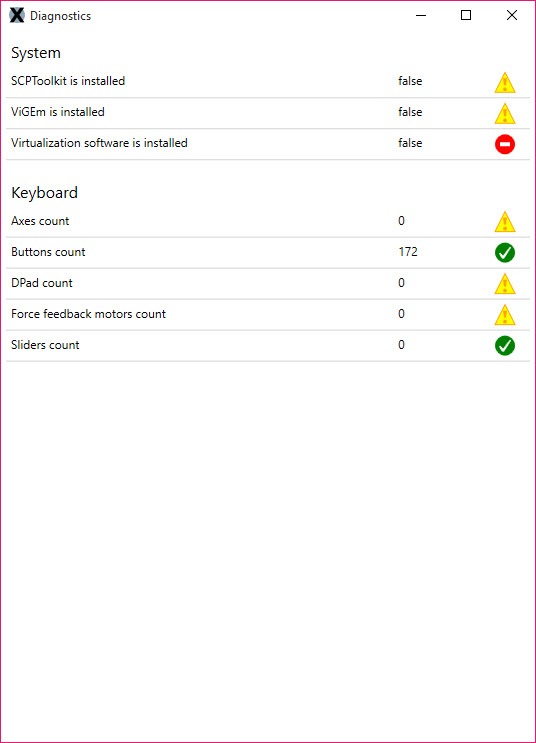
The clever part of how this works is that XOutput doesn’t just translate inputs at the application level. It uses a kernel-mode driver called ViGEmBus (Virtual Gamepad Emulation Bus) to create an actual virtual Xbox controller device that shows up in Windows as if it were real hardware. Games querying XInput find this virtual device and treat it like an Xbox pad.
ViGEmBus is a separate component you install once, then XOutput registers virtual controllers through it whenever you start the application.
The driver is open source, well-maintained, and also used by tools like DS4Windows for similar pad-emulation purposes. Installing it requires admin rights and a one-time signature trust step, after which you forget it exists.
The older version of the project used the SCP Toolkit driver, which is no longer maintained. If you find guides recommending SCP, they’re out of date. The current ViGEmBus path is the right one and the only one supported by recent XOutput releases.
The mapping workflow
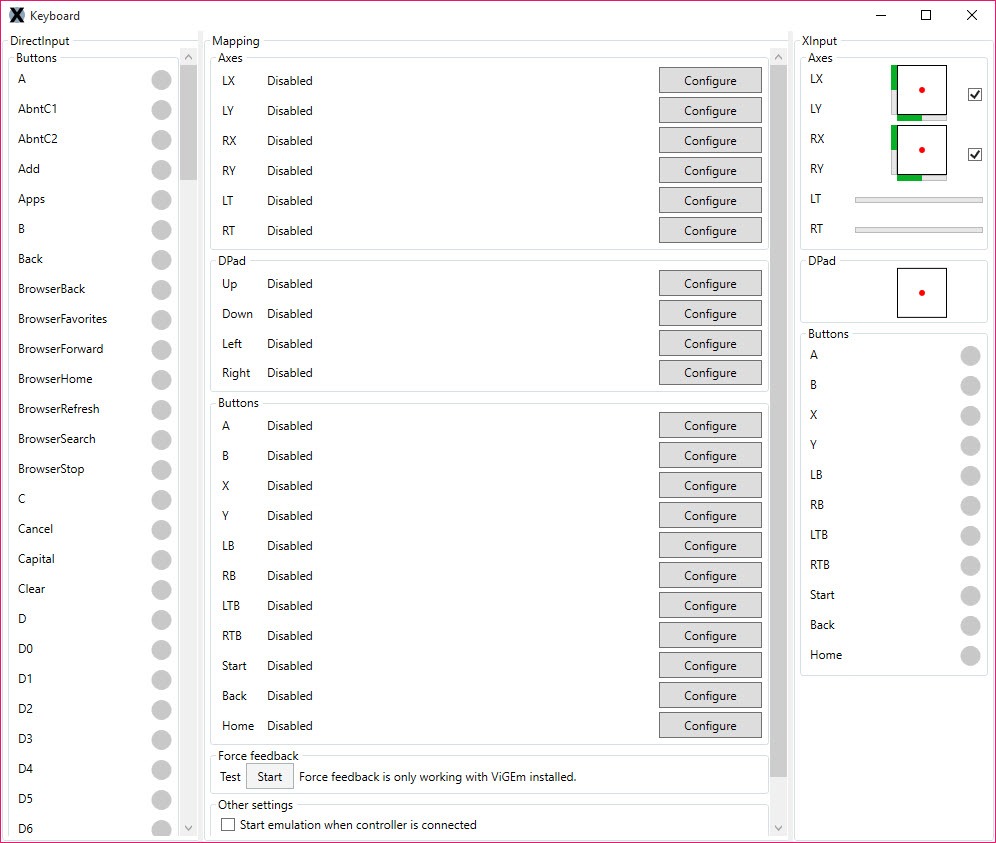
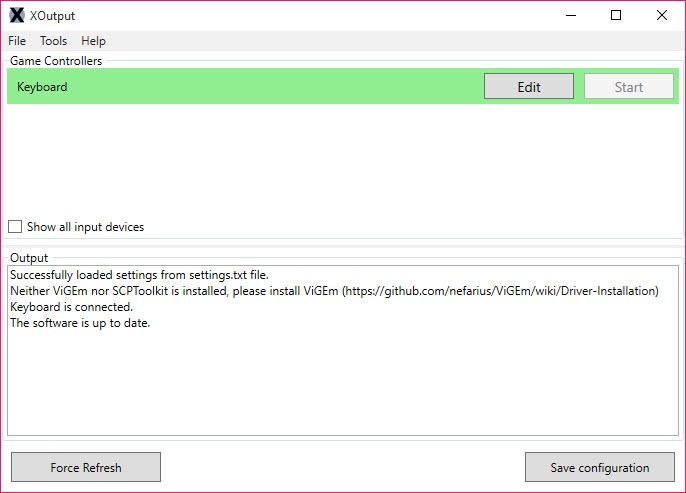
After installation, the main window lists every DirectInput device Windows currently sees. You pick the controller you want to wrap and click Edit to open the mapping screen. The mapping screen shows the virtual Xbox controller layout on one side and a list of your physical controller’s buttons, axes, sliders, and POV hats on the other.
You map each Xbox-style input to whichever physical input you want to trigger it. Left thumbstick X axis to the controller’s X axis, A button to whichever physical button you want, triggers to a button or to an axis depending on the controller. The interface is straightforward and the mapping process for a standard layout takes maybe two minutes once you’ve done it a few times.
The mapping is saved per-controller, identified by the device’s hardware signature. Plug the same controller back in next week and XOutput remembers what you mapped to where. You can also save and load mapping profiles as files, which matters if you swap between controllers or want to share a mapping with someone else using the same hardware.
Once the mapping is set, click Start in the main window and the virtual Xbox controller comes online. From this point forward, games querying XInput see your virtual pad, and your physical inputs route through to whatever you mapped.
Force feedback and rumble passthrough
Rumble is one of the things that often gets lost in input wrappers. XOutput passes XInput rumble events back to the physical controller via DirectInput’s force feedback API, so games that send vibration commands actually shake your hardware (if it supports vibration). The passthrough quality depends on your controller’s drivers and how clean its force feedback support is, but for most pads with rumble motors it works.
The same applies in reverse. The physical controller’s triggers, sticks, and buttons get mapped to the virtual XInput device cleanly with minimal latency added.
The wrapper sits in the input path adding a small overhead, but it’s not the kind of latency that matters for normal gameplay, fighting games being the possible exception where every frame counts.
How this differs from other input tools
The category of input mapping software on Windows is crowded, and XOutput lives in a specific corner of it. JoyToKey and AntiMicro map controller inputs to keyboard and mouse events, which is useful for using a gamepad in games that don’t support controllers at all. But they don’t create a virtual XInput device, so games that explicitly want a controller still won’t see one.
x360ce takes a different approach by injecting a DLL into individual game folders to fake XInput per-game. It works but requires per-game setup, sometimes triggers anti-cheat false positives, and the original project is no longer actively maintained. XOutput with ViGEmBus does the same job at the system level, with one mapping that applies to every game without per-folder configuration.
DS4Windows is the DualShock-specific equivalent. If you only have a PlayStation 4 controller, that tool is more polished for that hardware and supports Sony-specific features like the touchpad and lightbar. XOutput works with anything Windows sees as a DirectInput device, which is its breadth advantage.
For users mapping a controller to mouse and keyboard rather than to XInput, Keysticks and Gopher360 handle that use case. Different goal, different tool.
Where this actually gets used
The biggest user base is fight stick owners. Arcade sticks (from brands like Hori, Mad Catz, Qanba) often present as DirectInput devices and don’t speak XInput natively. Modern fighting games (Street Fighter 6, Mortal Kombat 1, Tekken 8) require XInput controllers for proper support. XOutput is the standard fix.
Second biggest is owners of older or generic USB gamepads. The Logitech F310 in its DirectInput mode, the WingMan series, third-party SNES-style USB pads, off-brand controllers from Amazon, anything that doesn’t have a built-in XInput identity. Wrapping these makes them work in games that otherwise wouldn’t see them.
A smaller use case involves specialty controllers like flight sticks or wheels being used for games they weren’t designed for. The mapping flexibility lets you remap a flight stick’s twist axis to right thumbstick X, for instance, which sounds silly but matters if you want to use specific hardware in a specific way.
Conclusion
XOutput is the right install for a narrow but common situation, which is owning a controller that Windows recognizes but that your games refuse to acknowledge. Fight stick users, owners of older or generic gamepads, and anyone with hardware that predates the XInput era will find this tool turns dead controllers back into working ones.
The setup involves installing a kernel driver and mapping inputs once per controller, which is more effort than zero but less than learning to play with a keyboard.
For users with current Xbox or PlayStation controllers from the past few years, the tool isn’t usually needed because those controllers already speak XInput natively or have first-party software that handles the wrapping. If your controller works in some games and not others, or works in Windows but not in any game, that’s the signal to install this.
The free, open-source, system-wide approach has won out over the older per-game DLL injection methods, and the active maintenance keeps it relevant for modern Windows versions and current titles.
Pros & Cons
- Creates a real virtual XInput device that works system-wide without per-game setup
- Supports any DirectInput controller including fight sticks, arcade pads, and generic gamepads
- Per-controller mapping profiles save and reload automatically based on hardware ID
- Force feedback and rumble pass through correctly to physical hardware
- ViGEmBus driver is open source and well-maintained, used by many similar tools
- Lightweight, low resource use, and minimal added input latency
- Requires installing the ViGEmBus kernel driver, which needs admin rights and trust setup
- Runs as a foreground application rather than a background service by default
- Some online games' anti-cheat systems flag virtual controllers as suspicious
- Older guides may reference the discontinued SCP Toolkit driver instead of current ViGEmBus
- No GUI polish compared to commercial alternatives, and the interface assumes some technical understanding
- Single-developer project means updates and support are community-paced
Frequently asked questions
The application creates a virtual Xbox 360 controller that Windows treats as real hardware, then maps your physical DirectInput controller's buttons and axes to that virtual device. Games requiring XInput see the virtual controller and respond to inputs from your physical hardware through it.
Windows has two different controller APIs, DirectInput (older, used by most generic gamepads and arcade sticks) and XInput (newer, used by modern PC games). Many games only check for XInput devices and ignore DirectInput entirely, leaving generic controllers unusable. This tool bridges the two.
ViGEmBus is the open-source kernel driver that creates virtual gamepad devices on Windows. The application uses it to register the virtual Xbox controller that games see. It's installed once and works with multiple controller tools beyond this one.
If your fight stick shows up as a DirectInput device in Windows, yes. Most arcade sticks from major manufacturers fall into this category, which is why this tool is popular among fighting game players.
Yes. The application supports mapping multiple physical controllers to multiple virtual Xbox controllers simultaneously, useful for local multiplayer with mixed hardware.
Most single-player and offline games work fine. Some online games with strict anti-cheat may flag virtual controllers and refuse to start. Close the wrapper before launching those specific games as a workaround.
x360ce is a per-game DLL injection approach where you copy files into individual game folders. This tool works at the system level through a kernel driver, so one configuration applies to every game without per-folder setup. The system-level approach is also less likely to trigger antivirus warnings.
Yes, if your physical controller has rumble motors and a working force feedback driver. The application passes XInput rumble commands back to the DirectInput device's force feedback interface.


