

Xcalday
About Xcalday
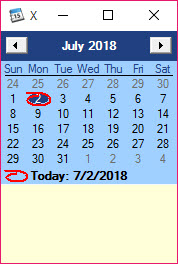
Xcalday is a fantastic tool that can keep your notice by days. You have only to select a day with a click, and in the bottom section, you can add your note.
Our working day is always full, and it is too important to have an ordered activity, but because of projects, of the time, we can’t always respect the deadline of our project, and we need to use some tools.
The application is an integrated calendar. So, it is simple to create a note, open the app to your preferred day and write the name of your project or task.
Today will appear with bold text in the calendar, and the chosen day is surrounded with a red circle – a simple window with the months and days with standard and intuitive buttons. Below we have the name of the month and the year. In the right corner, you have a close button.
Xcalday doesn’t require more performance from your computer. All notes will be saved in a simple text file, so your registry will not be modified.


