

Windows Repair Toolbox
About Windows Repair Toolbox
Anybody who fixes computers regularly keeps the same collection of small utilities, and keeping that collection current is the tedious part. Windows Repair Toolbox addresses that by holding the list rather than the tools, fetching each one from its own source at the moment you ask for it.
That distinction is the whole design and the first thing to understand. This repairs nothing itself. It is a catalogue and a launcher, presenting categories of other people’s utilities and downloading whichever you select.
The advantage is currency. Because nothing is bundled, the tool that arrives is the current version rather than whatever was packaged when the collection was assembled, which matters most for the malware scanners where an out-of-date one is close to useless.
What the categories cover
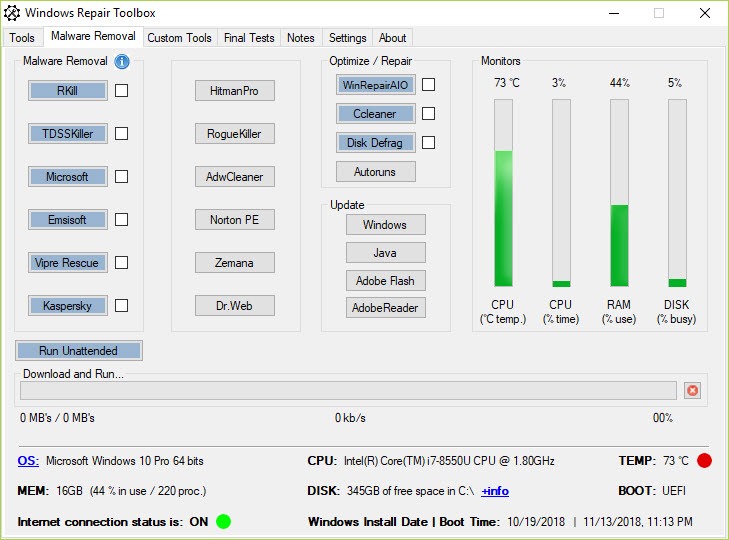
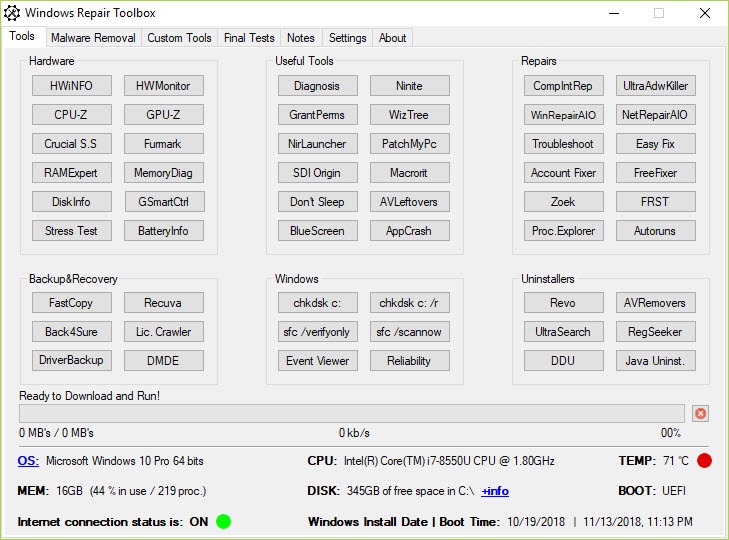
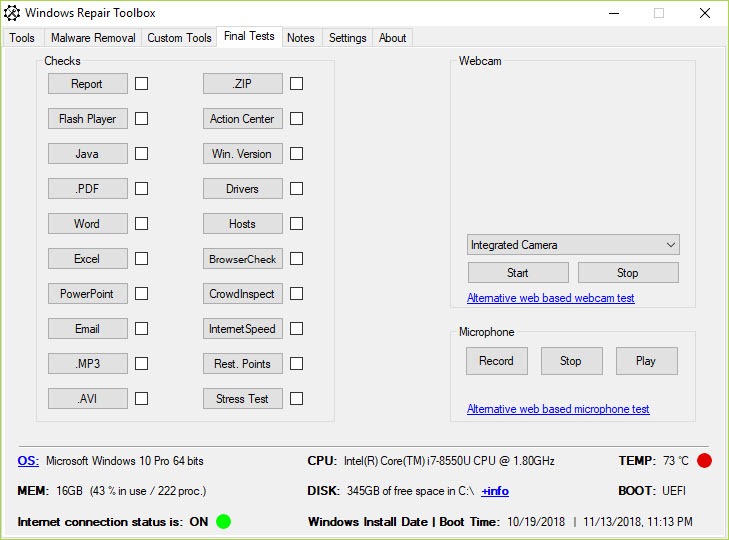
Windows Repair Toolbox organises its list by the job rather than by the maker. Hardware diagnostics, malware removal, repair utilities, uninstallers, network tools, data recovery and backup each hold a set of entries.
Most of the well-known names in each area are there, which is why a technician recognises the list immediately. Sitting down at an unfamiliar machine and having the whole toolkit one click away, without hunting for each utility individually, is the practical benefit.
A custom section takes your own additions, which is how a personal toolkit accumulates the things the curated list omits.
The problem with a machine that cannot reach the network
Here is the limitation that matters most, and it applies precisely to the situation this software exists for.
Windows Repair Toolbox downloads every tool when requested. A machine with a working connection therefore gets everything, and a machine whose network is the actual fault gets nothing at all. That covers a broken adapter, a missing driver after a rebuild, a network configuration nobody can untangle, and malware that has cut the connection deliberately.
Those are exactly the machines somebody arrives at with a repair toolbox in hand, which makes the dependency awkward rather than incidental.
The practical answer is downloading what you expect to need before you need it, on a machine that works, and carrying it. Driver problems in particular deserve their own offline provision, and Snappy Driver Installer carries driver packs on the stick rather than fetching them, which is what rescues a freshly rebuilt machine with no network adapter recognised.
Built-in functions and automatic mode
Beyond launching other people’s tools, Windows Repair Toolbox runs some operations directly, including system file verification and a few repair routines that need no external utility.
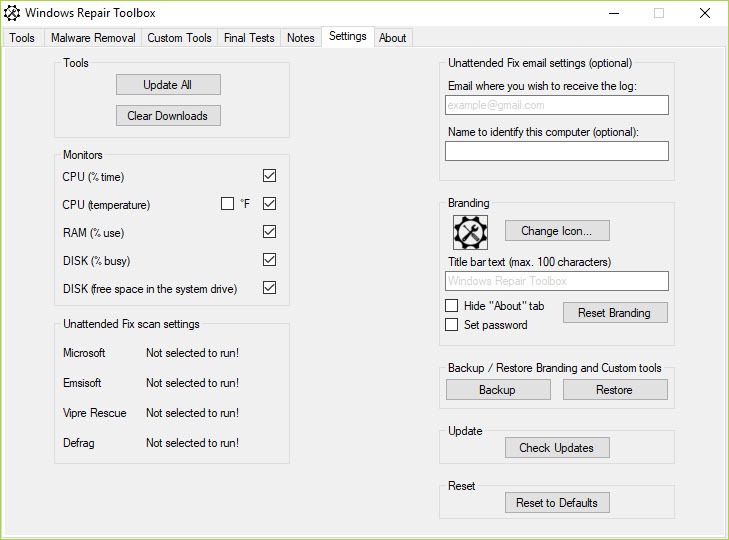
An automatic mode chains a chosen sequence of operations so a standard first-pass routine runs without supervision, which suits somebody working through several machines with the same complaint.
Treat that with the usual caution applied to unattended repair. A sequence that fixes four machines can make the fifth worse, and knowing which operation caused it requires having watched. Running the sequence attended the first few times is how you learn what it actually does.
The curation is somebody else’s judgement
This deserves stating plainly, because Windows Repair Toolbox presents its list as a toolkit rather than as a set of recommendations.
Some entries are excellent and belong on any technician’s stick. Malwarebytes for a second-opinion scan and a drive health checker for the question of whether a slow machine is actually a failing one are both properly diagnostic.
Others belong to the category of software that reports impressive numbers and changes nothing measurable, meaning the registry cleaners and general optimisers. Their presence in a curated list does not make them useful, and a technician new to the field could reasonably assume inclusion implies endorsement.
Reading each entry as an option rather than an instruction is the correct approach, and knowing which tools do measurable work is the skill the list cannot supply.
How it compares with the alternative
The same idea as Windows Repair Toolbox exists elsewhere, and a launcher organising several established utility suites into one searchable interface covers similar ground with a different emphasis, leaning towards the well-known diagnostic collections rather than a broad category sweep.
Choosing between them is a matter of which list matches your habits. Both remove the same tedium, which is assembling and updating a toolkit by hand, and neither repairs anything on its own.
Conclusion
Windows Repair Toolbox solves the organisational half of technical support rather than the technical half. Having the whole toolkit catalogued, current and one click away removes the tedium of assembling it by hand, and the custom section means the list becomes yours over time.
Two things shape how useful it actually is. It fetches everything on demand, so the machine that most needs a toolbox is the one it serves worst, and preparing in advance is the only answer to that. And the list is a list rather than a set of endorsements, so knowing which of those tools does measurable work remains your responsibility rather than the software’s.
Pros & Cons
- Holds a curated list rather than bundled copies, so tools arrive current
- Categories organised by the job rather than by the maker
- Custom section accepts your own additions to the toolkit
- Some repair operations run directly without an external utility
- Automatic mode chains a standard first-pass sequence
- Portable, so it lives on a stick with everything else
- Downloads on demand, so a machine with no working connection gets nothing
- Repairs nothing itself, being a catalogue and launcher
- The list includes optimisers that produce numbers rather than results
- Inclusion in the list can read as endorsement to somebody new to the field
- Unattended sequences can make one machine worse while helping four
Frequently asked questions
Mostly no. It catalogues and launches other people's utilities, downloading each on request. A few operations run directly, and the substance of the product is the list rather than any repair capability.
Very little, since every tool is fetched when requested. That is an awkward dependency given the machines a repair toolbox is carried to, so downloading what you expect to need in advance is the sensible habit.
Because nothing is bundled. Each utility is fetched from its own source at the moment you select it, which is what keeps malware scanners in particular from being uselessly out of date.
Read it as options rather than recommendations. Several entries do real diagnostic work, and others belong to the category that reports impressive figures without changing anything measurable.
Run it attended the first few times. A chained sequence that helps most machines can make one worse, and identifying which step did it requires having watched it happen.


