

Win32 Disk Imager
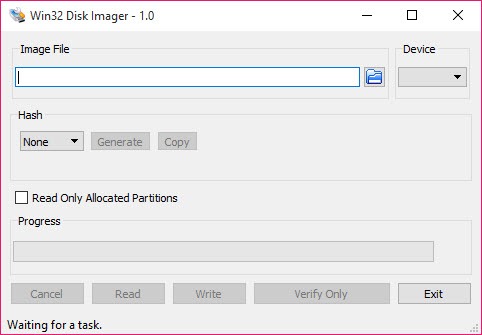
About Win32 Disk Imager
Win32 Disk Imager writes raw disk images directly to removable drives, taking an .img file and laying it onto an SD card or USB stick exactly as it is, byte for byte. That precision is what sets it apart from ordinary file copying. When you need a card that boots a single-board computer or carries an exact disk layout, dragging files across will not work, because the structure and boot information have to land in the right physical places. This tool puts them there.
What makes it more useful than a one-way burner is that it reads as well as writes. You can pull the entire contents of a card back into an .img file, capturing a perfect snapshot of everything on it, partitions and all. So the same small application both deploys an image and backs one up, which is exactly the pairing you want when you are tinkering with bootable media and do not want to lose a working setup.
It is a focused, no-nonsense utility. There are no wizards, no sprawling option panels, just a source image, a target drive, and buttons to read or write. For a job that demands accuracy over hand-holding, that simplicity is a feature.
Writing an image, byte for byte
The core function is taking a raw .img file and writing it to a drive. Win32 Disk Imager does this at the raw level, meaning it does not care about the file system or what is inside the image, it just reproduces it exactly onto the target. That matters enormously for bootable media, where a card needs the right boot sector, partition table, and file placement to start a device at all.
This is the difference between an image that boots and a pile of copied files that does nothing. If you have downloaded a disk image for a single-board computer, this is how you get it onto the card correctly. T
he process is direct. You select the .img, select the drive letter, and write. If you want a tool that also verifies and handles a wider spread of image formats for USB booting, something like balenaEtcher covers that angle, but for plain raw .img writing this remains a longtime favorite for its sheer directness.
Reading a drive back into a file
Here is the feature people often overlook. Win32 Disk Imager works in reverse too. You point it at a drive, choose a destination file, and hit read, and it captures the entire drive into an .img file on your computer. That image is a complete clone of the card, including the parts a normal file copy would never touch.
Why does this matter so much? Because tinkering breaks things. If you have a working setup on an SD card, perhaps a configured single-board computer or a custom boot environment, you can image it before you change anything and restore that exact state if your experiment goes wrong. It is the closest thing to an undo button for physical media. The read-and-write pairing turns the tool into both a deployment utility and a backup utility in one, which few burn-only tools offer.
Where it fits among similar tools
It is worth being clear about scope, because several tools live in this neighborhood and they are not interchangeable. Win32 Disk Imager is at its best with raw .img files and with the read-back capability. It does not build multi-image boot menus or convert formats on the fly.
If your goal is creating bootable USB drives from disc images with formatting control, Rufus is the more feature-rich pick for that specific task. And if you want one big USB stick that holds many bootable images you can pick from at startup, Ventoy takes a completely different approach by letting you just drop image files onto the drive. This tool, by contrast, is the precise raw imager.
The right choice depends on whether you need raw .img read/write (this), formatted bootable creation (Rufus), or a multi-boot menu (Ventoy).
Practical use and the cautions that come with it
In daily use the workflow is quick once you know it. Pick image, pick drive, read or write, done. But raw drive access carries a real risk worth stating plainly. Because the tool writes at the device level, selecting the wrong drive letter can overwrite something you did not mean to. Always confirm you have the correct removable drive selected before writing, because there is no gentle recycle bin for a drive you have just imaged over.
It also expects the target drive to have enough capacity for the image, and when reading a card to a file, the resulting .img matches the full card size rather than just the used space, so a large card produces a large file.
None of this is a flaw, it is simply the nature of working at the raw level. Treat it with the same care you would any tool that writes directly to disks, and it rewards you with reliable, exact results every time.
Conclusion
For anyone working with bootable cards, single-board computers, or raw drive backups, Win32 Disk Imager earns its long-standing popularity through sheer reliability and focus. It writes images exactly, reads them back just as exactly, and does not clutter the job with features you did not ask for. The two-way read-and-write design quietly makes it more useful than the many tools that only burn in one direction.
It is not the tool for building multi-boot drives or converting formats, and its raw access demands respect, since a careless drive selection can cost you data. But if what you need is to write a raw image accurately or snapshot a card before you tinker, this is one of the most dependable choices around, and its plainness is exactly why it keeps getting the job done.
Pros & Cons
- Writes raw .img files byte for byte, producing correctly bootable media
- Reads a drive back into an .img file for exact, full backups
- Captures complete card contents including partitions a file copy would miss
- Simple interface with no wizards, just source, target, read, and write
- Long-trusted tool for single-board computer images and SD card snapshots
- Selecting the wrong drive can overwrite data, demanding careful attention
- Read images match full card size, not just used space, creating large files
- No format conversion or multi-image boot menu features
- Bare-bones design offers no verification or guided workflow
Frequently asked questions
It writes raw .img disk images directly to removable drives like SD cards and USB sticks, byte for byte, and can also read a drive back into an .img file. That makes it both a deployment tool and a backup tool.
Copying files does not reproduce the boot sector, partition table, and exact placement that bootable media needs. This tool writes at the raw level, so the card boots correctly instead of just holding loose files.
Yes. Using its read function, it captures the entire card into an .img file on your computer, a complete clone including partitions. You can restore that exact state later if something goes wrong.
Yes, and it is worth taking seriously. Because it writes directly to drives, choosing the wrong drive letter can overwrite data you wanted to keep. Always confirm the correct removable drive before writing.
It is built around raw .img files and the read-back workflow. For broader format support or formatted bootable creation, a dedicated USB-boot tool is the better fit, while this stays focused on precise raw imaging.


