

VPN Unlimited
About VPN Unlimited
VPN Unlimited routes your internet traffic through an encrypted tunnel to a remote server, so the sites you visit see the server’s address instead of your own. Your real IP stays hidden, your data travels scrambled, and anyone watching the connection, from the network owner to your provider, sees noise rather than your activity. That’s the whole job of a VPN, and this one handles it with a solid spread of servers and a few features that lift it above the basics.
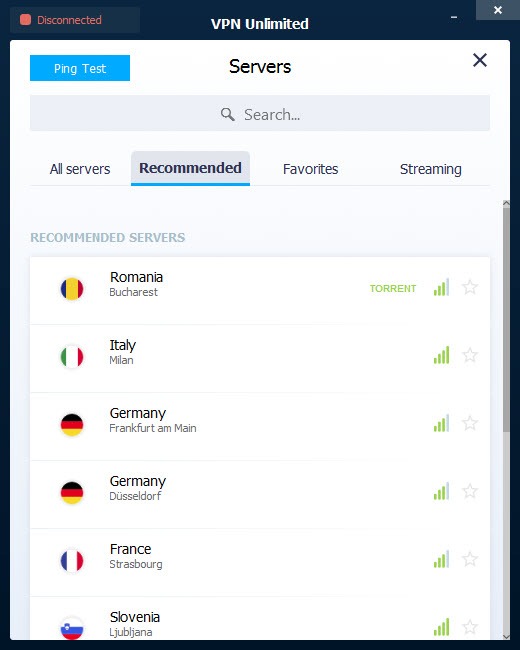
The setup is deliberately simple. Open the app, pick a server from the list, and connect. From that moment your traffic flows through that location, which means you appear to be browsing from wherever the server sits.
Useful for privacy on a shared or public network, and useful too when a site or service behaves differently depending on where you connect from.
What you get on top of that base is where the detail lives. A choice of connection protocols, strong encryption, a kill switch, leak protection, and some specialized servers for specific tasks. We’ll also be straight about where it falls short, because no VPN is perfect and this one has a couple of rough edges worth knowing.
How strong is the encryption and protocol choice?
Security comes down to two things. How your traffic is scrambled, and the method used to move it. On encryption, VPN Unlimited uses AES-256, the same cipher trusted for sensitive government data and considered impractical to break by brute force. Your traffic is locked tight regardless of which server you pick.
The protocol choice is broader than many rivals offer. You can run OpenVPN, IKEv2, WireGuard, or the provider’s own KeepSolid Wise. That last one is the interesting one. It disguises your VPN traffic as ordinary secure web traffic by routing it over the same port a browser uses for HTTPS, which makes it much harder for a network or a censor to detect that you’re using a VPN at all.
If you’re somewhere that actively blocks VPN connections, that obfuscation is the feature that gets you through. For a more hands-on, configure-it-yourself approach, OpenVPN itself is available, but here the protocols come wrapped in a friendly app.
The kill switch and leak protection
A VPN is only private as long as the tunnel holds. The moment the connection drops, your device can fall back to its normal exposed link without you noticing, leaking your real IP mid-session. The kill switch exists to stop exactly that. If the VPN connection falters, it cuts your internet rather than letting traffic slip out unprotected, so your address never gets exposed during a dropout.
There’s a catch worth flagging. The kill switch isn’t available on every protocol across every setup, and which combinations support it varies, so it’s worth checking that yours is covered before you rely on it.
The app also includes a Stop DNS Leak setting that plugs a common hole where address-lookup requests sneak outside the tunnel. In testing by reviewers, it held up against DNS and WebRTC leaks, which is reassuring since those are the gaps that quietly undo a VPN’s protection.
Servers built for specific jobs
Beyond the general-purpose locations, VPN Unlimited offers servers tuned for particular tasks, and this is where it pays off for power users. There are dedicated servers for P2P and torrenting, so file-sharing traffic goes to locations equipped for it rather than being throttled or blocked on a standard server.
You can also add a personal server or a personal static IP, which is handy if you keep getting flagged by sites that distrust shared VPN addresses, or if you need a consistent IP for remote access to something. There’s a SOCKS5 proxy option too, for cases where you want to route a single app rather than your whole system.
The app even shows the load on each server as a percentage, so you can steer clear of a congested location and pick one with room to breathe. A tool like NordVPN offers a larger network, but the specialized-server options here are properly useful.
The conveniences that make it livable
Small features decide whether you actually keep a VPN running or quietly turn it off. Trusted Networks is one of the good ones. You mark your home or office Wi-Fi as safe, and the app stops auto-connecting when you’re on it, saving the overhead for the networks that actually need protecting. On an untrusted public network, it does the opposite and keeps you covered.
There are ping tests to find the fastest server for your location, a favorites list so you’re not scrolling for the one you always use, and management for several devices under one account. None of these are headline features, but together they’re the difference between a VPN you fight with and one that fades into the background.
For accessing region-locked streaming libraries, it connects to servers set up for the major services, though as always with VPNs, that’s a cat-and-mouse game that can change.
Conclusion
VPN Unlimited is a capable, well-rounded VPN that covers the essentials and adds a few useful extras that matter in practice. The AES-256 encryption, the broad protocol lineup, and especially the KeepSolid Wise obfuscation make it a sensible pick if you need to get past networks that block VPNs, and the specialized P2P and personal-server options give power users room to work. For everyday privacy on public Wi-Fi and casual region-shifting, it does the job without fuss.
It isn’t the one to pick if raw speed or a spotless privacy record tops your list. The performance is merely steady, and the logging practices have earned fair criticism that anyone privacy-focused should weigh. But taken as a whole, with its obfuscation, specialized servers, and quality-of-life touches like Trusted Networks, it’s a solid all-rounder that handles the core mission well and gives you more control than the bare-minimum apps.
Pros & Cons
- Strong AES-256 encryption keeps your traffic locked against brute-force attacks
- Wide protocol choice including OpenVPN, IKEv2, WireGuard, and an obfuscation option
- KeepSolid Wise disguises VPN traffic as HTTPS to slip past blocks and censorship
- Kill switch blocks traffic if the connection drops, preventing IP exposure
- Stop DNS Leak setting held up against DNS and WebRTC leaks in testing
- Specialized servers for P2P, plus optional personal server and static IP
- Server load percentages let you avoid congested locations
- Trusted Networks auto-disables the VPN on Wi-Fi you mark as safe
- Speeds are middling rather than top-tier, and weaker for latency-sensitive gaming
- Kill switch availability depends on the protocol and setup, not universal
- Logging practices have drawn criticism for keeping more than a strict no-log stance
- It relies on shared DNS rather than running a full set of its own DNS servers
- Streaming access to region-locked libraries can come and go as sites adapt
Frequently asked questions
It encrypts your internet traffic and routes it through a remote server, hiding your real IP address and making your activity unreadable to your network or provider. You appear to browse from the server's location instead of your own.
It uses AES-256, a strong cipher trusted for sensitive government data and considered impractical to crack by brute force. Your traffic stays encrypted no matter which server or location you connect to.
It's a proprietary protocol that disguises your VPN traffic as ordinary HTTPS web traffic. This makes it much harder for a network or censor to detect that you're using a VPN, which helps in places that actively block VPN connections.
Yes. The kill switch cuts your internet if the VPN connection drops, so your real IP isn't exposed during an outage. Note that its availability can depend on which protocol and setup you're using, so confirm yours supports it.
Yes. It offers dedicated servers for P2P and torrenting, routing that traffic through locations equipped to handle it rather than standard servers where it might be restricted.
The provider markets a no-log stance, but reviewers have noted it records certain information, so its logging is not as strict as some competitors. It's a point to weigh if minimal data retention is your priority.


