

VPN Gate Client Plug-in
About VPN Gate Client Plug-in
Most VPN services follow the same business pattern. You pay a subscription, the provider runs servers, you get an account and credentials, and the provider promises various things about privacy in exchange for your money.
VPN Gate Client Plug-in is a different model entirely. It’s a free public relay network where the servers are run by volunteers around the world, the client is open source, no account is required, and the relationship between user and operator is essentially “use what’s available, when it’s available, at your own risk.”
The application itself is a plugin that loads into SoftEther VPN Client. It adds a server browser populated by the live list of currently-active volunteer relays, ranked by speed, line quality, uptime, and the country each one is located in.
Pick a server, click connect, and the SoftEther client handles the tunnel through whichever protocol the relay supports. The plugin doesn’t bring its own VPN engine. It’s a directory and connection initiator riding on top of an existing VPN client.
How the relay network actually works
Volunteers run a piece of software on their machine or VPS that turns it into a public VPN relay. The software registers with the network’s central directory, advertising the relay’s location, supported protocols, current load, and uptime. Anyone running the plugin sees that relay in their server list and can connect through it.
The catch, and it’s a meaningful one, is that the traffic going through a relay is visible to whoever runs that relay. Your encrypted tunnel terminates at the volunteer’s machine, where decrypted traffic exits to the open internet.
A malicious operator could log everything, inject content into unencrypted connections, or perform man-in-the-middle attacks on connections that don’t enforce HTTPS strictly. This is a fundamental property of the architecture, not a fixable flaw, and using HTTPS-only browsing along with the VPN is the practical mitigation.
The network publishes a transparent log retention policy: connection logs are kept for two weeks by the volunteer operators and the central directory. This is unusual in the consumer VPN space, where every provider claims no-logs whether or not they actually deliver on it. Here the trade-off is upfront. You’re using a free service with explicit log retention. That’s the deal.
Protocol coverage and what each relay supports
The plugin’s server list shows which protocols each relay accepts. The full set covers SoftEther’s proprietary SSL-VPN protocol, L2TP/IPsec, OpenVPN, and MS-SSTP. Most relays support multiple protocols simultaneously, and the right choice depends on what the network between you and the relay is willing to pass.
The SSL-VPN protocol is the workhorse, designed to disguise VPN traffic as ordinary HTTPS to evade deep packet inspection systems. In environments where standard OpenVPN connections get dropped at the perimeter firewall, the SSL-VPN protocol often gets through. That censorship-circumvention angle is the network’s primary purpose, and the protocol choice reflects it.
L2TP/IPsec is the option that works without installing the SoftEther client at all, since most operating systems include built-in L2TP/IPsec support. The plugin publishes the connection details for L2TP-supporting relays, and you can set up the connection through your OS’s native VPN dialog.
OpenVPN config files for each relay are also downloadable, which means OpenVPN GUI clients can connect to relays without involving the plugin at all.
Server list, country selection, and quality metrics
The server browser shows each relay with country flag, IP address, line speed, ping, uptime score, and a quality star rating. Sorting by any of those columns helps you pick a relay that fits the use case. Streaming wants high line speed and stable uptime. General browsing wants low ping. Bypassing a specific country’s filtering wants a relay in a country that filtering doesn’t block.
The list changes constantly. Relays come online when volunteers boot their machines, drop offline when those machines shut down, and rotate based on load distribution. Refreshing the list every few minutes shows different content. For users trying to connect to a specific country, persistence matters: the country you want might not have a relay available right now, but probably will in a few hours.
A practical limitation. Smaller countries get fewer relays. Larger countries with active volunteer communities get many. Japan, South Korea, the United States, and a handful of European countries typically have dozens of options at any time.
Other regions might have one relay, or none. For users specifically needing a particular geographic exit point, the network is unreliable in a way commercial VPNs aren’t.
Setup and the SoftEther dependency
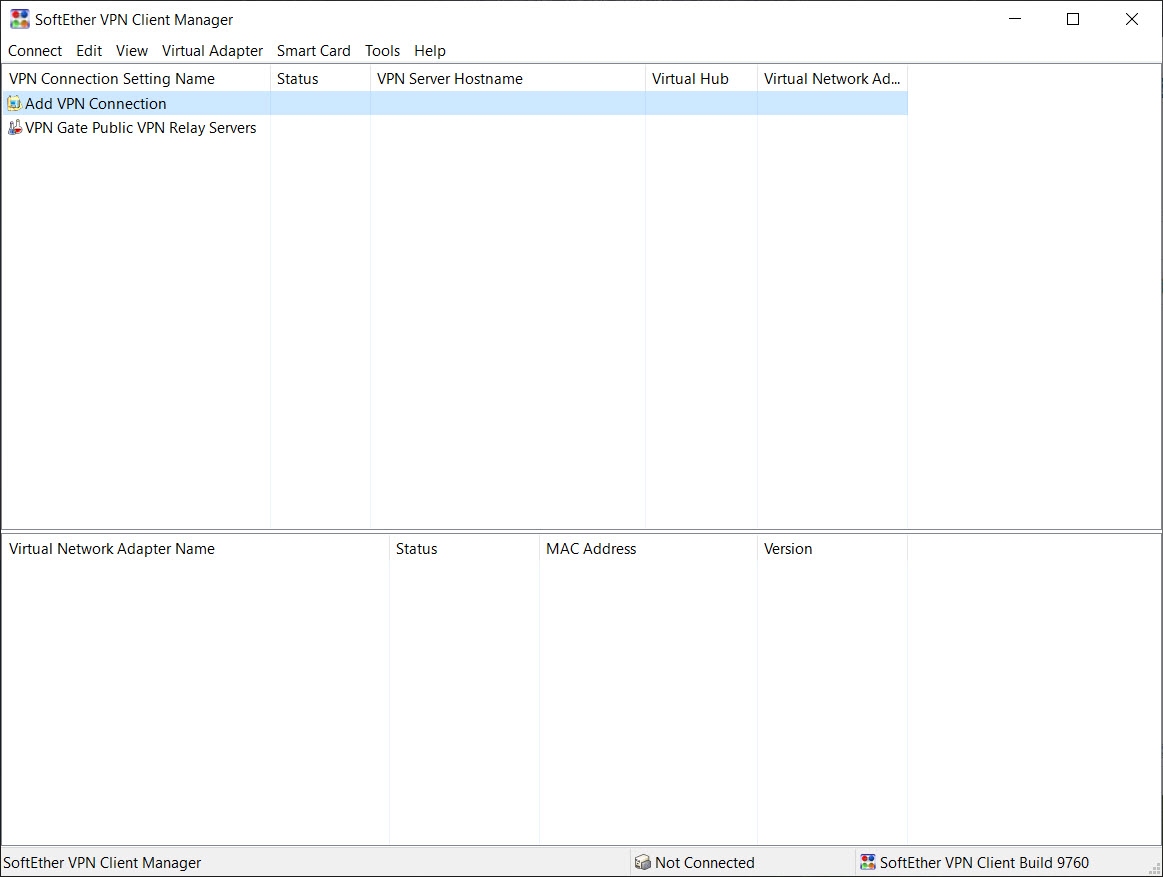
The plugin requires SoftEther VPN Client to be installed first. The plugin loads as an extension into the client, adding the server browser interface and the connection logic for the public relay network. Without SoftEther client, the plugin has nothing to plug into.
That dependency chain produces some setup friction. Users who just want a free VPN don’t necessarily understand they need two separate downloads and an installation order that matters. The plugin’s installer detects whether SoftEther client is present and prompts accordingly, but the up-front confusion is real for new users.
Once installed, the plugin shows up as a server group within the SoftEther client’s main window. Double-clicking the server group opens the live list of relays, and the connection flow proceeds from there. After the first connection, the plugin remembers which relays you’ve used and which protocols worked, making subsequent connections faster.
Where the application falls short
The free-volunteer-relay model is genuinely the application’s defining characteristic, but it produces unpredictability that commercial services don’t have. A relay you used yesterday might not be there today. The relay you connect to today might be slow, unreliable, or operated by someone you wouldn’t trust if you knew who they were. The plugin can’t change those realities, only surface them transparently.
Speed is highly variable. Some relays deliver good throughput, others throttle aggressively, and the speed you see on the server list is an estimate that may not match real-world performance. Switching relays when you hit a slow one is one click, but the iteration takes time.
Streaming service unblocking is unreliable. Major services maintain active block lists against VPN exit IPs, and volunteer relay IPs end up on those lists quickly. The specific relay you connect to might or might not work for any given streaming service on any given day. For users primarily interested in streaming unblocking, dedicated commercial providers like hide.me VPN handle that problem more reliably even on free tiers.
The interface, sitting inside SoftEther client, is unmistakably built by engineers for engineers. Dense, functional, and not pretty. Users coming from polished consumer VPN apps will find the experience jarring.
Where the application makes sense
The honest use cases are bypass-focused rather than privacy-focused. Accessing geo-restricted content from a country where you don’t have a paid VPN subscription. Getting around network filtering at a school, office, or hotel that blocks specific sites without doing deep packet inspection. Researching country-specific search results or testing how a website appears from a different region. Crossing a national content filter when you don’t have access to a more sophisticated tool like Freegate.
The use cases that don’t fit are anything where you’re actually trusting the VPN with sensitive traffic. Banking, personal email, anything carrying credentials, anything you wouldn’t want a random volunteer to potentially observe.
The threat model defaults to “less trustworthy than no VPN at all” for those uses, since at least without a VPN you’re only trusting your ISP, not an unknown relay operator.
Conclusion
VPN Gate Client Plug-in occupies an unusual position in the VPN category, which is “free and transparent about its limitations” rather than “commercial and selling a privacy promise.” The volunteer-relay model is genuinely different from commercial providers, and the trade-offs that come with it are stated explicitly rather than buried.
The natural audience is users who need to bypass geographic restrictions, basic content filtering, or network-level censorship without paying for or registering with a commercial service. Students at schools that block specific sites, users in regions where commercial VPNs are blocked or restricted, anyone curious about how a website looks from a different country. Users wanting actual privacy protection for sensitive activity should look elsewhere.
The application is honest about being a tool for shifting your apparent location through a network you don’t control, rather than a privacy shield in any meaningful sense, and that honesty is more useful than the marketing of most alternatives.
Pros & Cons
- Completely free with no account, registration, or payment information required
- Server list spans dozens of countries with multiple volunteer relays in active regions
- SSL-VPN protocol disguises VPN traffic as HTTPS for circumvention of basic filtering
- Transparent log retention policy stated upfront rather than hidden behind marketing claims
- OpenVPN config files and L2TP credentials available for use with alternative clients
- Multiple protocols per relay let you pick what works on your network
- Requires SoftEther VPN client to be installed first as a dependency
- Relay traffic is visible to whoever operates the volunteer machine
- Connection logs are retained for two weeks per stated policy
- Speed and availability vary widely between relays and over time
- Streaming service unblocking is unreliable as volunteer IPs end up on blocklists
- Interface inherits SoftEther's engineer-built aesthetic rather than polished consumer design
- Country coverage is uneven, with smaller regions sometimes having no available relays
Frequently asked questions
It adds a server browser to SoftEther VPN Client that lists currently-active volunteer-run public VPN relays. You pick a relay from the live list and the SoftEther client establishes a tunnel through it. The plugin handles the directory and connection initiation; the underlying VPN protocol is handled by the SoftEther client.
Yes. The plugin extends SoftEther VPN Client and won't function without it. Install SoftEther client first, then install the plugin. The plugin's installer prompts if the client isn't detected.
Yes. The service is free to use with no account, registration, or payment required. The funding model is research-project rather than commercial, which is why the access is open.
Yes, by stated policy. Connection logs are retained for two weeks at the relay and directory levels. This is explicit and upfront rather than hidden behind marketing claims, which is unusual for the VPN category.
Volunteer-run relays come and go as the people running them boot or shut down their machines. Smaller regions sometimes have no available relay at all. Refreshing the list later may show different countries as relays change throughout the day.
Yes. OpenVPN configuration files for each relay are downloadable, and L2TP/IPsec credentials work with the native VPN support in most operating systems. You can connect to the relays through any compatible VPN client, the plugin just makes the relay selection easier.
The relays collectively offer SoftEther's SSL-VPN protocol, L2TP/IPsec, OpenVPN, and MS-SSTP. The exact protocol set varies per relay. The plugin's server list shows which protocols each relay accepts.
Not really. The volunteer-run relay architecture means decrypted traffic exits through someone else's machine, where in principle it can be observed. Bypassing geographic restrictions or basic filtering is the right use case. Routing banking, credentials, or sensitive personal traffic through unknown relays is not.


