

Windows Repair
About Windows Repair
Windows Repair is an all-in-one toolbox for fixing a system that has started misbehaving. When your PC throws errors it never used to, when updates refuse to install, when the firewall acts strange or a browser stops connecting, the cause is often that something quietly changed settings that were never meant to be touched. Windows Repair walks through those broken settings and resets them to how they are supposed to be.
The core idea is restoration, not optimization. Malware, botched installs, and messy uninstalls leave behind altered registry values, broken file permissions, and tangled system configurations.
Windows Repair knows what the correct defaults look like and methodically puts them back. It is what you reach for when a machine is limping and you would rather fix it than wipe it and start over.
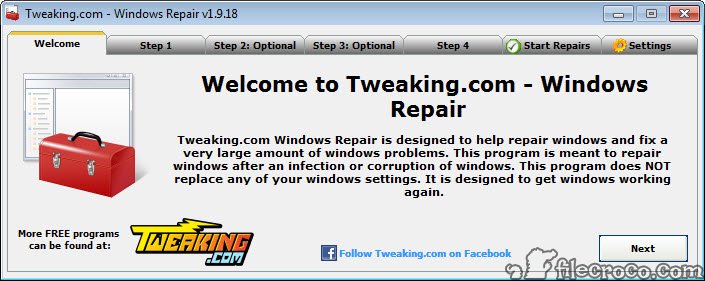
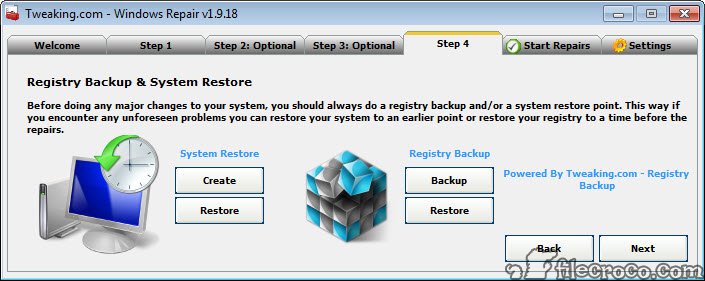
It runs through a guided sequence of steps before any repair, which is a sensible touch. You are nudged to check for infections, verify the file system, and create a restore point first, so you are not stacking a repair on top of an unresolved problem or working without a safety net.
What it actually repairs
The repair list is long and aimed squarely at the things that commonly break. Registry permissions and errors sit at the top, since a corrupted or wrongly-permissioned registry is behind a huge share of strange behavior. File permissions come next, resetting access rights on system folders that malware or a bad installer may have scrambled.
From there it branches into the usual trouble spots. Network and connection problems, including a proper Winsock and proxy reset for when a machine can see the network but refuses to actually browse.
Update components, for the all-too-common case where updates jam and will not budge. Firewall configuration, restoring its rules to a clean baseline. Even browser settings get a reset, undoing hijacks that redirect your searches or plant unwanted toolbars.
If your specific issue is a corrupted network stack, a focused tool like WinSockFix does that one job. Windows Repair folds the same kind of fix into a much wider battery of repairs you can run in one sitting.
Built around recovering from malware damage
A lot of the design assumes you have just cleaned an infection and are dealing with the wreckage it left behind. This is the part people underestimate. Removing the malware itself is only half the battle, because the damage to your settings stays after the threat is gone.
There are tools here specifically for that aftermath. One unhides files and folders that an infection flagged as hidden, a classic trick that makes your documents seem to have vanished. Another re-enables system tools like the task manager or registry editor when malware has locked them out, a job that overlaps with a dedicated utility like Re-Enable. The workflow expects you to run a scanner like Malwarebytes first, then come here to repair what the infection broke.
The guided steps are not just hand-holding
It would be easy to skip the preliminary steps and jump straight to the repairs. Resist that. The reason Windows Repair pushes a restore point first is that resetting permissions and registry keys at scale is powerful, and powerful operations occasionally go sideways on an unusual configuration. A restore point means a bad outcome is a few minutes of rollback rather than a reinstall.
The same logic applies to the file system check it recommends before repairs. If your disk has underlying corruption, repairing settings on top of it just papers over a deeper crack. Doing things in the suggested order is the difference between a clean fix and a frustrating afternoon.
Where it helps and where it does not
This shines when a system is functional but degraded. Things load slowly, error dialogs pop up, a feature that used to work now throws a permission error. Run the relevant repairs and a machine like that often comes back to life without any reinstall. For technicians and anyone who fixes computers for family and friends, Windows Repair consolidates a dozen manual command-line fixes into one interface.
What it will not do is resurrect a system that no longer boots, or recover lost files, or remove an active infection on its own. It is a repair tool, not an antivirus and not a backup utility. Pointed at the right problem it is excellent. Pointed at the wrong one it simply will not help, and you need to be honest about which situation you are in.
There is also a learning curve in knowing which repairs to run. Running everything blindly works more often than not, but a little understanding of what each repair touches goes a long way toward fixing the actual issue rather than shotgunning the whole list.
Conclusion
Windows Repair is built for people who fix computers, whether that is your job or just the role you have fallen into for everyone you know. It does not promise magic. What it offers is a thorough, methodical way to undo the settings damage that malware and bad software leave behind, all from one place instead of a dozen scattered commands.
Use it on the right problem, a degraded but still-working system, run the guided steps in order, and it is one of the most useful recovery tools you can keep on hand. Just go in clear-eyed about its boundaries. It repairs what is broken in your settings. It does not replace your antivirus, your backups, or a clean reinstall when a machine is truly beyond saving.
Features & benefits
Pros & Cons
- Fixes a wide range of common system problems from one interface
- Resets registry permissions, file permissions, and other settings to correct defaults
- Strong focus on repairing the damage left behind after a malware cleanup
- Guided steps encourage a restore point and checks before any repair runs
- Consolidates many manual command-line fixes into a single guided workflow
- Available as a portable build for running on a machine without installing
- Will not fix a system that fails to boot or recover deleted files
- Not an antivirus, so it cannot remove an active infection by itself
- Knowing which repairs to run takes some experience
- Running every repair blindly can be overkill for a single specific issue
Frequently asked questions
It targets registry errors, file permission issues, network and connection failures, stuck update components, firewall misconfigurations, and browser hijacks, among others, resetting them to their correct defaults.
Yes. The intended workflow is to remove any infection with a dedicated scanner first, then use this tool to repair the settings the malware altered. Repairing before the threat is gone can undo your work.
Because resetting permissions and registry keys across the system is a powerful operation. A restore point lets you roll back quickly if a repair has an unexpected effect on an unusual setup.
No. It is a repair tool, not an antivirus. It fixes the broken settings an infection leaves behind, but you need a separate security tool to remove the malware itself.
Yes, a portable build is available, which is handy for repairing a machine you would rather not install software on or for keeping on a technician's USB drive.
No. It runs inside a working session, so it cannot help a system that fails to boot. For those cases you need recovery or reinstallation options instead.


This site contain very trusted software we need daily. I like it. Thanks for giving us a easy way to download these useful software products.
I’m on a limited budget and appreciate filecroco.com. Thanks Ed