

SoftEther VPN
About SoftEther VPN
Most VPN software people install is a client that connects to a paid commercial service. SoftEther VPN is the opposite of that. It is a VPN server platform you run yourself, which also includes its own client, and which can speak the protocols of nearly every other VPN system in existence. You set up the server on a machine you control, point clients at it, and you have your own private network without paying anyone a monthly subscription.
The project started in 2004 as a master’s thesis at the University of Tsukuba in Japan, written by Daiyuu Nobori to solve a specific problem. The existing VPN protocols of that era (IPsec, PPTP, L2TP) had trouble traversing the firewalls, proxies, and NAT routers of real networks without extra software. The solution was to build a new protocol that uses TCP port 443 and looks indistinguishable from regular HTTPS traffic.
That decision shaped the entire architecture and remains the reason people choose this software twenty years later.
The multi-protocol server is the headline feature
SoftEther VPN server does not speak one protocol. It speaks several, simultaneously, on the same server instance. A single deployment can accept connections from the native SoftEther client over its proprietary SSL-VPN protocol, from any OpenVPN client (Windows, iOS, Android, Linux), from L2TP/IPsec clients (built into most operating systems by default), from Microsoft’s SSTP, from L2TPv3 routers for site-to-site links, and from EtherIP for layer-2 bridging.
This matters because you are not picking a protocol at the server, you are picking what your clients can use. A small office can deploy one server and let staff connect from whatever software is most convenient on each platform. iPhone users use the built-in L2TP/IPsec. Linux laptops use OpenVPN. Office workstations use the native client for performance. The administrator does not have to maintain separate VPN systems for each.
Compared to running a dedicated OpenVPN server alongside an L2TP server alongside an SSTP service, this is a substantial reduction in operational complexity.
Layer 2 tunneling and what it changes
Most VPN protocols operate at layer 3 of the network stack, meaning they encapsulate IP packets. SoftEther VPN can operate at layer 2, encapsulating raw Ethernet frames. This has practical consequences for what you can do with the network.
Layer 2 tunneling means clients connected to the VPN appear on the same broadcast domain as the server, not just routed to it. Things that depend on Ethernet-level discovery (NetBIOS browsing, mDNS/Bonjour, Wake-on-LAN, certain printer discovery protocols, IPv6 link-local) work across the tunnel without configuration tricks. For site-to-site links between two offices, this lets you bridge the LANs as if they were physically connected by a long cable. The remote office’s computers get IP addresses from the main office’s DHCP server, appear in network browsers, and so on.
The trade in operating at layer 2 is overhead. Ethernet frames carry more headers than IP packets, and broadcast traffic on a bridged link consumes bandwidth even when no one is doing useful work. For most remote-access scenarios (one user connecting to access internal resources), layer 3 routing is more efficient and the layer 2 capability is unused. For site-to-site bridges between LANs that should behave as one network, the feature is precisely what you want.
The native protocol disguised as HTTPS
The SoftEther native protocol runs over TCP port 443 using SSL/TLS. From the perspective of a firewall doing deep packet inspection, the connection looks like someone browsing an HTTPS website. There is no characteristic VPN handshake to detect, no UDP traffic on an unusual port, no IPsec headers. The only way to identify it as a VPN is to look at traffic patterns over time and notice the connection stays open for hours with sustained data transfer.
This is the headline feature in restrictive network environments. Hotel networks that block VPN protocols often miss SoftEther because they cannot distinguish it from web traffic. Corporate networks that allow only HTTPS through a proxy will pass SoftEther traffic without resistance.
Whether you should use this capability to bypass your employer’s network policies is a separate question we will not get into, but the technical capability is real and the implementation is among the cleanest in the category.
OpenVPN can do similar TCP-over-443 tunneling, but it has a recognizable handshake signature that some firewalls detect. WireGuard cannot do TCP at all (it is UDP-only by design), making it useless in environments that block UDP. For pure firewall evasion, SoftEther is technically the strongest option, although OpenVPN with TCP fallback covers most cases.
Server, client, and bridge components
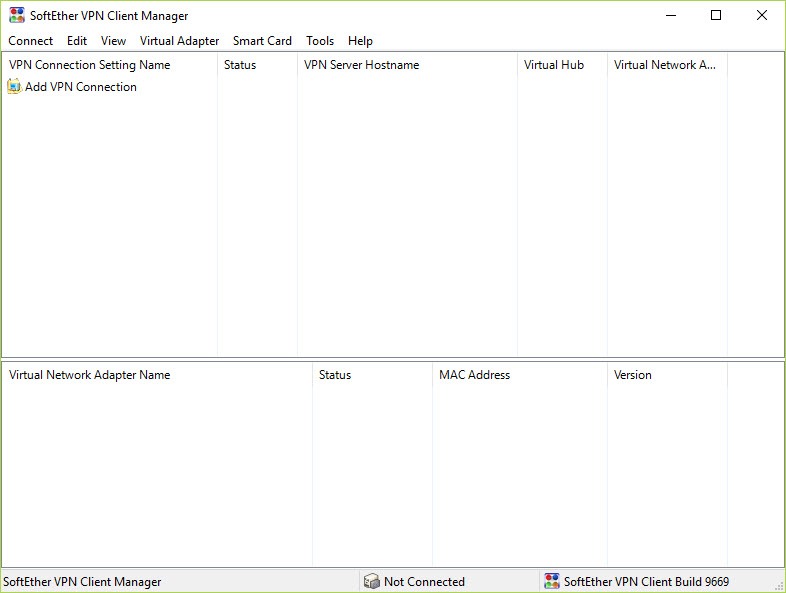
The package installs as three distinct components. The Server software does the actual VPN work, accepting connections and routing traffic. The Server Manager is a separate GUI tool for configuring servers, including remote ones over the network. The Client connects to SoftEther servers using the native protocol with features the generic clients lack (parallel transmission for higher throughput, hardware offload, integration with the local network stack). The Bridge is a special-purpose component for site-to-site links that does not accept end-user connections but extends one LAN into another.
The Server Manager is the most polished interface. You can connect to multiple servers from one console, configure virtual hubs (essentially virtual switches within the server), manage user accounts with several authentication backends (local password, RADIUS, NT Domain, certificate, anonymous), and view real-time connection logs. For an administrator managing more than one VPN endpoint, having a single GUI instead of editing config files across multiple servers is a meaningful workflow improvement compared to vanilla OpenVPN.
Authentication options and user management
User authentication supports password (local database), RSA certificate (the most secure option, with the server validating client certificates against a configured CA), NT Domain or Active Directory integration, and RADIUS for centralized authentication. You can mix methods per user, so an administrator can require certificate-only login for sensitive accounts while standard users authenticate with password.
The certificate flow is particularly well-implemented. The server can generate its own root CA, issue client certificates from the Server Manager interface, and revoke them when an employee leaves. Compared to maintaining a separate PKI for OpenVPN, this is one less thing to manage.
Two-factor authentication is available through RADIUS integration, which means any RADIUS-compatible 2FA backend works.
Performance and the throughput claims
Throughput depends entirely on which protocol you use. The native SoftEther protocol with parallel transmission can push close to gigabit speeds on modern hardware, partly because it uses multiple TCP connections in parallel to bypass the bandwidth-delay product limitations of single-TCP-stream tunneling. OpenVPN through the same server typically lands lower because OpenVPN is single-stream over UDP or TCP. L2TP/IPsec is in the middle, with hardware AES acceleration making a significant difference.
The encryption uses OpenSSL under the hood. AES-128 and AES-256 are the modern options. The documentation also lists RC4, DES, and Triple-DES as supported, which are present for compatibility with older clients but should not be selected in any new deployment. The administrator can disable weak ciphers at the server level.
The VPN Gate research network
There is a sub-project called VPN Gate that is worth mentioning briefly. It is a volunteer-run network where individuals contribute their own SoftEther servers as free public relays. The intended use is academic research into VPN technology and traffic patterns. In practice, many people use VPN Gate servers to bypass geographic restrictions or as free VPN endpoints.
Two things to know. The volunteer servers are operated by strangers with no logging guarantees, so treat the traffic as potentially observed by the relay operator. And the project’s research-focused nature means stability and bandwidth vary considerably between servers. As a substitute for a paid VPN service like ProtonVPN, it works but with significant caveats around trust and reliability.
The licensing situation
The project was relicensed to GPLv2 in 2014 when the academic phase ended and the source was opened. It is fully free for personal, academic, and commercial use. There is no paid tier, no enterprise edition with extra features, no subscription.
The development continues at the University of Tsukuba and through community contributions on GitHub. Release cadence has slowed compared to the active development years, but the codebase is stable and security updates continue.
Conclusion
SoftEther VPN is the right tool when you want to operate your own VPN infrastructure rather than rent one. Small businesses linking branch offices, system administrators providing remote access to internal resources, technical users in restrictive network environments, and anyone who needs a VPN endpoint in a specific location without paying a subscription will find it well-suited. The multi-protocol server is the feature that makes it more useful than running individual protocol servers separately.
What you trade for that capability is operational responsibility. There is no support hotline, no automated server provisioning, no monthly invoice you can expense. You configure your own users, manage your own certificates, and troubleshoot your own connectivity problems.
For users who want a VPN to click on, this is the wrong category of software entirely. For users who want to understand and control their own network, it is among the most capable options available without paying for a commercial appliance.
Pros & Cons
- Multi-protocol server accepts connections from native, OpenVPN, L2TP/IPsec, SSTP, L2TPv3, and EtherIP clients simultaneously
- Layer 2 tunneling enables true LAN bridging across remote sites for protocols that require Ethernet-level discovery
- Native protocol over TCP 443 is indistinguishable from HTTPS traffic to deep packet inspection
- Server Manager GUI handles multi-server administration from one console, including certificate management
- Cross-platform with server runtimes on Windows, Linux, FreeBSD, Solaris, and macOS
- Fully free and open source under GPLv2 with no commercial edition
- Strong authentication options including certificates, RADIUS, NT Domain integration, and 2FA via RADIUS backends
- Significant learning curve compared to subscription VPN clients, especially around virtual hub configuration
- Documentation reads like a research project rather than a product manual, with technical depth but uneven usability
- Default cipher list includes outdated algorithms (RC4, DES) that must be manually disabled
- Development pace has slowed since the academic phase ended, with infrequent feature updates
- VPN Gate relays are not a substitute for a paid privacy VPN, despite some marketing positioning them that way
- Layer 2 bridging can create broadcast traffic problems if not configured carefully, especially over high-latency links
Frequently asked questions
The application is software you install on your own server. NordVPN is a subscription service where the provider operates the servers. With this tool, you are the VPN provider for yourself and whoever you give credentials to. There is no monthly fee and no third party seeing your traffic, but you also have to deploy and maintain the server.
The client primarily speaks the native SoftEther protocol and connects best to SoftEther servers. For connecting to other VPN systems, you would use a dedicated client for that protocol. The server side is where the multi-protocol capability lives.
The application is technically capable of this if you run a server in the target region, but most users looking for geo-unblocking find subscription services more convenient because they handle the server infrastructure. Self-hosting works if you already have a server somewhere geographically useful.
Logging is fully configurable at the server level. The administrator decides what gets logged. There is no built-in logging service that reports outside the server. For privacy-focused deployments, you can disable all connection logging entirely.
WireGuard is generally faster on modern hardware because of its lean codebase and UDP-only design. The application's native protocol with parallel transmission can match WireGuard on TCP-based throughput tests but uses more CPU. For pure speed on networks that allow UDP, WireGuard wins. For firewall traversal, this tool wins.
Yes, this is one of the application's strongest use cases. The Bridge component combined with layer 2 tunneling lets you extend one office's LAN to another so the two networks behave as one. The native protocol's reliability over imperfect internet connections makes this practical even when the link quality varies.
For a small deployment (under 20 simultaneous clients), almost anything modern works. A small VPS with one or two cores and 1 GB of RAM handles this easily. For higher loads, the application scales reasonably with CPU cores because cryptographic operations parallelize across connections.


