

SD Card Formatter
About SD Card Formatter
The system will format a memory card if you right-click it, and the question worth answering is why anybody bothers with a separate program to do the same thing. SD Card Formatter exists because those two operations are not the same thing, and the difference shows up in cameras rather than on the computer.
SD Card Formatter comes from the standards body that defines how these cards work, which means it formats them to the specification the cards were built around rather than treating them as generic storage.
Whether that matters depends entirely on where the card is going afterwards.
What the generic format leaves off
Here is the answer to the question people ask constantly about SD Card Formatter, put the way practitioners explain it to each other.
A memory card is not a small hard drive. Its internal flash has a specific layout, and the specification says where the partition should start, how the file allocation structures should be aligned against that layout, and how the whole arrangement should sit.
The system’s own format produces a working card and does not necessarily observe any of that. The partition may start at an offset the card’s controller did not expect, the structures may sit across internal boundaries rather than aligned to them, and hidden areas are not always reset.
On a computer that produces no visible problem, since the computer reads whatever it finds. In a camera, a dashcam, a drone or an embedded device expecting the card laid out exactly to specification, it produces the awkward category of fault where the card mostly works and occasionally does not.
There is also a protected area on these cards used for security purposes, which generic formatting tools do not handle and this one does.
The erase format and what it actually restores
This is the SD Card Formatter finding worth having, and it comes with a limit nobody mentions.
Beyond the quick format there is a longer one that erases the whole card rather than just clearing the file table. That erase uses the flash operations the card supports for discarding data, rather than simply writing over it.
The effect on write speed is real and measurable. Users report a drive writing at around one megabyte per second after an ordinary format and roughly six times that after the long erase, on the same hardware.
Here is the limit. That speed lasts until the card has been filled once. Deleting files and writing again brings the slow behaviour back, because the blocks are marked used rather than actually empty, and only another full erase resets them.
So the long format is a periodic maintenance operation for a card that has become sluggish, not a permanent fix applied once.
Checking what is still on the card before erasing it is a separate step, and a recovery tool that finds what a quick format left behind works only before the long erase, never after.
Restoring a card that shows the wrong size
The problem SD Card Formatter solves that people do not expect, and it is common.
A card used in a single-board computer, a camera with unusual partitioning or any device that carved it up will show a fraction of its real capacity when reconnected to a computer. A thirty-two gigabyte card reporting itself as a few hundred megabytes is the usual symptom.
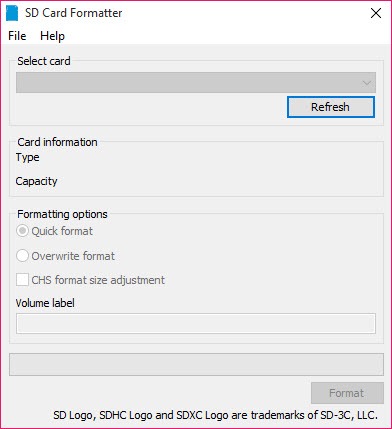
The system’s format works within whatever partition it finds, so it formats the small one and leaves the rest of the card invisible. The size adjustment option here rebuilds the card to its full capacity instead.
That is the answer to a question asked constantly by anybody who has repurposed a card from a project, and it is why the tool is worth keeping around even for people who never use a camera.
For writing an image back onto such a card afterwards, Rufus handles the boot arrangement and partition scheme properly.
The switch on the side
The simplest cause of a card that refuses SD Card Formatter entirely, and it catches everybody at least once.
Full-size cards carry a small physical switch that locks them against writing. If it is in the protected position, nothing will format the card and the error messages rarely say why.
Checking that switch before troubleshooting anything else takes two seconds. The switch is also only a signal, since it tells the reader the card is protected rather than physically preventing anything, so a worn switch or a sticky one produces intermittent behaviour that looks like a failing card.
When the generic format is fine
Being fair about the boundary, because SD Card Formatter is not always necessary.
A card that lives permanently in a computer as extra storage does not need any of this. Alignment matters to devices that expect the specification, and a computer is not one of them.
Equally, a card that needs a particular file system for a specific purpose rather than the one the specification prescribes is outside what this does. It formats to the card standard, and anything else is a different job, which FAT32Formatter covers when a large volume in that particular format is what a device demands.
Conclusion
SD Card Formatter answers a question most people never think to ask, which is whether the format they just did produced a card the device will actually be happy with. For a card going into a camera, a dashcam or anything embedded, formatting to the specification rather than approximately is the difference between reliable and mostly reliable.
Two capabilities justify keeping it even if you never own a camera. The long erase restores write speed on a card that has grown sluggish, remembering that the effect lasts one fill, and the size adjustment recovers the full capacity of a card some project left carved into pieces. Both solve problems the built-in format cannot touch.
Pros & Cons
- Formats to the specification the cards were designed around
- Aligns structures to the card's internal flash layout rather than approximately
- Resets the protected area that generic tools leave alone
- Long erase restores write speed on a card that has become sluggish
- Size adjustment recovers full capacity from a card partitioned by another device
- Simple enough that there is nothing to configure wrongly
- Makes no difference for a card used only as computer storage
- Restored write speed lasts only until the card is filled once
- The long erase takes considerable time on a large card
- Formats to the card standard, so it cannot produce another file system on request
- Erasing properly means recovery afterwards is not possible
Frequently asked questions
It follows the specification the cards were designed around, placing the partition and aligning the internal structures to the card's flash layout, and resetting the protected area. The generic format produces a working card without necessarily observing any of that.
On a card that has slowed, yes, through the long erase rather than the quick format. The gain is measurable and it lasts until the card has been filled once, after which the slow behaviour returns and another erase is needed.
Because a device partitioned it and the system's format works inside whatever partition it finds. The size adjustment option here rebuilds the card to its full capacity instead.
Check the small switch on the side of a full-size card. In the protected position nothing will write to it, and the error messages seldom explain that.


