

Real Temp
About Real Temp
Every temperature monitoring tool shows a number in degrees, and almost none of them explain where that number comes from. Real Temp is built around the explanation, which turns out to matter for anybody trying to decide whether their processor is running too hot.
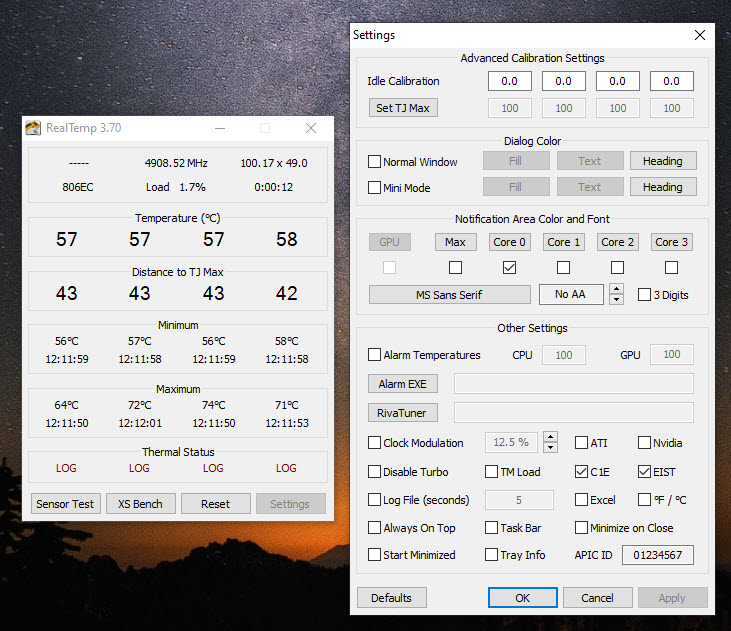
The sensor Real Temp reads does not measure temperature in the way a thermometer does. It reports how far the core currently is below the point at which it will start protecting itself by slowing down.
Absolute temperature is then worked out by subtracting that distance from the throttling point. The reading you see is a calculation rather than a measurement, and that has consequences.
The constant it subtracts from can be wrong
Here is the practical consequence, and it explains something that confuses people constantly.
The throttling point differs between processors and is not always reported correctly by the processor itself. Real Temp therefore lets you set it, because getting it wrong shifts every absolute reading by however much you are out.
That is why two monitoring tools can show temperatures ten degrees apart on the same machine while both read the same sensor perfectly accurately. They assumed different throttling points, and only one of them is right.
The distance figure, by contrast, is what the sensor actually reports and needs no assumption. A core sitting thirty degrees below its limit is thirty degrees below its limit regardless of what anybody thinks the limit is.
For a maintained tool doing the same job with the throttling points for current processors already correct, Core Temp is the sensible default.
The sensors are worst where it matters least
This Real Temp quirk is well established and almost never mentioned, and knowing it prevents a great deal of pointless worry.
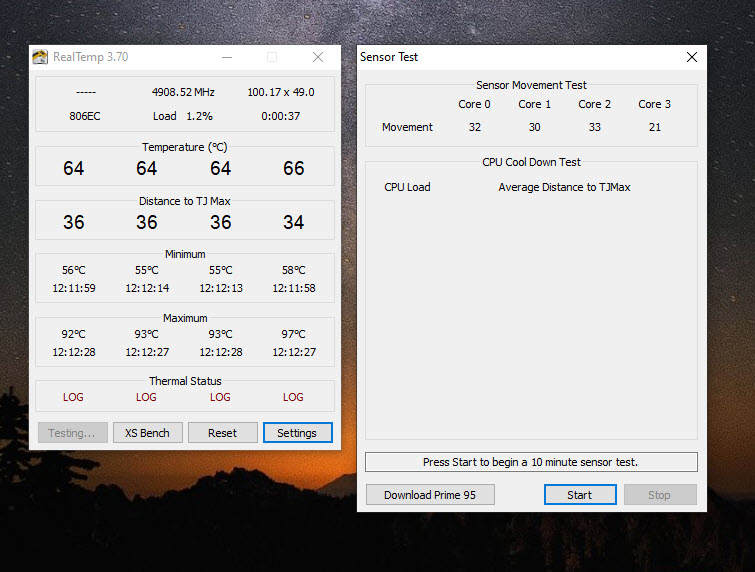
The digital sensors in these processors are calibrated to be accurate near the throttling point, which is where accuracy has consequences. At idle they are considerably less reliable, and on some processors they simply stop moving below a certain point, reporting the same figure regardless of what is actually happening.
Somebody watching an idle machine report thirty degrees on three cores and a stubborn thirty-five on the fourth is usually looking at sensor behaviour rather than a cooling problem.
Real Temp includes a sensor test for exactly this, checking whether the readings respond as they should so you can tell a stuck sensor from a hot core.
The practical conclusion is to ignore idle temperatures and pay attention under load, which is the opposite of what most people do.
The flag that answers the actual question
Underneath the temperatures Real Temp records whether the processor has thermally throttled since it started.
That is the question people are really asking. Nobody cares about degrees in the abstract, they care whether heat is costing them performance, and this reports it directly rather than leaving you to infer it from a number and a guess about the limit.
Minimum and maximum per core are recorded alongside, which is how you find out what happened during a long session you were not watching.
Seeing that behaviour as it happens, over a game rather than after it, needs an overlay, and a monitoring tool that reports clocks and temperature during a workload covers that.
Logging, for the problem that only happens sometimes
Real Temp writes readings to a file at an interval you choose, which is the feature that solves intermittent problems.
A machine that throttles once an hour, or slows down during one particular task, cannot be diagnosed by watching a window. A log covering the afternoon can be read afterwards and matched against what you were doing.
That is unglamorous and it is how these problems actually get solved, since the alternative is staring at a display waiting for something you cannot predict.
Intel only, and frozen
Two limitations decide whether Real Temp applies to you at all.
It reads Intel processors. Nothing else has the sensor arrangement it was written for, and a machine with a processor from anywhere else gets nothing here.
And development stopped a long time ago. That matters specifically because of the throttling point problem, since processors released since then are not in whatever table it carries, so their absolute readings may be wrong until you set the value yourself.
Establishing exactly which processor you have is the first step in that case, and CPU-Z reports the model and stepping precisely.
Conclusion
Real Temp teaches something most monitoring tools obscure, which is that a processor’s temperature reading is derived rather than measured, and that its accuracy depends on a constant which may be wrong. Once you know that, the disagreement between tools stops being a mystery and idle readings stop being alarming.
Its own limits are clear enough. One manufacturer’s processors, development long since stopped, and recent hardware needing the throttling point set by hand. For an older machine, or for understanding what these sensors actually report, it remains properly instructive. For monitoring current hardware without doing that homework, a maintained tool is the better choice.
Pros & Cons
- Explains that the sensor reports distance from the throttling point, not temperature
- The throttling point is adjustable, so absolute readings can be corrected
- Sensor test distinguishes a stuck reading from a properly warm core
- Throttling status recorded directly, which is the question people actually have
- Minimum and maximum per core since starting
- Logging at a chosen interval, for problems that occur unpredictably
- Portable and tiny, with nothing installed
- Intel processors only
- Development stopped, so recent processors may carry a wrong throttling point
- Absolute temperatures are only as correct as that value
- Sensors are unreliable at idle, which misleads anybody watching an idle machine
- Maintained alternatives handle current hardware without manual correction
Frequently asked questions
Because absolute temperature is calculated by subtracting the sensor's reading from an assumed throttling point, and tools can assume different values. Both may be reading the sensor correctly while disagreeing about the constant.
Because these sensors are calibrated for accuracy near the throttling point rather than at idle. On some processors they stop responding below a certain temperature entirely, which produces a figure that does not move.
Recording whether heat has actually cost you performance, which is the real question behind asking about temperature. It reports that directly rather than requiring you to infer it.
No. It reads the sensor arrangement in one manufacturer's processors, so anything else is outside its scope entirely.
Only knowing that recent processors may not have the correct throttling point set, which makes absolute readings unreliable until you correct it. A maintained alternative avoids that work.


