

NVIDIA Profile Inspector
About NVIDIA Profile Inspector
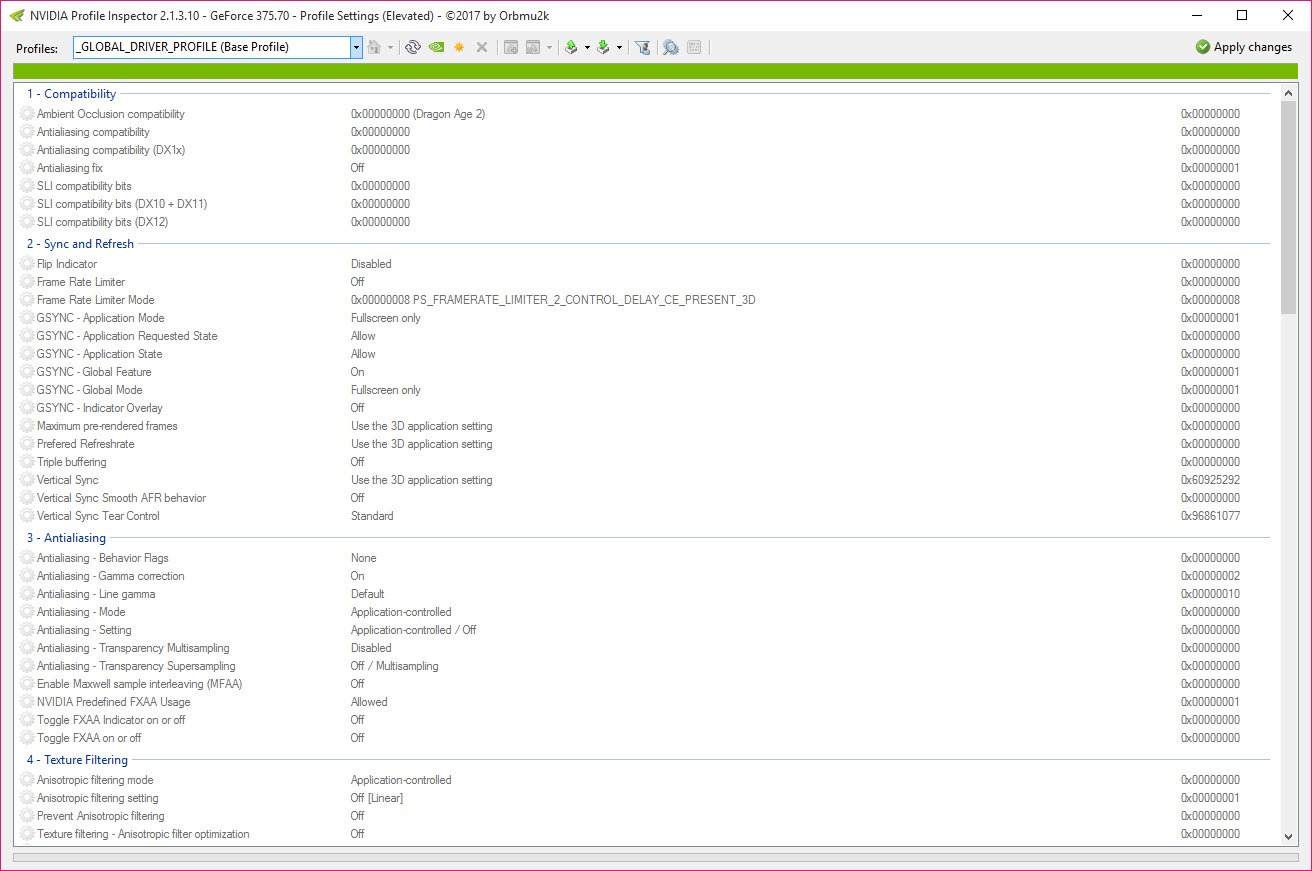
The graphics control panel most people know exposes perhaps a dozen settings. The driver underneath it holds hundreds, stored as a profile for every application it recognises, and the panel simply does not show them. NVIDIA Profile Inspector opens that database and lets you edit it directly.
The NVIDIA Profile Inspector scope needs stating immediately. This works with NVIDIA cards only, because it edits that driver’s own profile store. A card from any other manufacturer has nothing here at all.
Confirming which card is actually installed takes seconds with GPU-Z, which also reports the driver version the profiles belong to.
Profiles apply to one application
Everything in NVIDIA Profile Inspector is per-application rather than global, which is the arrangement that makes aggressive settings reasonable.
The driver identifies a game by its executable and applies the profile attached to it. Change a setting in a profile and it affects that game alone, leaving everything else on the machine untouched.
That is what allows a heavy-handed override for one older title that needs it, while a modern game running the same afternoon uses entirely different settings without anybody switching anything.
Antialiasing in games that never offered it
This is the NVIDIA Profile Inspector use people know it for, and it deserves explaining properly because the terminology is opaque.
Older games often shipped with no antialiasing option, or with a weak one. The driver can apply it externally, and doing so requires knowing how that particular game renders, because applying edge smoothing to a game that draws in an unexpected order produces either nothing or a mess.
The compatibility bits are the answer. They are numeric flags telling the driver which approach to take for that engine, and they exist because somebody worked out through experiment which value produces a correct result in which game.
That is the honest description. These values are community knowledge assembled by trial and error rather than documented behaviour, so using them means finding the flag somebody established for your game and accepting that a wrong one produces artefacts rather than an error message.
When it works, an older game gains clean edges it never had, which is the single most satisfying thing this tool does.
The settings most people actually came for
Beyond the specialist territory, NVIDIA Profile Inspector offers several options with broad usefulness.
A frame rate limiter caps output at a chosen value, which reduces heat, noise, power draw in games that would otherwise render three hundred frames nobody sees. Anisotropic filtering can be forced to full quality regardless of what a game offers, and texture filtering quality can be set to favour image quality over the driver’s default balance.
Vertical synchronisation behaviour is configurable well beyond on and off, including adaptive modes that engage only when the frame rate can sustain it. Prerendered frame and latency settings control how far ahead the processor may queue work, which affects input responsiveness directly.
Power management mode is the last of the commonly wanted ones, determining whether the card drops its clocks aggressively between frames or holds them.
Watching what any of that changes in practice needs an overlay, and MSI Afterburner reports frame rate, clocks, temperature and power draw over a running game.
Shader cache, and the setting that looks like an improvement
One setting worth raising rather than leaving alone is the shader cache size. Games compile shaders as they encounter them and store the results, and a cache too small for a large modern title means recompiling the same work repeatedly, which shows as brief stutters when entering new areas.
Raising the limit costs disk space and nothing else, and on a machine with room to spare it removes a class of stutter people usually blame on the game.
The setting that looks like an improvement
The NVIDIA Profile Inspector negative level of detail bias deserves its own warning, because it is the classic trap.
Setting it negative makes textures appear sharper, which looks better in a screenshot and looks worse in motion. The sharpening comes from the card sampling higher detail than the distance warrants, and the result is shimmering on surfaces as you move, particularly on regular patterns like fences and roof tiles.
People apply it, admire a static image, and then spend an evening wondering why the game has developed a crawling texture problem. Leaving it at the default and forcing anisotropic filtering instead achieves the sharpness without the artefact.
That pattern repeats throughout. Several settings here produce an immediately visible change that is not an improvement, and the absence of any warning in the interface is why reading before changing matters.
Exporting, importing, getting back
NVIDIA Profile Inspector exports profiles to a file and imports them again, which is how somebody shares a working configuration for a particular game and how you carry your own arrangement to another machine.
NVIDIA Profile Inspector restores driver defaults for a single profile or across the board, which is the escape route when something has gone wrong and the cause is unclear.
Driver updates are the other thing to know about. A driver installation can reset the profile store, so a carefully assembled set of overrides may quietly disappear when the graphics driver updates. Exporting after configuring is therefore not optional if you intend to keep the work.
For adjusting the card itself rather than how games use it, meaning clocks, fan curves and power limits, a tuning tool built for that side of the hardware is the separate instrument.
Where it can actually cause problems
Three NVIDIA Profile Inspector cautions belong together at the end.
Forcing settings can break rendering. A game receiving antialiasing it was not designed for may show transparent surfaces incorrectly, lose an effect entirely, or produce flickering geometry. That is not a fault in the tool, it is the consequence of overriding what the game asked for.
Performance is the second. Forcing high-quality filtering and external antialiasing lowers frame rate, sometimes considerably, and the trade may not be one you wanted. Measuring before and after with something repeatable is the only way to know, and 3DMark provides a figure you can compare against itself.
The third concerns online games specifically. Some competitive titles monitor for modifications to how the game renders, and while driver settings are a grey area rather than a modification, anybody playing something with strict enforcement should be cautious about aggressive overrides in that particular game.
Conclusion
NVIDIA Profile Inspector is the tool for anybody who has ever wondered why the control panel offers so little. The full profile database is there, per-application, including the compatibility flags that let older games receive antialiasing they were never built to have and the limiter that stops a card rendering frames nobody sees.
Approach it with two habits and it stays useful rather than becoming a source of mysteries. Export your profiles once configured, because a driver update can clear them. And change one thing at a time, because several settings here look like improvements in a still image and reveal themselves as problems the moment anything moves.
Pros & Cons
- Exposes hundreds of driver settings the control panel does not show
- Every change applies to one application rather than to everything
- Antialiasing can be forced in games that never offered it
- Frame rate limiter reduces heat, noise and power in games that overproduce frames
- Anisotropic filtering and texture quality can be raised beyond the driver default
- Latency and prerendered frame settings affect input responsiveness directly
- Profiles export and import, so configurations transfer or survive a driver update
- Restoring driver defaults is available per profile or across the board
- NVIDIA cards only, so other hardware gets nothing from it
- Compatibility flags are community trial and error rather than documented values
- Several settings produce visible changes that are not improvements
- Forcing options can break rendering in ways that look like game faults
- Driver updates can reset the profile store without warning
- The interface offers no guidance about what any setting will do
Frequently asked questions
Exposes the full profile database rather than the small selection the panel presents. The driver stores hundreds of settings per application, and this edits them directly, including options that have never appeared in any official interface.
Numeric flags telling the driver how to apply edge smoothing to a particular game engine. They exist because forcing antialiasing externally requires knowing how a game renders, and the working values were established by experiment rather than published.
No. It edits one manufacturer's driver profile store, so a card from anybody else has nothing for it to read or change.
It can. Installing a graphics driver may clear the profile store, which is why exporting your configuration after setting it up is worth doing rather than optional.
Yes. Antialiasing applied to a game not designed for it can break transparency, lose effects or produce flickering, and high-quality filtering costs frame rate. Neither produces an error message, so both appear as game faults.
No. It edits how the driver treats applications rather than how the card runs, so clocks, fan curves and power limits belong to a separate tuning tool.


