

netcut

About netcut
netcut is one of those tools that produces strong reactions depending on who’s looking at it. To a network administrator running a small office or a tech-savvy home user trying to figure out which devices are eating their bandwidth, it’s a genuinely useful LAN scanner with an ARP-based device manipulation feature. To Windows Defender and various other antivirus solutions, it’s frequently flagged as a HackTool because the same ARP techniques that power its legitimate features can also be used to disrupt networks the user has no authority over.
The tool sits squarely in the dual-use category that includes Wireshark, nmap, and various other utilities that security professionals rely on but that produce uncomfortable conversations when they show up on someone else’s computer.
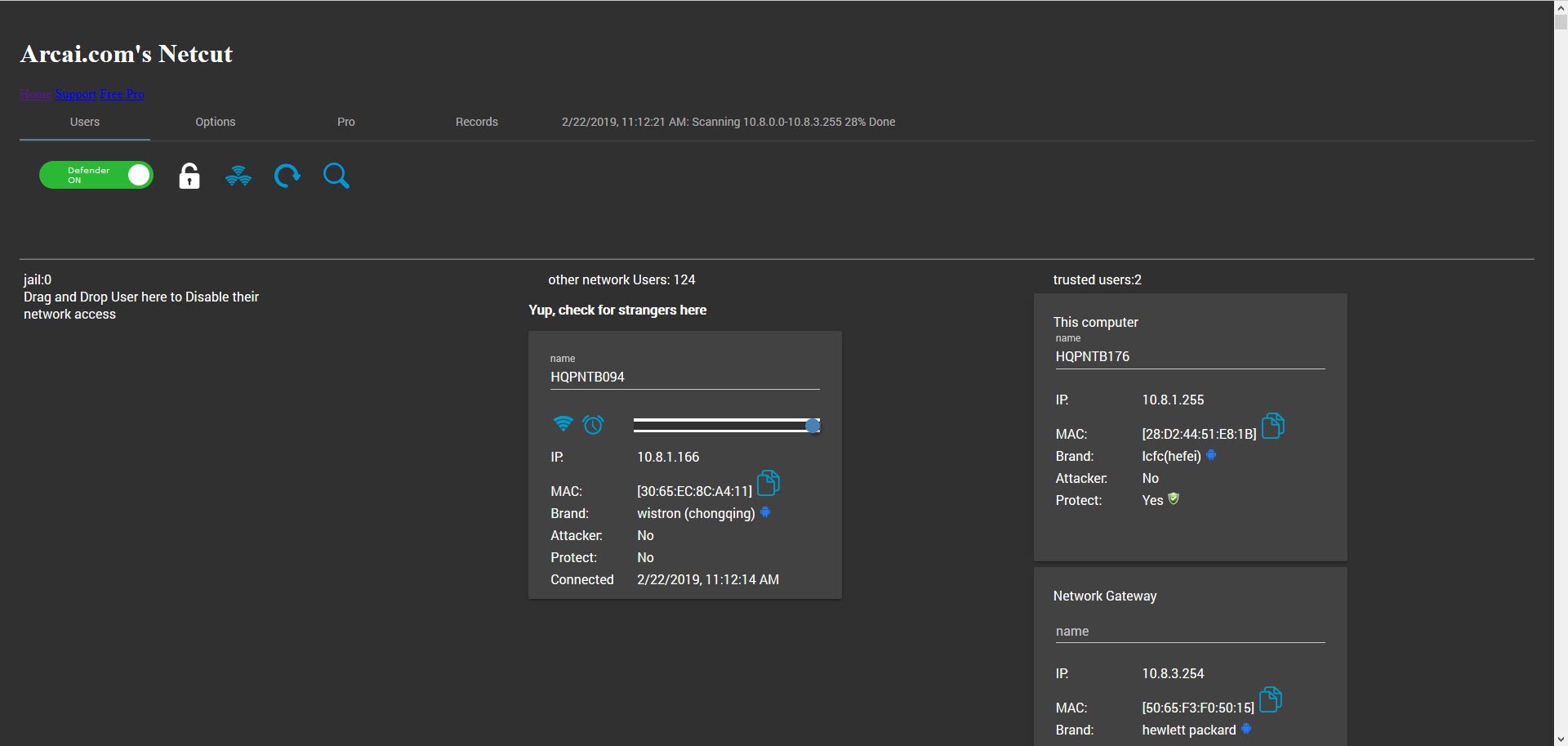
What the application actually does technically is fairly simple to describe. It scans your local network using the ARP protocol (Address Resolution Protocol) and produces a list of every device currently connected, showing IP addresses, MAC addresses, and (where it can identify them) device names and manufacturers.
Beyond identification, it can manipulate the ARP cache of devices on the network through what’s commonly called ARP spoofing, which can either disconnect specific devices from network access or protect your own device from being similarly disconnected by someone else running similar tools. The application requires WinPCap or Npcap (the packet capture libraries) to function, which it typically installs alongside itself during setup.
Beyond the core scan-and-manipulate functions, the application includes bandwidth monitoring per device and various other capabilities that legitimate network administration actually benefits from. The free version covers basic LAN scanning and discovery, with paid Pro tiers unlocking the more advanced manipulation features and bandwidth-control capabilities.
What ARP is and why it matters here
Understanding ARP is genuinely important for understanding both what this tool does and why it can be controversial. ARP is the protocol that translates IP addresses (the logical addresses that applications use, like 192.168.1.50) into MAC addresses (the physical hardware addresses that network cards actually use). Every time your computer wants to send a packet to another device on the same local network, it needs to know that other device’s MAC address. ARP handles this lookup. Your computer broadcasts “who has IP 192.168.1.1?” to the entire LAN, and the device with that IP responds with its MAC address.
The protocol was designed in 1982 with assumptions that don’t really hold up to current security thinking. ARP has no authentication mechanism. Any device on the LAN can claim to have any IP address, and other devices on the LAN will believe it.
If your computer sends an ARP query asking for the MAC of your router (which is how it sends packets to the internet), and another device responds first claiming to be the router, your computer will start sending all internet-bound traffic to that other device instead. The other device can then do whatever it wants, including dropping the packets entirely (which disconnects you from the internet), forwarding them to the real router (man-in-the-middle attack), or various other manipulations.
ARP spoofing is the technique of sending fake ARP responses to manipulate which devices get traffic. The technique works on essentially every IPv4 LAN because ARP is fundamental to how IPv4 networking operates at the local level. There’s no patch that fixes it, only mitigations that detect spoofing attempts and respond accordingly. Static ARP entries (manually configured ARP mappings that don’t accept dynamic updates) prevent the most basic attacks. ARP inspection at the switch level catches anomalous ARP traffic. Various other defenses address various scenarios.
For the LAN scanning portion of what netcut does, ARP is just the discovery mechanism. The application broadcasts ARP queries for every IP in your subnet, collects the responses, and presents the results as a device list. This part is genuinely benign and matches what dozens of other LAN scanners do.
The device discovery interface
After installation and the initial scan, the application presents a table of every device it found. Each row shows the IP address, MAC address, and (where available) the device name and manufacturer information that the MAC address indicates. The MAC-to-manufacturer lookup uses a database of OUI (Organizationally Unique Identifier) prefixes that manufacturers register with IEEE, with the result being that you can usually identify whether a device is an iPhone, a Samsung TV, a Dell laptop, or various other hardware categories without having physical access to it.
The discovery typically takes 10-30 seconds depending on subnet size. Most home networks have between 5 and 30 active devices, with the scan completing quickly enough that running it whenever you suspect new devices have joined is practical. Larger networks (small offices, campus networks, hotel networks) can have hundreds of devices, with scan times scaling accordingly.
The device list updates dynamically as new devices appear or existing devices go offline. Joining your home network with a new phone produces a new entry in the list within seconds. Powering off a device causes its entry to age out of the display.
The continuous monitoring lets you watch what’s happening on your network in real time, which is genuinely useful for understanding what’s connected and identifying anything unexpected.
For users wanting more detailed network analysis beyond just device discovery, dedicated tools like NetworkMiner handle deeper packet capture and protocol analysis that go beyond what ARP-based scanning can reveal. The two tools complement each other rather than competing, with this software handling the surface-level identification and other tools handling the deeper inspection.
What the cut function actually does
The “cut” function in the application’s name refers to its ability to disconnect specific devices from the network. The mechanism uses ARP spoofing, sending fake ARP responses to the target device that claim the gateway router has a different MAC address than it actually does. The target device updates its ARP cache with the false information and starts sending all internet-bound traffic to wherever the fake MAC address resolves to (typically nowhere, which means the traffic is just dropped).
From the target device’s perspective, the internet stops working. The device is still connected to the local network, can still ping other local devices, can still see the network exists, but anything that requires going through the router (which is essentially anything outside the LAN) fails. The device’s user typically sees this as “internet is down” without any obvious indication that anything unusual is happening.
The technical implementation uses standard ARP packets that any network card can send. There’s no exploitation of vulnerabilities in the traditional sense. The protocol is doing exactly what it’s designed to do. The “attack” is that the protocol’s design doesn’t authenticate ARP messages, which means anyone on the same LAN can manipulate the ARP cache of any other device on the same LAN.
The legitimate use cases for this functionality are real but specific. Network administrators testing the resilience of their networks against ARP attacks. Home users wanting to disconnect specific devices for parental control reasons (when their router doesn’t include this feature). Users diagnosing network issues by observing how their network responds when specific devices are removed. The questionable use cases are equally real. Disconnecting other people from coffee shop WiFi for fun. Cutting off competing players in online games. Disrupting networks the user has no authority over.
For users wanting legitimate parental control or network management without ARP manipulation, dedicated tools like NetSpot handle WiFi analysis, NetSetMan handles network profile management, and various router-based features handle device control through proper authenticated mechanisms rather than ARP spoofing.
The choice between these legitimate tools and netcut‘s approach depends on whether you have actual authority over the network you’re managing.
The Protect My PC feature
The application includes a feature called “Protect My PC” that defends against ARP spoofing attacks targeting your own device. The mechanism continuously monitors your ARP cache for unexpected changes and re-establishes correct mappings whenever it detects manipulation attempts. If another device on the network is running ARP spoofing software (including this same tool), Protect My PC keeps your gateway mapping correct despite the spoofing attempts.
The feature is genuinely useful as a defense mechanism. On networks where you don’t fully trust everyone connected (public WiFi, shared apartment WiFi, hotel networks), Protect My PC reduces your vulnerability to ARP-based attacks from other users on the same network. Combined with VPN usage that encrypts your traffic regardless of routing, this protection produces meaningful defense against various network-level attacks.
The implementation works at the operating system level, requiring administrator privileges to monitor and modify the ARP cache continuously. The feature runs as a background service that can be enabled when needed and disabled when not, with the system overhead being modest enough to leave on permanently for users who want continuous protection.
For users who specifically want defense against network attacks rather than offensive capability, this feature alone might justify installing the application. The “use the same tool as a defense against the tool” approach has practical value because the defender knows exactly how the attacks work, having implemented the attacks themselves.
Bandwidth control and the per-device limits
The Pro version adds bandwidth control that limits how much network bandwidth specific devices can consume. The implementation uses ARP-based redirection to route the target device’s traffic through your computer, with your computer applying bandwidth caps before forwarding the traffic to the actual gateway. The technique is essentially man-in-the-middle as a feature rather than as an attack, with you intentionally inserting yourself between specific devices and the network.
For network administrators on small networks where router-level QoS isn’t available or sufficient, this approach provides bandwidth control that wouldn’t otherwise be possible. The trade-off is that all the controlled traffic flows through your computer, which means your computer becomes a bottleneck and a single point of failure for the controlled devices’ connectivity.
The legitimate applications include managing shared internet connections where one device is consuming disproportionate bandwidth, ensuring critical devices get bandwidth priority over recreational ones, and various other scenarios where bandwidth needs differ across devices on the same network. The questionable applications include throttling other users on networks you share without their knowledge, which produces the same legal and ethical issues as the disconnection functionality.
WinPCap and Npcap dependencies
The application requires packet capture library support to function, with the installer typically including WinPCap or Npcap as a dependency. WinPCap is the older library (Windows Packet Capture, originally from the 1990s) that powered most Windows packet capture tools for years. Npcap is the modern replacement (developed by the nmap project) that supports current Windows versions including Windows 11, where WinPCap doesn’t work cleanly.
For users installing this software on current Windows versions, ensuring Npcap rather than WinPCap is the underlying packet library matters for reliability. The installer typically handles this correctly during installation, but users with existing WinPCap installations from older software may need to remove WinPCap and install Npcap separately for current versions to work properly.
The packet capture library requirement is what produces some of the antivirus warnings during installation. Packet capture is a privileged operation that requires kernel-level access to network interfaces, which various security tools view with suspicion regardless of what application is using the capability. Wireshark, nmap, and various other legitimate tools use the same libraries and produce similar warnings on the same systems.
Why antivirus flags it
The application is frequently flagged by Windows Defender, various commercial antivirus solutions, and various other security tools as PUP (Potentially Unwanted Program), HackTool, or similar categories. The flagging isn’t because the application contains malware in any traditional sense. The application doesn’t install backdoors, doesn’t steal data, doesn’t perform any of the activities that traditional malware engages in.
The flagging is because the application’s capabilities can be used to attack networks. ARP spoofing for disconnecting devices is essentially a denial-of-service attack against those devices when used without authorization. Bandwidth manipulation is essentially traffic interception. The dual-use nature means antivirus solutions take a precautionary approach by flagging the tool regardless of how the user actually intends to use it.
For users who specifically want to use the tool for legitimate purposes, the antivirus warnings produce friction but aren’t blocking in any technical sense. Adding the application to antivirus exclusions allows installation and operation, with the user accepting responsibility for using the tool appropriately. For users who don’t have a clear legitimate purpose, the warnings serve as an appropriate deterrent against casual misuse.
The pattern matches what happens with various other dual-use security tools. Wireshark, nmap, Aircrack-ng, John the Ripper, and various other utilities that security professionals legitimately use all produce similar antivirus reactions because the same capabilities that make them useful for defenders also make them useful for attackers.
Limitations and what it can’t do
The application only affects devices on the same local network as the user running it. ARP is a local protocol. ARP spoofing only works between devices that share the same broadcast domain. Devices on the other side of a router (anywhere on the internet) are unaffected by ARP manipulation regardless of how aggressive the manipulation is.
For target devices using static ARP entries (manually configured ARP mappings that don’t accept dynamic updates), the disconnection function doesn’t work. Various enterprise networks configure static ARP for security reasons, with the result being that netcut and similar tools simply don’t function on those networks. Home networks essentially never use static ARP, so the limitation typically doesn’t matter for casual home use.
Properly-configured network switches with dynamic ARP inspection (DAI) can detect and block ARP spoofing attempts at the switch level. Enterprise networks with managed switches typically implement DAI as standard practice, with the result being that ARP-based tools don’t function on properly-secured networks. Home routers and basic switches don’t typically implement DAI, with the result being that home networks are typically vulnerable.
The application doesn’t break encryption. HTTPS traffic remains encrypted regardless of how ARP manipulation affects routing. The “cut” function disconnects devices entirely from network access, but it doesn’t expose what those devices were doing while they were connected. Various other man-in-the-middle attacks (SSL stripping, certificate manipulation) require different tools and substantially more sophistication than ARP spoofing alone provides.
For users who want to detect when ARP manipulation is happening to their device, various tools monitor ARP cache for unexpected changes and alert when manipulation occurs. These detection tools are essentially the inverse of what this application does, identifying when ARP attacks are happening rather than performing them. Combined with VPN usage that encrypts traffic regardless of routing, the detection tools provide layered defense against network-level attacks.
Considerations and limitations
The legal status of using this application varies substantially by jurisdiction and circumstance. Using it to manage networks you own or have authorization to manage is generally legal. Using it to manipulate networks you don’t own or don’t have authorization to manage falls under various computer fraud and unauthorized access laws in most jurisdictions, with potential criminal penalties depending on specific local laws and circumstances.
Network providers sometimes detect ARP-based attacks and respond with various countermeasures including identifying the attacking device’s MAC address and blocking it from the network. For users running this tool on networks where they’re guests rather than administrators, getting their device blocked from the network is a real possibility that produces immediate practical consequences regardless of legal implications.
The application’s interface design reflects priorities from earlier in its development. The visual aesthetic looks notably different from current desktop applications, with various small interface conventions that newer software has moved past. The functional capability remains intact, but users coming from polished current applications find the experience feeling distinctly older.
Some specific feature combinations don’t work as advertised on all networks. ARP spoofing depends on the specific network topology, switch behavior, and various other factors that vary across different deployments. The application that worked perfectly on one network sometimes fails on another network for reasons that aren’t obvious without substantial troubleshooting. For users encountering inconsistent results, the variability is inherent to the underlying techniques rather than being specific to this software.
The application’s commercial Pro tier produces the typical issues that paid software in this category encounters. Activation systems, license validation, and various other commercial protections add friction that the free tier doesn’t have.
Users who buy the Pro version sometimes encounter issues with license servers, activation across multiple computers, and various other commercial complications that simple freeware doesn’t have.
Conclusion
For users with legitimate needs around LAN device discovery, network monitoring, and ARP-based defense, netcut delivers serious capability through its scanning, monitoring, and manipulation features. The combination of ARP-based device discovery that produces detailed information about every connected device, real-time monitoring that tracks devices joining and leaving the network, and the Protect My PC feature that defends against attacks from other users on the same network covers a substantial range of network administration scenarios.
For technicians, network administrators, and tech-savvy users who understand ARP and have legitimate authority over the networks they’re managing, the application produces useful results.
Users wanting WiFi-specific analysis with signal strength mapping find NetSpot covering that specific scenario more directly. Users wanting network profile management for switching between different network configurations find NetSetMan handling that workflow with a more focused interface.
Users wanting the LAN scanning capability without the manipulation features and resulting antivirus issues find NetScan and similar pure-discovery tools producing the scanning results without the dual-use complications.
For users whose specific scenario actually benefits from ARP-based capabilities and who have appropriate authority over their target networks, this software remains one of the more capable options in its narrow but real category, with the active development across nearly two decades providing accumulated polish that newer alternatives haven’t matched.
Pros & Cons
- ARP-based LAN scanning identifies all devices on the local network with MAC and manufacturer information
- Continuous monitoring shows new devices joining and existing devices leaving in real time
- Protect My PC feature defends against ARP spoofing attacks from other devices
- Free version covers basic LAN scanning and discovery use cases
- Bandwidth monitoring per device shows which devices consume what network resources
- Cross-platform versions exist for various operating systems beyond Windows
- Active development continues with periodic updates from Arcai
- Compatible with current Windows versions through Windows 11 with appropriate Npcap support
- Frequently flagged by antivirus solutions due to dual-use nature of ARP manipulation
- Requires WinPCap or Npcap packet capture libraries which add complexity
- Many capabilities only work on networks where you have legitimate administrative authority
- Doesn't function on networks with static ARP entries or dynamic ARP inspection
- Pro tier features and licensing produce typical commercial software friction
- Interface design reflects priorities from earlier development eras
- Legal status varies by jurisdiction with potential serious consequences for unauthorized use
Frequently asked questions
This software is a LAN scanning and management utility from Arcai that identifies devices connected to your local network using the ARP protocol and includes features for manipulating network connections through ARP-based techniques. The application shows IP addresses, MAC addresses, and manufacturer information for each connected device, monitors devices joining and leaving the network in real time, and provides ARP-based connection control for users with authority over their networks. Free and paid Pro versions are available with the Pro version unlocking advanced features.
The application uses the ARP (Address Resolution Protocol) for both discovery and manipulation functions. For discovery, it broadcasts ARP queries across your local subnet and collects responses to build a list of connected devices. For manipulation, it sends crafted ARP packets that update the target devices' ARP caches with false mappings, which can redirect or block their network traffic. The technique works because ARP doesn't authenticate messages, allowing any device on the same LAN to manipulate other devices' ARP information.
Run the installer downloaded from the developer or this site, which installs both the application itself and the required packet capture library (Npcap on current Windows versions, WinPCap on older systems). The installer typically prompts for the dependency installation during the main setup process. After installation completes and the system restarts if required, launch the application with administrator privileges, which it requires for low-level network operations.
Launch the application with administrator privileges. The initial scan runs automatically and presents a list of all devices detected on your local network. Each device shows its IP, MAC address, and identifiable information. From the device list, you can monitor traffic patterns, view detailed information about specific devices, and (in the Pro version) apply bandwidth limits or connection controls to specific devices. The Protect My PC feature can be enabled separately for defensive monitoring of your own device's ARP cache.
ARP (Address Resolution Protocol) translates IP addresses into MAC addresses on local networks. When your computer wants to send data to another device on the same LAN, it uses ARP to find that device's hardware address. The protocol has no authentication, which means any device on the same LAN can claim any IP address through ARP responses. This is what allows ARP-based tools like this one to manipulate network behavior. Understanding ARP is essential for both using ARP-based tools and defending against them.
The application's ARP-based capabilities can be used both legitimately (network administration, defense) and maliciously (network disruption, traffic interception). Antivirus solutions take a precautionary approach by flagging tools with dual-use capabilities regardless of the user's actual intentions. The flagging doesn't mean the application contains malware, but rather that the capabilities themselves can be misused. Similar flagging happens with Wireshark, nmap, and various other legitimate security tools that have similar dual-use characteristics.
This feature defends your own device against ARP spoofing attacks from other devices on the same network. It continuously monitors your computer's ARP cache for unexpected changes and re-establishes correct mappings whenever it detects manipulation attempts. On networks where you don't fully trust everyone connected (public WiFi, shared apartments, hotels), the feature reduces your vulnerability to network-level attacks from other users on the same network.
The application requires administrator privileges for low-level network operations and a packet capture library (Npcap on current Windows versions, WinPCap on older versions). The packet capture library typically installs alongside the main application during the standard installer process. Without these requirements, the application can't perform the kernel-level network operations that ARP-based scanning and manipulation need. The dependencies are standard for packet-level networking tools rather than being specific to this software.
The application's capabilities depend on the specific network's configuration. Most home networks and basic small office networks support all features because they don't implement defenses against ARP manipulation. Enterprise networks with managed switches that implement Dynamic ARP Inspection (DAI) detect and block ARP spoofing at the switch level. Networks with static ARP entries don't accept dynamic updates and prevent the manipulation features from working. The basic LAN scanning function typically works regardless of network configuration since it uses standard ARP queries.
Use the standard add/remove programs interface to uninstall the application. The uninstaller removes the application files and most of its configuration. The packet capture library (Npcap or WinPCap) typically remains installed because other applications may depend on it, but you can uninstall it separately if no other tools require it. For users wanting to verify clean removal, checking that no application-related entries remain in the network adapter properties or registry confirms complete uninstallation.


Any users tried this application? Does it work as intended? Thanks.
I am using this application, and it works great!