

Namebench
About Namebench
Every address you type gets translated into a number before anything loads, and the server doing that translation is one most people never chose. Namebench tests how fast that server answers against dozens of alternatives and tells you which would answer faster.
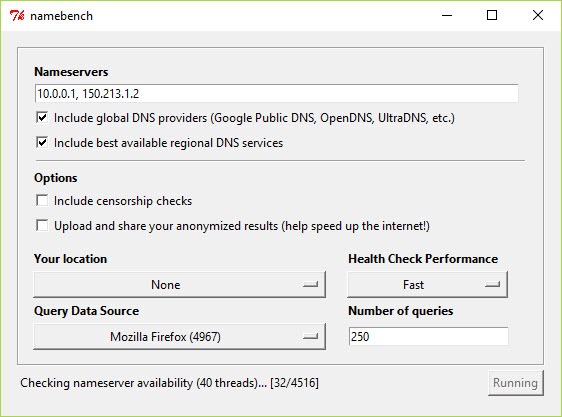
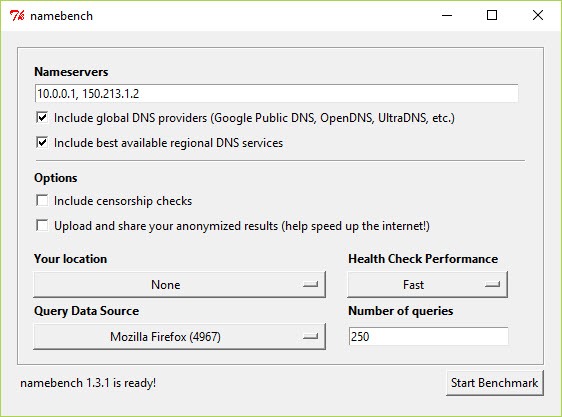
What sets the Namebench method apart is the test material. Rather than a fixed list of popular sites, it can read your own browser history and test the names you actually visit, which produces a recommendation shaped by your habits rather than by an average.
That is a clever idea, and understanding what the result means, and what it does not, matters more than the number it produces.
What it measures, and what it reads to do it
Namebench asks each candidate resolver to translate the same set of names, and the time to answer is recorded across many queries. The report shows averages, the fastest response, the spread, and how each compares with the one you are using now.
The history-based test is where the privacy question sits, and it deserves stating plainly. Using your browsing history means the tool reads your browsing history. Nothing leaves your machine except the lookups themselves, and the lookups do go to every resolver being tested, so each candidate sees the names you visit for the duration of the run.
The alternative is a standardised list, which tests general performance rather than yours and reads nothing personal.
Beyond speed, the report flags resolvers returning incorrect or manipulated answers, which is the part regulars describe as more valuable than the speed comparison.
Why it keeps recommending your own machine
This is the Namebench puzzle people report most often, and the cause teaches something about your network.
The recommendation sometimes comes back pointing at your own computer’s address. That looks like a fault and is actually a correct measurement of something you did not know was there.
A local resolver on the machine, meaning a caching service, a tunnel client, a filtering tool or an advertising blocker that intercepts lookups, answers from memory almost instantly. Measured purely on speed, it wins every time, so the benchmark recommends it.
The lesson is that something on your machine is already sitting between you and the resolver you think you use. That is useful to know regardless of what you do about it.
Seeing those intercepted queries directly is a different exercise, and Wireshark shows the traffic itself, including which address your lookups actually reach.
The recommendations have aged
Being direct about this, because Namebench has not been maintained for a considerable time and the effect is specific.
The list of candidate resolvers is fixed inside the tool, and resolvers change. Servers move, shut down and change behaviour, and a list compiled long ago tests against a picture of the internet that no longer matches.
Users report recommendations that make no geographic sense, meaning a resolver on another continent declared fastest for a machine that could not possibly reach it quickly. That is stale data producing a confident answer, and it is the main reason to treat the output as a starting point rather than a verdict.
Running it on a current system also meets errors from the environment it was built for, which people report as the first obstacle before any test runs at all.
For a machine that moves between networks with different requirements, a profile switcher that stores complete network configurations handles the resolver alongside everything else, without any benchmark involved.
It benchmarks and does not switch
The Namebench distinction people get wrong is between measuring resolvers and changing them.
This measures. Acting on the result means changing the resolver setting yourself, and the tool does nothing about that.
DNS Jumper is the complementary half, switching between resolvers with a click and including its own quick latency check, which is what most people arriving here actually wanted. Community discussion consistently pairs the two in exactly that way.
Speed is the smaller question now
One honest observation that Namebench cannot make about itself.
The difference between a fast resolver and a slow one is milliseconds per lookup, and lookups are cached after the first, so the effect on how the internet feels is smaller than the marketing of any such tool suggests. A resolver that is broken or blocking things makes a real difference, and one that is merely slightly slower does not.
What choosing a resolver decides far more consequentially is who sees every name you visit. That is a privacy decision, and speed benchmarks say nothing about it. Anybody switching resolvers on the basis of a few milliseconds is making the less important choice while ignoring the more important one.
Conclusion
Namebench had a better idea than most tools in its category, which was testing against the names you actually visit rather than a generic list, and its reliability checks remain more useful than its speed rankings.
Time has caught up with it. The resolver list is stale, the recommendations occasionally absurd, and the environment it needs is no longer standard. Use it to learn what is intercepting your lookups and to see how resolvers compare in principle, confirm anything it tells you with something current, and remember that the resolver you pick decides who watches you far more than how fast you browse.
Pros & Cons
- Tests resolvers against the names you actually visit rather than a fixed list
- Reports spread and reliability alongside averages
- Flags resolvers returning incorrect or manipulated answers
- Runs without installing or changing anything on the system
- Explains something real when it recommends your own machine
- Unmaintained, with a resolver list that has aged badly
- Recommendations can be geographically nonsensical
- Running it on a current system meets environment errors first
- Reads your browsing history if you use that test mode
- Measures speed, which is the least consequential part of choosing a resolver
- Does not switch resolvers, which is what most people came for
Frequently asked questions
Either a standard list of names or your own browser history, so the result reflects the sites you actually visit. Using history means the tool reads it, and every tested resolver sees those names during the run.
Because something on your machine is already answering lookups from memory, meaning a caching service, a tunnel client or a filtering tool. It is faster than any remote resolver, so it wins the test, and the recommendation is telling you that interception exists.
Treat them as a starting point. The resolver list is old, servers have moved and closed, and users report results that make no geographic sense. Confirm any recommendation with a current tool before switching.
No. It measures and reports, and changing the resolver is left to you or to a switching tool built for that.
Rarely. The difference is milliseconds per lookup and results are cached, so a resolver has to be broken or blocking something before you feel it. Who sees your lookups is the larger consequence of the choice.


