

MSI Wrapper

About MSI Wrapper
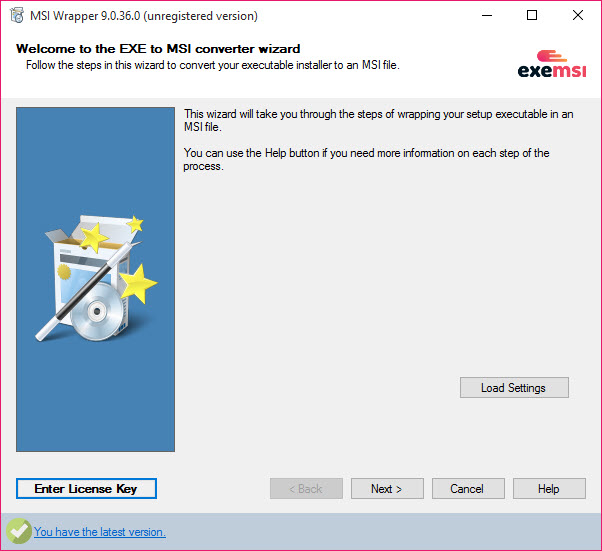
MSI Wrapper takes an ordinary setup.exe and wraps it in an MSI package, so that a program whose installer was never written for the installer service can still be pushed out by Group Policy, a deployment console or any tool that insists on MSI files.
The wizard asks for the executable, the silent switches it needs, the identifiers that let the package be upgraded and uninstalled cleanly, and the publisher details that appear in Apps and Features, then builds the package in a few seconds.
It is not a repackager. Nothing is captured, no file list is built, no registry snapshot is taken. The original installer still runs inside the MSI and does the actual work, and the wrapper’s job is to make that happen silently, with the right rights, and to tell the installer service what got installed so it can take it away again.
That distinction decides whether this is the right tool. For a setup that already installs silently with a switch, it is exactly right. For one that does not, no wrapper will save it.
The wizard, page by page
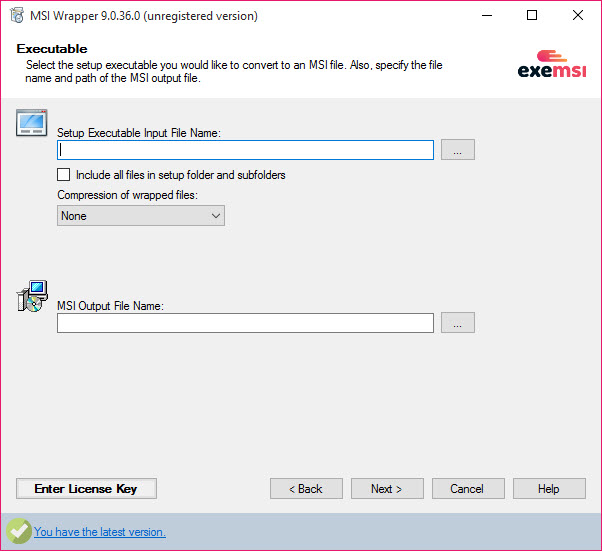
The first real MSI Wrapper page takes the setup executable from a local drive or a share, with an option to bundle every file in its folder into the package for installers that ship as several pieces, extracted to a temporary folder at install time. Compression is adjustable and the advice is to keep it low, since the setup is usually compressed already. The output page sets where the MSI lands.
Then come the pages that matter for deployment. Visibility decides whether the wrapped program’s own uninstall entry shows in the programs list alongside the MSI, stays hidden as a system component, or is removed, and the default of visible MSI plus hidden original is the sensible one.
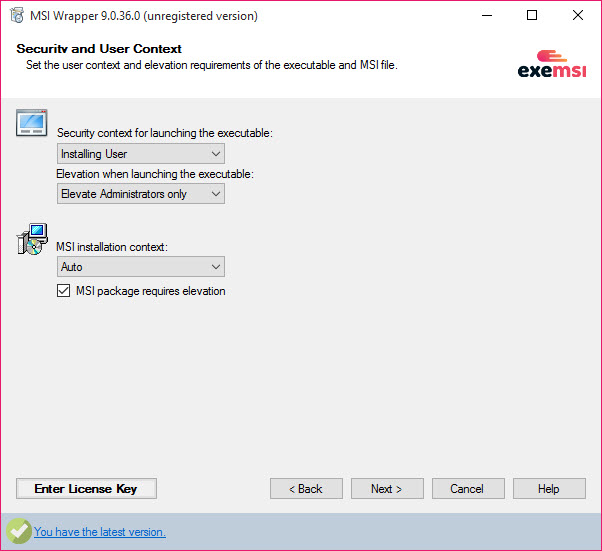
The security page chooses whether the wrapped setup runs as the system account, which has broad rights and no network access, or as the logged-on user, and whether the package installs per machine or per user. MSI Wrapper explains each choice in a sentence on the page itself, which is more than most packaging tools bother with.
Identifiers, and why the lookup button matters
An MSI Wrapper package, like any MSI, needs an upgrade code that stays constant across versions of the same product, so a newer package replaces the older one instead of sitting beside it. The wizard generates one and expects you to keep it, and a saved settings file makes that easy. The application ID is the other half. It is the key the wrapped program writes to the programs list, and the wrapper needs it to find the uninstaller later.
The lookup button is the trick here. Install the program by hand once, press the button, and the wizard lists everything in the programs list so the right entry can be picked rather than typed, and several entries can be joined with a separator for a setup that installs more than one thing.
Get this page wrong and the package installs fine and refuses to uninstall, which is the single most common complaint about wrapped MSIs and the reason to read it twice.
Silent switches and the tips button
The parameters page takes the arguments passed to the wrapped setup for install and for uninstall, which in practice means the silent switch and whatever suppresses the reboot prompt.
MSI Wrapper inspects the executable, recognises the common installer frameworks, and offers the switches each one normally accepts from a tips button, which turns a search through documentation into a click for installers built with NSIS or the other popular toolkits.
Actions run a command or a batch file before or after the wrapped installer, with macros that pass the installer’s exit code and the interface level, which is how a licence file gets copied into place after the setup finishes.
The working directory for those is the temporary folder, which is deleted afterwards, so anything that needs to persist has to be copied out.
Testing and saving
The last page assembles the msiexec command line for a silent test and runs it from a button, and the settings file saves the whole configuration so the next version of the same program is a matter of swapping the executable and rebuilding. Both are small conveniences that the second package makes you grateful for.
Where a wrapper stops
The limits of MSI Wrapper follow from the design. A setup that cannot install silently cannot be wrapped into something that does. A setup that needs network access during installation fails under the system account and has to run as the user.
And the resulting MSI knows nothing about the files it installed, so a deployment tool that reports on components sees one opaque package. For a true repackage with a file and registry list, a capture tool is a different and far heavier job.
Conclusion
MSI Wrapper is for the administrator who has to deploy a program whose installer is a plain executable, and who needs it to behave like an MSI for the tools in use. For that job it is quick, well explained on every page, and careful about the two things that break wrapped packages, the identifiers and the context.
Anyone who needs a package that lists its own files, or who is fighting a setup with no silent mode, needs a capture tool or a different installer, not a wrapper. This one does the narrow job and tells you plainly where the job ends.
Pros & Cons
- Wraps any setup executable into an MSI in a few minutes
- Visibility, security context and per-user or per-machine choices on explicit pages
- Upgrade code and application ID handling with a lookup from installed programs
- Tips button suggests silent switches for recognised installer frameworks
- Before and after actions and a saved settings file for rebuilds
- The wrapped setup must already support a silent install
- The MSI contains no component list, only the opaque executable
- A wrong application ID produces a package that will not uninstall
- System account context has no network access
Frequently asked questions
No. It passes the silent switch to the wrapped setup, which must support one. The tips button suggests the switch for common frameworks, but a setup with no silent mode stays interactive.
The application ID does not match the entry the wrapped program writes to the programs list. Install the program once by hand, use the lookup button to pick the right entry, and rebuild.
Yes. The actions page runs a command or batch file before or after, with the installer's exit code available as a macro.
Yes. The security page offers a per-user mode that lowers the elevation requirement and writes to the user's own registry hive, which suits setups that only change current-user settings.


