

Malware Scene Investigator
About Malware Scene Investigator
Malware Scene Investigator looks for the fingerprints malware leaves behind instead of the malware itself. It carries no signature database. It checks the places infections tend to tamper with, such as the hosts file, proxy settings, drivers, temporary folders and scheduled tasks, and reports anything that looks out of place, usually in well under a minute.
That approach suits one specific situation. The machine behaves strangely, the antivirus insists everything is fine, and you want a second opinion that does not depend on whether a threat is already known.
A heuristic check of symptoms can catch what a signature scanner misses, though it also raises more false alarms.
A symptom scan that takes a minute
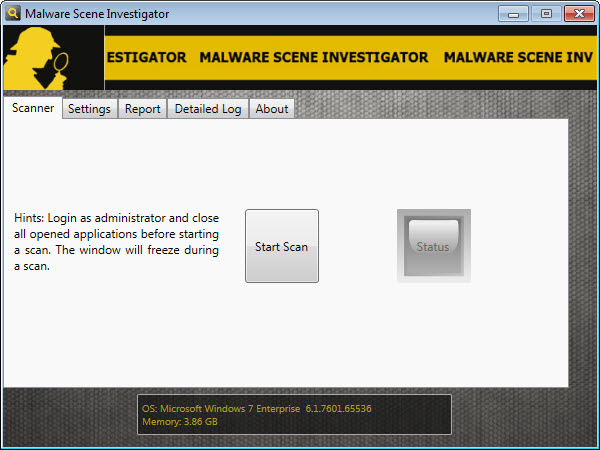
There is nothing to install. Launch Malware Scene Investigator, close other programs, press Start Scan, and the check runs through the system’s usual hiding spots. On a typical machine the whole pass completes in seconds, which makes it practical to run before and after any cleanup to compare.
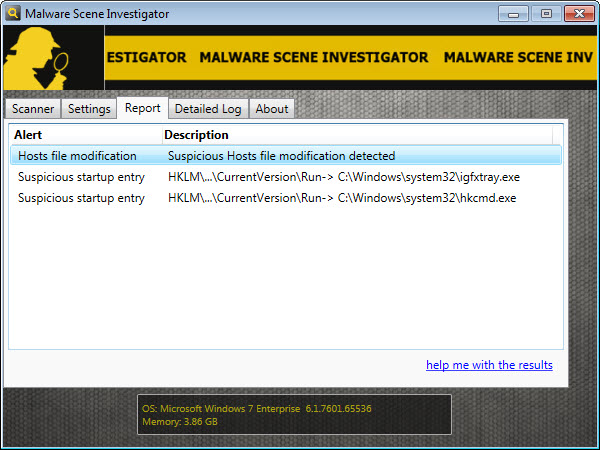
The list of checks reads like a technician’s first-glance routine. Modified hosts entries that redirect familiar sites, an enabled proxy server you never configured, unknown drivers, executables sitting in temporary folders where legitimate software rarely leaves them, and recently created files in system directories.
Each is a common side effect of an infection, and each is also something you would otherwise have to dig out by hand.
Report first, detailed log second
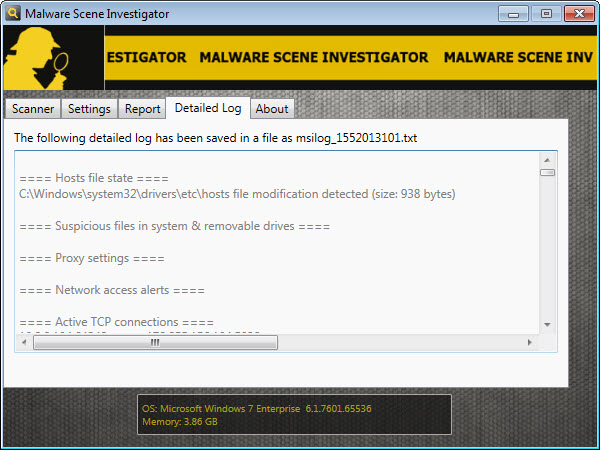
Results arrive in two tabs. The Report tab gives a short summary of anything suspicious, an overview that tells you within seconds whether something deserves attention. The Detailed Log tab adds full paths and the broader system picture, including open network connections, running processes and scheduled tasks.
That second tab is what makes the tool useful for asking for help. A volunteer on a security forum can read the log and point at the one entry that matters, while you stay hands-off. The log can be copied and shared, which turns “my PC acts weird” into evidence someone can work with.
Reading the results without panicking
Be prepared for false positives. Plenty of legitimate software adds hosts entries, installs drivers or drops helper executables in temporary folders, so a flagged item is a lead, not a verdict. The sensible move is to check the full path in the log, ask whether you recognise the program, and research anything unfamiliar before touching it.
The tool also removes nothing. That is a deliberate choice that keeps a beginner from deleting something vital, but it means the actual cleanup happens elsewhere. For startup entries the log points at, AutoRuns shows and disables them in detail.
For a confirmed infection, a portable second-opinion scanner handles the removal, and a fresh scan here afterwards confirms the symptoms are gone.
Where it fits in a toolkit
Think of Malware Scene Investigator as a stethoscope. It is quick and portable, and good at telling you where to look. It does not replace an antivirus, it does not monitor in real time, and it will not explain whether a flagged file is malicious.
Experienced users and helpers will get the most out of it, because they can tell an innocent driver from a suspicious one at a glance. Beginners can still use it productively, as long as they treat the report as something to share with someone experienced rather than a to-do list for deleting files.
Conclusion
Malware Scene Investigator suits anyone who suspects an infection their antivirus cannot see, especially those comfortable reading a system log or willing to share one with a helper. It is fast and refreshingly honest about its role, flagging what changed and leaving the decisions to you.
It is not a cleaner and not a guard. Use it as the first diagnostic step, follow its leads carefully, and let dedicated tools handle the removal once you know what you are dealing with.
Pros & Cons
- No installation, and a full scan typically finishes in under a minute
- Detects infection symptoms without relying on signature updates
- Checks hosts file changes, proxy settings, drivers and temporary-folder executables
- Detailed log is easy to share with forum helpers
- Removes nothing, so it cannot break the system by itself
- Frequent false positives from legitimate software
- Offers no removal or repair tools
- Interpreting results needs some experience
- No real-time protection
Frequently asked questions
No. It only detects signs of infection and reports them. Removal requires a dedicated scanner or manual cleanup based on the log.
Because it looks for behaviour, not known threats, and legitimate software sometimes edits the hosts file, installs drivers or uses temporary folders. Check the path and the program behind each entry before acting.
Yes. The detailed log can be copied and posted, which is exactly how forum helpers diagnose suspected infections remotely.


