

LG Mobile Support Tool
About LG Mobile Support Tool
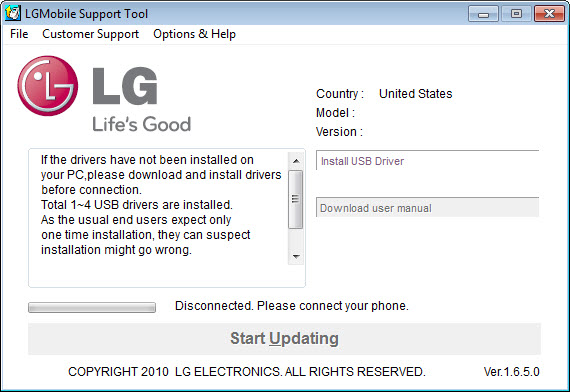
LG Mobile Support Tool keeps an LG phone updated and recoverable from your computer. Connect the handset over USB and the application identifies the exact model, checks for the latest official firmware, and walks you through installing it. When an update goes wrong and the phone will not start, the same tool can reinstall the software from scratch and bring a dead device back to life. It is the safety net and the update channel for an LG phone, run from the desktop rather than the handset itself.
The value is in not being stranded. Phone firmware matters for performance, stability, and security patches, but checking and applying it manually is a chore most people skip until something breaks.
LG Mobile Support Tool automates that, scanning for the right version for your specific phone and handling the download and install once it is connected. And if a botched update ever leaves the phone unbootable, it gives you a way out that does not involve a repair shop.
Updating firmware without the guesswork
The update process is built around automatic detection. You plug the phone in, and the application reads which model and software version it is running, then compares that against the latest official release available for it. If there is something newer, LG Mobile Support Tool offers to download and install it, so you are never left hunting for the correct file or worrying that you grabbed firmware meant for a different handset.
That matters because firmware is unforgiving about matching the exact device. The wrong file can brick a phone, so a tool that identifies your model and pulls only the right version removes the most dangerous part of the job.
The one thing it asks of you is patience and a steady connection. The USB link has to stay solid for the whole update, since an interruption mid-flash is exactly the kind of thing that causes problems. A focused flashing utility like LG Flash Tool covers the more manual ROM-flashing route for users who want that level of control.
The emergency recovery that saves a dead phone
The recovery feature is the one you hope never to need and are grateful for when you do. If an update fails partway or the phone otherwise refuses to boot, you can put the handset into its emergency mode, connect it, and have the application reinstall the operating system in full. A device that seemed bricked gets a complete, clean software reinstall through LG Mobile Support Tool rather than a trip to a service center.
This is the difference between a frightening problem and a minor inconvenience. A phone stuck on a boot loop or a black screen feels like a write-off, but as long as the tool can detect it in emergency mode, there is usually a path back.
For anyone who tinkers with their phone’s software, having that recovery option on hand is reassuring, because it means a failed experiment is recoverable rather than fatal.
Backing up your data before anything risky
Beyond updates, the application handles backup and restore. You can save your phone’s data, contacts, messages, photos, videos, and music, to your computer, and pull it back onto the device when you need to. This is the step you should always take before any firmware work, because updates and recoveries can wipe what is on the phone, and a backup on your computer means nothing important is lost.
It doubles as ordinary insurance too. Phones get lost, broken, or replaced, and a recent backup sitting on your computer turns any of those from a disaster into a restore. The tool also manages file transfer between the phone and the computer, so moving photos or documents across is part of the same package.
For broader LG device management with backups and firmware in one place, LG Bridge is the companion that handles those everyday tasks, and the connection itself relies on having the LG United Mobile Driver installed so the computer recognizes the phone properly.
Conclusion
LG Mobile Support Tool is a must-have for anyone who owns an LG phone and wants to keep it current or rescue it when something goes wrong. The automatic firmware detection, the emergency recovery, and the backup tools cover the maintenance jobs that matter most, and the automation means you are not left matching files by hand or guessing at versions. When an update fails, it is often the only thing standing between you and a repair bill.
Its limits are honest and narrow. It only works with LG hardware, it needs a stable connection to do its job safely, and it is built for maintenance rather than day-to-day phone juggling. None of that detracts from the core, which updates and recovers reliably.
For the LG owner who values keeping their device healthy and protected against a bad update, it earns its place on the computer.
Pros & Cons
- Automatically detects your exact phone model and finds the correct firmware
- Downloads and installs official software updates without manual file hunting
- Emergency recovery reinstalls the operating system on a phone that will not boot
- Backs up contacts, messages, photos, videos, and music to the computer
- Restores backed-up data and transfers files between phone and computer
- Runs on modest hardware and does not require administrator rights
- Works only with LG devices, so it is no help for phones from other brands
- A firmware update or recovery demands a stable USB connection throughout
- Recovery requires putting the phone into its emergency mode first
- It is a maintenance and update tool rather than a full daily phone manager
Frequently asked questions
It updates and recovers LG phones from a computer. Connected over USB, it detects the model, finds and installs the correct firmware, backs up and restores data, transfers files, and can reinstall the operating system on a phone that will not boot.
You connect the phone over USB and the application automatically detects its model and current software, then checks for the latest official version. If a newer one exists, it downloads and installs it, so you never have to find the file yourself.
In many cases, yes. If a phone fails to boot, you can put it into emergency mode, connect it, and the tool will reinstall the operating system in full, which often revives a device that appeared bricked after a failed update.
Yes. It can save your contacts, messages, photos, videos, and music to your computer and restore them later. Running a backup before any firmware update or recovery is wise, since those operations can erase what is on the phone.


