

LG Flash Tool


 (13 votes, average: 2.46 out of 5)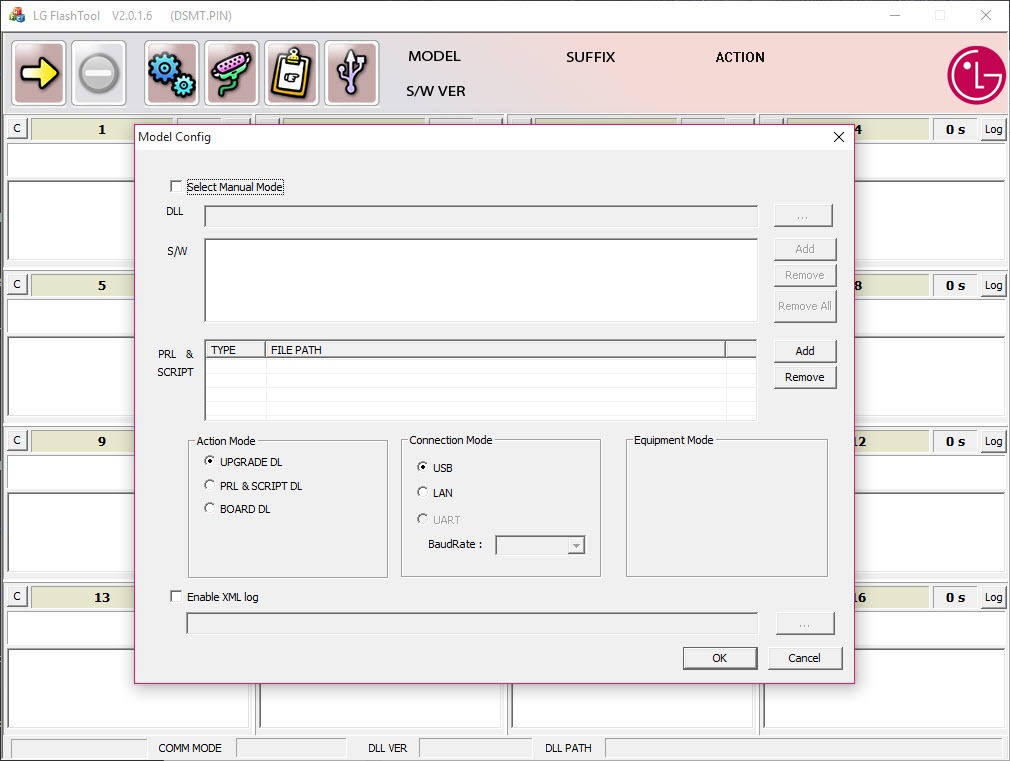
About LG Flash Tool
LG Flash Tool is a Windows utility built for one job. It writes KDZ firmware images to LG smartphones over USB, either to restore a device that refuses to boot or to roll a phone back to a clean stock build. There is no app sync, no contact backup, no media transfer. Just the flashing engine and the dialog box where you point it at a KDZ or TOT file and let it write the partitions.
Most people land on LG Flash Tool because their LG phone is sitting in a download loop, a soft brick, or a botched OTA, and the official sync software cannot help them. KDZ is the proprietary container format the manufacturer used for full-image firmware packages, and LG Flash Tool is one of the few utilities that knows how to unpack it and push the partitions back to the device in the right order. It is a recovery tool first and a downgrade tool second.
What KDZ and TOT files actually contain
A KDZ archive is not a single ROM image. It is a wrapped bundle that contains a DZ payload, which in turn holds the partition images (boot, recovery, system, modem, factory) plus a model descriptor. LG Flash Tool parses the wrapper, validates the model code against what the device reports over USB, and writes each partition to the matching slot. TOT files are the older flat format used on earlier LG hardware before the company moved to the structured KDZ container.
This matters because the tool is strict about matching. If your phone reports as VS985 and the KDZ is built for LS990, the writer will refuse to start or will fail mid-flash with a model mismatch error. The same goes for region-locked firmware.
You cannot push a Korean carrier build onto a European unlocked unit without bypassing the model check, and bypassing the check is how most people end up with a paperweight. The strictness is annoying when you know what you are doing, but it is the only thing standing between a careless click and a dead radio.
Flash modes and what each one does
There are three flash modes, and picking the wrong one is the most common mistake. Normal mode (sometimes labeled “Upgrade”) preserves user data and writes only the firmware partitions. CSE flash, also called emergency mode, wipes the device clean and rewrites every partition including userdata. CSE Boot is used when the phone cannot boot at all and needs to be put into download mode manually by holding the volume-up key while connecting USB.
A working device getting a routine downgrade only needs Normal mode. A genuinely bricked phone that no longer shows the LG logo needs CSE Boot, and that involves the LG United Mobile Driver being installed correctly first.
Without the right USB driver, the tool will not see the phone in download mode no matter what you do. This is the number one reason flashes fail before they even start.
The DLL swap and why the tool still works at all
Here is something the polished review sites rarely mention. The original build of LG Flash Tool phones home to a server that has not existed for years to authenticate before it will write anything to a connected device. To make the utility usable today, the community circulated a patched DLL (msc8800.dll being the common one) that bypasses the auth check and lets the writer run offline. Any working copy you find now is one of these patched builds. The behavior is identical to the original, the connection-to-server-failed error just no longer blocks the flash.
This is also why you may see the program throw a “cannot run this program” or DBMS prompt the first time you launch it. The patched build expects you to leave the DBMS field set to its default and the country/operator dropdowns matched to your KDZ. Get those wrong and the writer refuses to start.
Working with the bundled firmware loader
Once a KDZ is loaded, the interface shows you the model name, software version, country code, and operator code parsed from the file header. You can read these to confirm you have the correct firmware before you commit. The progress bar that follows is not particularly informative. It shows percentage and a partition counter, but it does not tell you which partition is currently writing. A flash that stalls at 30% for ten minutes is almost certainly still working on the system partition, which is the largest, and pulling the cable here will brick the phone in a way that may not be recoverable without JTAG.
The whole process takes between eight and twenty minutes depending on the phone model, with newer devices on the slower end because of larger system images. The phone reboots automatically when the writer finishes, and the first boot after a flash takes longer than a normal cold start, sometimes three or four minutes before the launcher appears.
Where it fits next to the manufacturer sync utility
LG Bridge is the official sync application for contacts, photos, and OTA updates. It does not flash KDZ files and it cannot recover a bricked phone. The two utilities solve different problems and do not overlap. If your phone boots normally and you want to back up your photos, you want LG Bridge or the LG Mobile Support Tool. If your phone is stuck on the boot logo or you need to roll back a firmware update that ruined your battery life, you want LG Flash Tool.
For users coming from other brands, the closest parallel is what Odin3 does for Samsung devices or what SamFirm does for fetching stock Samsung firmware. LG Flash Tool occupies the same niche for LG hardware, and like Odin it has zero handholding.
It assumes you have the correct firmware file, you know which mode to pick, and you understand that interrupting a flash means a dead phone.
Limitations worth knowing before you start
There is no built-in firmware repository. You bring your own KDZ. The tool will not download it, identify what your phone needs, or warn you if the file you loaded is for a different region. There is no rollback. Once a flash starts and writes the first partition, there is no abort button that does anything useful. The interface is from another era of Windows UI design and the buttons are tiny on high-DPI displays. Multilanguage support is limited and the error messages, when they appear, tend to be cryptic Korean codes that you have to look up.
The patched community builds also have no update path. Whatever version you grab is the version you keep. If a new LG model came out that needs different handling, the tool will not know about it and there is no team shipping fixes.
Conclusion
LG Flash Tool is for one specific kind of user. Someone with an LG phone that is misbehaving badly enough to need a full firmware rewrite, who already has the correct KDZ in hand, and who is comfortable installing USB drivers and following a flash procedure step by step.
For that user it is the right tool, and arguably the only practical one, since the manufacturer never released a public flashing utility and the community has had to keep this one working through patched builds.
If your phone boots and you just want to manage files or push an official update, this is overkill and you are reaching for the wrong utility. If your phone is stuck on the LG logo, in a download loop, or rolled back is the only way out of a bad OTA, this is what gets you home. It is not friendly and it is not forgiving, but it does what nothing else on the platform does.
Pros & Cons
- Writes KDZ and TOT firmware images directly, the only practical way to flash full LG ROMs on a PC
- Handles both routine downgrades and full recovery flashes for bricked devices
- Reads model, country, and operator codes from the KDZ header so you can verify the firmware before committing
- CSE Boot mode works on phones that cannot reach the boot logo, recovering devices most other utilities give up on
- Free to use with no account, no login, no telemetry once the auth bypass is applied
- Requires the LG USB driver to be installed and working correctly before the phone is recognized
- Will not flash without the patched DLL, and finding a clean trustworthy copy of the patch is a hassle
- Strict model and region matching means a wrong KDZ will either refuse to flash or brick the phone
- No firmware repository, no automatic detection of what your device actually needs
- Interface is dated, error codes are cryptic, no progress detail beyond a generic percentage
- No active maintenance, so newer LG models released after development stopped are not supported
Frequently asked questions
The application writes a full firmware image (a KDZ or TOT file) to an LG smartphone over USB, replacing whatever is currently on the device. It is used for recovering bricked phones, downgrading firmware, or restoring a phone to a clean stock build.
The original build tried to authenticate against a server that no longer exists. Any working copy in circulation today uses a patched DLL that bypasses the check and lets the writer run offline. If you see the server error, you have an unpatched build.
Sometimes, yes. If the phone can still enter download mode (volume-up held while connecting USB), CSE Boot flashing can write fresh firmware to the partitions and bring it back. If the bootloader itself is damaged, the tool cannot help and the device needs JTAG-level recovery.
KDZ is the newer wrapped container that holds a DZ payload plus partition images and a model descriptor. TOT is the older flat format used on earlier LG hardware. The application can write both, but most modern LG firmware ships as KDZ.
The KDZ contains a model code in its header, and the writer refuses to flash if that code does not match what the connected phone reports. This is a safety check. Forcing a mismatched firmware is how most bricks happen, so the strictness is doing you a favor.
DBMS is a database setting the application uses to recognize older device models. For most flashes you leave it at the default. The country and operator dropdowns are more important and need to match the KDZ you are flashing.
Between eight and twenty minutes depending on the phone model and the firmware size. The first boot after the flash takes another three to four minutes. Do not disconnect the cable during the write or during the first reboot.


