

ISO2GoD
About ISO2GoD
ISO2GoD is a conversion utility that takes Xbox 360 ISO image files and converts them into the Games on Demand (GoD) container format that modded Xbox 360 consoles can install and run from internal storage.
The tool reads the ISO file (typically a backup or rip of an original Xbox 360 game disc), extracts the relevant content while discarding optical disc padding and security data the modded console no longer needs, then repackages everything into the LIVE container structure that the Xbox 360 dashboard expects from official Games on Demand purchases. The result is a folder structure that you can transfer to the modded console’s internal drive, where the dashboard treats it like any officially-purchased downloadable game.
The audience for this software is genuinely narrow. Original unmodified Xbox 360 consoles can’t install games to internal storage in a way that allows playing without the disc, so the GoD format isn’t relevant to them. The tool only matters if you’ve modified your Xbox 360 with custom firmware (RGH, JTAG, or similar hardware modifications) that lets the system run unsigned code and load games from sources beyond the original disc.
How the conversion actually works
The conversion process reads an Xbox 360 ISO file and extracts the components that matter for GoD format. ISO files are essentially raw images of game discs, which means they contain the actual game data plus various structures that exist for optical disc reading rather than for storage-based playback. Disc padding regions that exist for read-head positioning. Layer break markers for dual-layer DVDs. Various security-related data that the original Xbox 360 disc drive used during authentication.
The application reads the ISO’s GDF (Game Disc Format) filesystem, identifies the actual game files inside (the default.xex executable, asset files, language packs, audio, video, and various others), and extracts those into a working area.
The disc-specific metadata gets discarded because the GoD container will be installed to internal storage rather than read from optical media. The remaining content gets repackaged into the LIVE container structure that Xbox 360 dashboard recognizes.
The repackaging includes generating the appropriate header information that makes the resulting container appear to the dashboard as a Games on Demand title. Title ID extracted from the original disc. Display name, icon, and metadata embedded in the container header. Cryptographic structures (which on a non-modified console would prevent the unsigned content from loading, but on a modified console get accepted because the modification bypasses the signature verification).
The end result is a folder containing the LIVE container files that you copy to your modded console’s storage.
Trim mode and what gets removed
The trim feature handles the practical reality that Xbox 360 ISOs contain substantial wasted space. The GDF format requires data to start at specific sector boundaries within the disc image, with the regions before those boundaries being padding rather than actual content. For dual-layer games, the padding can be substantial, sometimes adding several hundred megabytes to the ISO size beyond what the actual game requires.
The application’s trim mode identifies these padding regions and removes them during conversion. The resulting GoD container is substantially smaller than the source ISO, which matters when you’re storing many converted games on the modified console’s internal drive. A 7 GB ISO might trim down to 5.5 GB or less depending on how much padding the original disc layout included.
The Truncate Empty Space option goes further, removing additional empty regions within the actual game content where possible. This deeper trimming requires more processing time but produces even smaller resulting files. For users with limited internal storage on their modded console, the storage savings from aggressive trimming can mean the difference between fitting an additional game or not.
For users with abundant storage, trimming isn’t strictly necessary because the resulting files work correctly either way. The trade-off is conversion time versus storage efficiency, with the right choice depending on whether your bottleneck is conversion speed or storage capacity.
LIVE container structure and the Xbox 360 dashboard
The output of the conversion is a specific folder structure that the Xbox 360 dashboard recognizes as a Games on Demand installation. The structure includes a content folder named after your Xbox profile ID (or zeros for unsigned content), title ID folders for each converted game, and the LIVE container files that contain the actual game data.
For users transferring converted games to the console, the folder structure needs to be placed in the correct location on the modded console’s internal drive. The path typically follows the pattern Content[ProfileID or zeros][TitleID]\00007000[ContainerFile]. The console’s dashboard then scans these folders during boot or refresh, identifies the container files as installed games, and shows them in the games library alongside any other installed content.
The dashboard treats the converted games similarly to officially-purchased Games on Demand titles for most operations. Launching the game, viewing its details, deleting it through the dashboard interface all work through the same mechanisms that handle official content. The exception is online connectivity, where unmodified consoles connecting to Xbox Live can detect the modification and may produce account bans, with the practical implication being that modded consoles should be kept offline from Xbox Live to avoid this risk.
Original Xbox titles and Xbox 1 compatibility
Beyond Xbox 360 games, the application handles original Xbox titles for users with backward-compatible setups. Original Xbox games on Xbox 360 used emulation through specific compatibility files that Microsoft released across the console’s lifetime, with each supported Xbox 1 game requiring its own emulation profile.
The application can convert original Xbox ISOs into GoD format for installation on Xbox 360 consoles that have backward compatibility enabled.
The original Xbox conversion produces somewhat different results than Xbox 360 conversion because the underlying file formats and structures differ. Xbox 1 games used XBE executables rather than the XEX format Xbox 360 used, with the conversion process handling these format differences automatically. The resulting installations work through the Xbox 360’s emulation layer rather than through native execution.
For the specific use case of running original Xbox games on modded Xbox 360 consoles without the original discs, this dual-platform support matters. The same tool handles both generations of Xbox content, with users not needing separate utilities for each platform.
Users with substantial Xbox 1 collections that they want to play on their modded Xbox 360 setups benefit from this consolidated conversion approach.
XEX header extraction and DVD region handling
The application can extract XEX headers from ISO files for various analysis purposes beyond direct conversion. The XEX header contains information about the game’s executable including title ID, base version, target firmware requirements, and various other metadata that’s useful for understanding what specific game and version a particular ISO represents.
For users dealing with collections of unidentified ISOs (perhaps inherited from older systems or sourced through community archives), the header extraction helps identify what each file actually is. Run the extraction, get the title information, look up the corresponding game database entry, and you have a positive identification rather than guessing based on filenames that may not match the actual content.
The DVD region handling addresses the original Xbox 360’s region-locking system. Some games shipped with region restrictions that prevented them from running on consoles set to different regions. Modified consoles typically bypass these restrictions, and the application’s conversion preserves the original region information so the resulting GoD container behaves the same way the original ISO would have. For users specifically wanting to remove region restrictions during conversion, the application includes options for this scenario.
Padding and size optimization options
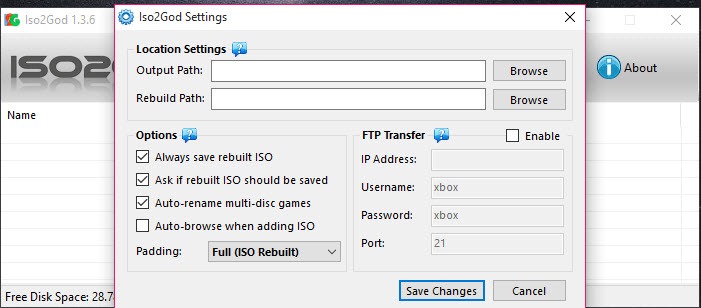
Beyond basic trim mode, the application exposes more granular options for managing file sizes during conversion. The Padding section includes options for keeping or removing various padding regions, with each option producing different trade-offs between conversion time, file size, and potential compatibility implications.
For users wanting maximum compatibility with the broadest range of console firmware versions, conservative padding settings preserve more of the original disc structure even when it produces larger files. For users wanting maximum storage efficiency on consoles known to handle aggressively-trimmed files correctly, the more aggressive options reduce file sizes substantially.
The CON header type selection affects whether the resulting file uses the LIVE container format (which appears as Games on Demand) or the CON container format (which appears as installed game data). Most users want LIVE format for the proper Games on Demand appearance, but specific scenarios benefit from CON format depending on how the modified console’s dashboard handles different container types.
iso2god-rs and the Rust rewrite
The original ISO2GoD application has been around for over a decade with the 1.3.6 release being the canonical version most users still use. The codebase shows its age in various ways including conversion speeds that match what was reasonable on early-2010s hardware rather than current systems. For users converting large collections of ISOs, the time investment can be substantial.
The iso2god-rs project rebuilt the same functionality in Rust with substantial performance improvements. Conversions that take several minutes with the original application complete in seconds with iso2god-rs running on modern hardware. The reimplementation maintains compatibility with the same input ISOs and produces output that matches the original tool’s format, which means users can switch between tools without compatibility concerns.
The trade-off is interface accessibility. The original application provides a graphical interface that walks users through the conversion workflow. iso2god-rs is a command-line tool that requires terminal usage and parameter understanding to operate. For users comfortable with command-line work who want maximum conversion speed, iso2god-rs produces dramatically better throughput. For users wanting the friendly graphical workflow, the original application remains more accessible.
Various community wrappers exist that provide GUI frontends for iso2god-rs, combining the speed advantages with friendlier interfaces. For users wanting the best of both approaches, these wrapper tools cover the use case at the cost of adding another component to the workflow.
Use cases and the modded Xbox 360 ecosystem
The practical use cases all assume a modified Xbox 360 console with either RGH (Reset Glitch Hack) or JTAG modification that allows running unsigned code. For users with these consoles, GoD format installations provide several advantages over disc-based gaming or other installation formats.
Running games from internal storage eliminates disc dependencies entirely. No swapping discs between sessions. No risk of disc damage from frequent insertion. No drive wear from continuous reading. Faster load times because internal storage typically performs better than the optical drive even on dual-layer DVDs. For console gaming setups intended for ongoing use rather than collecting physical media, internal storage installation produces a substantially better experience.
The format also enables larger game collections than disc storage would practically support. Modified Xbox 360 consoles with upgraded internal drives can store dozens or hundreds of games simultaneously, with the dashboard providing browse-and-launch access to the entire library through normal interface operations. For users wanting console gaming with the convenience of digital library access, this approach matches what current consoles do natively but with content the original Xbox 360 ecosystem didn’t support natively.
For preservation purposes, the format provides longer-term storage stability than physical discs. Optical media degrades over time through various mechanisms including disc rot, scratches, and case damage. Digital storage on modern drives produces more stable long-term storage with proper backup practices, which matters for preserving access to games that may not be reasonably purchasable in any other form decades after their original commercial release.
Considerations and limitations
The application is genuinely only useful for users with modified Xbox 360 consoles. Users with unmodified consoles can’t use the GoD format that the application produces, with the modification requirement representing a substantial barrier to entry that affects who finds this tool relevant. The modification process itself involves hardware work (soldering for some methods, specific software flashing for others) and various risks including bricking the console if performed incorrectly.
Original development on the application stopped years ago, with the 1.3.6 release being the last canonical version from the original developers. Community continuation through iso2god-rs and various other forks keeps the functionality alive, but no actively-maintained version exists in the original codebase. For users encountering bugs in the 1.3.6 release, the practical recourse is using one of the forks rather than expecting fixes in the original.
Some specific games produce conversion issues that aren’t always cleanly resolved. Games with unusual disc layouts, very old releases that predate certain conversion conventions, or specific titles with copy protection schemes that interact poorly with the conversion process can produce containers that don’t run correctly on modified consoles. The community wikis maintain lists of known problem titles with workarounds for many of them, but specific games occasionally require additional work beyond standard conversion.
The Windows interface design reflects priorities from years ago. The graphical interface is functional rather than refined, with various small inconsistencies and rough edges that newer software wouldn’t include. For users coming from polished current applications, the experience feels notably dated despite handling its core function adequately.
The legal status of the activities the application enables is more complicated than the technical capabilities suggest. Modifying Xbox 360 consoles, ripping game discs to ISO format, and running converted content through the modification mechanisms all sit in legal territory that varies by jurisdiction and individual circumstances. Users should understand the legal context that applies to their specific situation rather than assuming the technical possibility implies legal permissibility.
Conclusion
For users with modified Xbox 360 consoles wanting to convert ISO backups to Games on Demand format for internal storage installation, ISO2GoD delivers the standard solution that’s served the modded Xbox 360 community for over a decade. The combination of trim mode for size optimization, dual support for Xbox 360 and original Xbox content, multiple container format options, and the graphical interface that doesn’t require command-line work covers the practical workflow that the use case requires.
The format produces installations that the Xbox 360 dashboard treats identically to officially-purchased Games on Demand titles, which means converted games integrate naturally with the rest of the modified console’s interface.
The reasons to consider alternatives are mostly about specific priorities. Users wanting maximum conversion speed find iso2god-rs producing dramatically faster results at the cost of command-line interface complexity. Users dealing with specific games that produce conversion issues sometimes find specialized tools handling those edge cases better than the general-purpose application does.
Users entirely outside the modded Xbox 360 ecosystem don’t have any use for this software regardless of its capabilities. But for the specific scenario of GUI-driven Xbox 360 ISO to GoD conversion in the modded console community, this software remains the standard tool that documentation, tutorials, and community knowledge all reference, with the long track record producing substantial accumulated workflow knowledge that newer alternatives haven’t matched.
Pros & Cons
- Converts Xbox 360 ISOs to Games on Demand format for installation on modified consoles
- Trim mode removes optical disc padding to reduce resulting file sizes substantially
- Original Xbox 1 ISO support enables backward-compatible game installation
- XEX header extraction helps identify unknown ISO files
- LIVE and CON container format options accommodate different console firmware scenarios
- Graphical interface provides accessible workflow without requiring command-line work
- Free without commercial restrictions for users in the modified Xbox 360 community
- iso2god-rs fork provides dramatically faster conversion for users wanting maximum speed
- Active community wikis document workflows and known issues for specific titles
- Only useful for users with modified Xbox 360 consoles, narrow audience
- Original development stopped years ago with continuation through community forks
- Some specific games produce conversion issues requiring workarounds
- Interface design feels dated compared to current software
- Legal status of associated activities varies by jurisdiction
- Maximum conversion speed requires the iso2god-rs command-line fork rather than the GUI version
Frequently asked questions
This software is a conversion utility that takes Xbox 360 ISO image files and converts them into Games on Demand (GoD) container format for installation on modified Xbox 360 consoles. The conversion extracts game content from the ISO, discards optical disc padding and security data, and repackages everything into the LIVE container structure that the Xbox 360 dashboard treats as installed Games on Demand titles. The application also handles original Xbox 1 ISOs for users with backward-compatible setups.
The application reads an Xbox 360 ISO's GDF filesystem, identifies the actual game files (default.xex executable, assets, language packs, audio, video), and extracts those into a working area. Disc-specific metadata gets discarded because the resulting GoD container will be installed to internal storage rather than read from optical media. The extracted content gets repackaged into a LIVE container with appropriate header information including title ID, display name, icon, and metadata that the dashboard uses to recognize and present the converted game.
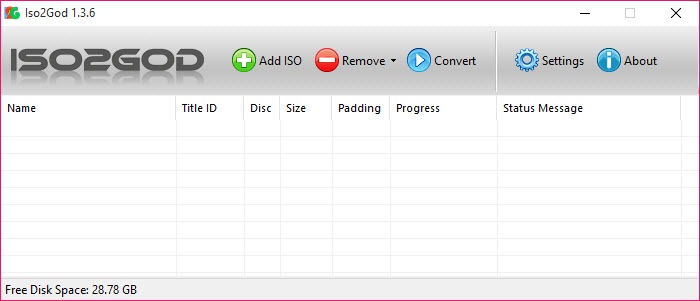
Run the application, point it at the Xbox 360 ISO you want to convert, configure conversion options (trim mode, padding settings, output location), and start the conversion. The process takes from minutes to substantially longer depending on the source ISO size and conversion settings. After completion, the resulting folder structure transfers to the modified Xbox 360 console's internal storage where the dashboard recognizes the converted game and lets you launch it like any other installed title.
Trim mode identifies and removes padding regions from the source ISO that don't contain actual game content. Xbox 360 disc images include substantial padding for optical disc requirements that aren't necessary for storage-based playback. Removing this padding produces smaller resulting GoD containers, which matters when storing many converted games on the modified console's internal drive. The trade-off is slightly longer conversion time, with the storage savings typically being worth the time cost.
iso2god-rs is a Rust-based reimplementation of the same functionality with substantially faster conversion speeds. Conversions that take several minutes with this software complete in seconds with iso2god-rs on modern hardware. The trade-off is interface accessibility, with iso2god-rs being a command-line tool requiring terminal usage while this software provides a graphical interface. For users wanting maximum speed and comfortable with command-line work, iso2god-rs produces dramatically better throughput. For users wanting the friendly graphical workflow, this software remains more accessible.
GoD stands for Games on Demand, the format Xbox 360 used for digitally-purchased games downloadable through the Xbox Live Marketplace. Games on Demand installations stored in the LIVE container format, which the Xbox 360 dashboard recognized as installed digital games separate from physical disc content. Modified Xbox 360 consoles can install content in this same LIVE format through tools like this software, producing installations that the dashboard treats identically to officially-purchased Games on Demand titles.
A LIVE container is a specific file format Xbox 360 used for various downloadable content including Games on Demand titles, downloadable game add-ons, and various other content. The format includes a header section with metadata (title ID, display name, content type, signature information) followed by the actual content data. Modified Xbox 360 consoles accept LIVE containers regardless of signature validation status, which lets them install converted ISO content that wouldn't pass authentication on unmodified consoles.
The original application's conversion speed reflects implementation priorities from years ago when computing was substantially less powerful than current hardware. The conversion involves reading large amounts of data, processing the file structures, and writing the resulting output, all of which the original codebase handles less efficiently than modern reimplementations would. For users wanting faster conversion, iso2god-rs handles the same task in a fraction of the time on current hardware, though through a command-line interface rather than the graphical workflow.
Yes, the application supports converting original Xbox ISOs in addition to Xbox 360 ISOs. The conversion process handles the format differences between Xbox 1 (XBE executables, different filesystem structures) and Xbox 360 (XEX executables, different conventions) automatically, producing GoD containers appropriate for each platform. Original Xbox games installed through this method run on Xbox 360 consoles with backward compatibility enabled, using the Xbox 360's emulation layer for the actual game execution.
This error typically indicates that the source ISO is incomplete, corrupted, or not actually an Xbox 360 game disc image. The default.xex file is the main game executable that every Xbox 360 game contains, and the conversion process needs to locate it to identify what title is being converted. Possible causes include using an ISO of something other than an Xbox 360 game (homebrew images, demos with unusual structures, malformed dumps), corruption during the original disc rip, or using a partial download. Verifying the ISO with hash checks against known-good references confirms whether the source file is intact before continuing troubleshooting.


