

Freegate
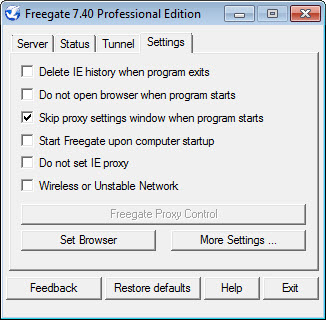
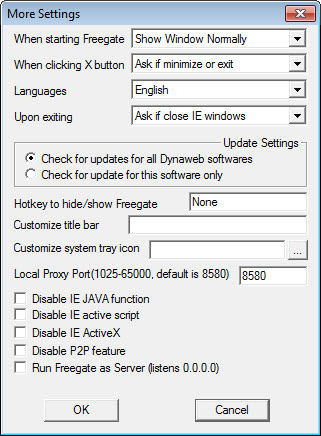
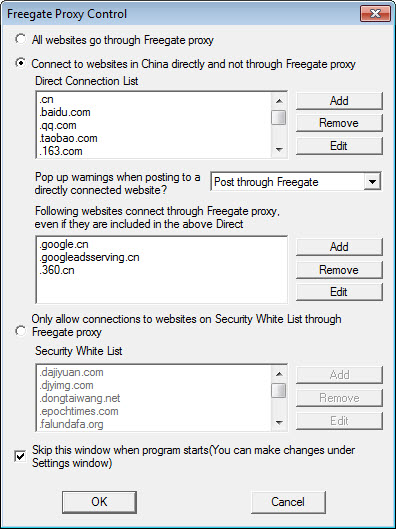
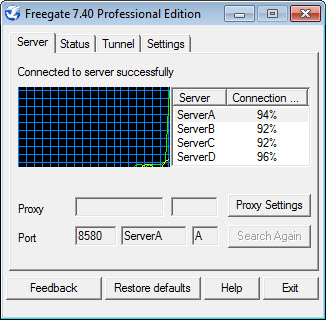
About Freegate
Freegate is an anti-censorship tool, not a general-purpose VPN. The distinction matters because the use cases are different. Where commercial VPNs target users wanting privacy, geo-unblocking for streaming, or protection on public Wi-Fi, this software targets users behind national firewalls who simply cannot reach blocked websites at all.
The application was built originally to help users inside China bypass the Great Firewall, with the design priorities reflecting that origin. It runs as a tiny portable executable with a minimal interface, automatic detection of the best available routing through the Dynaweb proxy network, and active counter-evolution against blocking techniques as governments update their filtering systems.
The application weighs in at under 2 MB, runs as a single executable without installation, and connects through the Dynaweb peer-to-peer network maintained by Dynamic Internet Technology (DIT). Once running, it routes your web traffic through Dynaweb proxy servers using SSL/TLS encryption, making your traffic look like ordinary HTTPS web browsing to whatever censorship infrastructure sits between you and the open internet.
The tool has been actively maintained for over two decades, with regular updates pushing new server addresses and routing techniques as old ones get blocked.
For users in countries where standard VPN protocols get blocked at the national level, this anti-censorship orientation produces working connections where commercial VPNs often fail outright.
How the Dynaweb network actually works
Most VPNs operate on a simple model. Your client connects to one of the provider’s servers, all traffic routes through that server, and the provider promises to keep it encrypted and unlogged. The model works for typical privacy and geo-unblocking needs, but breaks down in heavily censored countries where national-level filtering identifies and blocks VPN protocols outright.
Freegate uses a different approach. The Dynaweb network functions as anti-censorship-focused proxy infrastructure rather than a privacy-focused VPN. The client doesn’t connect to a single server.
Instead, it discovers and connects through whatever Dynaweb proxies happen to be reachable from your specific network at any given moment. New proxy addresses get distributed automatically as old ones get blocked, with the client cycling through options until it finds one that works.
The encryption uses standard SSL/TLS, which makes the traffic indistinguishable from regular HTTPS web browsing at the network level. Censorship systems looking for VPN protocol signatures don’t find them, because the traffic genuinely looks like normal encrypted web traffic.
The trade-off is that this approach produces variable performance depending on which proxy is currently reachable and how many other users are routing through the same path.
Single-file portable design
The application ships as a single executable under 2 MB. There’s no installer, no system service, no registry footprint, no DLLs to manage. Download the file, double-click it, and the application starts running. When you’re done, close it and it leaves no traces behind unless you explicitly save settings.
For users in censored countries where downloading software through normal channels is itself dangerous, this design matters substantially. The tiny file size makes it easy to share through whatever channels work (USB sticks, email attachments, peer-to-peer file sharing, encrypted messaging apps). The portable nature means it runs from anywhere including USB drives, leaving no installation traces on shared computers.
For users sharing computers (internet cafes, library terminals, friends’ machines), running the application without installing it covers the case where you don’t have administrator privileges or don’t want to leave evidence of usage on someone else’s system.
Close the application, delete the file, and there’s nothing left to find.
Browser integration and proxy configuration
Once the application is running, it sets up a local proxy that web browsers can be configured to use. Internet Explorer gets configured automatically by default, since the original design assumed Windows users running IE. Other browsers including Chrome, Firefox, and Edge can be configured manually to route through the local proxy that the application provides.
The browser proxy approach has practical implications for what gets censorship-protected. Web traffic routed through the configured browser benefits from the bypass. Other applications on the same computer (email clients, gaming, software updates, anything else with internet access) keep using your direct connection unless you specifically configure them to use the same proxy.
For users wanting comprehensive protection of all internet activity, this requires more setup than commercial VPNs that protect everything by default.
The trade-off again favors the specific anti-censorship use case. Users primarily need their web browsing to work despite filtering, and the browser-only proxy approach handles that scenario directly without the complexity of system-wide VPN configuration.
For users wanting more comprehensive protection, configuring multiple applications to use the same proxy is possible but more involved.
Server selection and performance
The application doesn’t expose a traditional country-selection interface. There’s no menu showing 80 server locations across 40 countries with city-level granularity. Instead, the connection happens automatically through whatever Dynaweb infrastructure is currently reachable, with the client deciding which proxy produces the best path.
Performance varies dramatically based on real-world conditions. When a fast proxy is reachable from your network, browsing feels close to direct. When all the fast proxies are blocked or congested, the available options may produce slow connections that feel substantially worse than a typical VPN.
Users in heavily contested regions (China, Iran) report the experience as functional but not always pleasant, with occasional slowdowns or disconnections as the network adapts to new blocking attempts.
The performance characteristics fit the use case rather than competing with commercial VPNs on speed. Users in censored countries who can’t reach blocked sites at all aren’t comparing this software to a fast US-based VPN.
They’re comparing it to having no access whatsoever, which is the realistic alternative when commercial VPN protocols get blocked at the national firewall level.
The political context behind the project
The application was developed by Dynamic Internet Technology (DIT), a US-based company founded by Bill Xia and engineers who came out of the Falun Gong movement. The political dimension is part of the application’s identity rather than incidental to it. DIT has been funded in part through grants from the US State Department’s Internet Freedom programs, which support anti-censorship technology development for countries with restricted internet access.
This political context produces specific implications worth understanding. The application is explicitly designed to bypass national censorship, with the developers actively engaged in cat-and-mouse counter-blocking work as Chinese, Iranian, and other governments update their filtering systems.
The active development cadence reflects this orientation, with releases focused on staying ahead of blocking techniques rather than on traditional product feature expansion.
For users in democratic countries where censorship isn’t a daily concern, the application is largely uninteresting compared to commercial VPNs that focus on the privacy and geo-unblocking use cases those users actually have. For users behind national firewalls, the anti-censorship focus produces tools tuned to their specific need rather than general-purpose privacy tools that aren’t optimized for their environment.
Compatibility and antivirus flagging
The application has been historically tied to older Internet Explorer integration, with current versions also supporting modern browsers through manual proxy configuration.
Compatibility with current operating systems requires verifying the application version against your OS version, since older releases may not run cleanly on the most current systems.
Some antivirus products flag the application as suspicious. The reason is straightforward. Anti-censorship tools and malware sometimes use similar techniques (proxy connections, traffic obfuscation, server discovery), and antivirus heuristics can’t always tell them apart. Adding the application to your antivirus whitelist resolves the false positive, with the trade-off being you have to trust the application enough to make that explicit exception.
For users on hardened or corporate systems where adding antivirus exceptions isn’t possible, the false positive issue may produce real friction. For users running their own personal systems with full control, the workaround is straightforward.
Comparison with commercial VPNs
Freegate sits in a different category than commercial VPNs rather than competing with them on shared dimensions. ExpressVPN, NordVPN, and similar services offer larger server networks, better streaming performance, audited privacy practices, polished applications, and reliable performance across most use cases. Their prices reflect those capabilities. Freegate offers free anti-censorship tooling specifically optimized for bypassing national firewalls, with weaker general-purpose features compensated by stronger circumvention capabilities in heavily censored environments.
Users in democratic countries with normal internet access typically benefit more from commercial VPNs. The polished applications, dedicated streaming infrastructure, and broad device support match those users’ actual needs. Freegate would feel like a step down for these users, since the features that make it strong aren’t features they actually need.
Users behind national firewalls face the opposite calculation. Commercial VPNs often fail outright in heavily censored countries because their distinctive protocol signatures get blocked at the network level. Freegate‘s SSL/TLS-disguised traffic gets through where standard OpenVPN or WireGuard connections fail. For users whose only working option is anti-censorship tooling specifically, this software fits the situation better than premium alternatives that don’t survive the filtering.
The Tor Browser is a closer comparison. Tor also focuses on anti-censorship and privacy in heavily restricted environments, with similar political orientation and a more sophisticated technical approach. Tor’s overall infrastructure is more robust against advanced blocking, but Tor is also slower than this application in many real-world scenarios.
Users in heavily censored countries often run multiple anti-censorship tools (this software, Tor, Lantern, Psiphon, others) and use whichever happens to be working at any given moment.
Considerations and limitations
Performance is genuinely limited compared to commercial alternatives. Anti-censorship infrastructure isn’t optimized for speed the way premium VPN networks are. Streaming HD video, online gaming, and similar bandwidth-intensive activities work poorly through the application even when it’s connecting successfully. For browsing news sites, accessing social media, sending email, and similar lower-bandwidth activities, the performance is generally acceptable.
The interface design is utilitarian rather than polished. Looking at the application gives the impression of software from the early 2000s rather than current commercial software.
For users who care about visual aesthetics, this matters. For users in censored countries who care about whether the tool works at all, the interface design is a non-issue.
Server selection control is limited. Users can’t pick specific countries or cities to route through, which means the application doesn’t work for geo-unblocking scenarios where you specifically need to appear from a particular location. The automatic routing optimizes for connection success rather than appearance from a specific country.
Mobile support exists but is less developed than the desktop application. Users primarily wanting mobile anti-censorship may be better served by alternatives designed mobile-first.
Conclusion
For users in countries with national-level internet censorship, Freegate does what commercial VPNs often can’t. The Dynaweb network’s anti-censorship orientation, SSL/TLS-disguised traffic, automatic proxy discovery, and ongoing development focused on counter-blocking produce working connections in environments where standard VPN protocols get blocked outright.
The portable single-file design and tiny size match the practical realities of distributing anti-censorship tools through whatever channels happen to be available.
For users in democratic countries with normal internet access, the calculation is different. Commercial VPNs offer better polish, faster speeds, dedicated streaming infrastructure, and broader feature sets that match what those users actually need. The anti-censorship orientation that makes this application strong in heavily filtered environments produces no real benefit in environments without filtering, leaving the rougher edges visible without the corresponding upside.
The right user for this software is someone whose alternative is no internet access at all rather than someone choosing between equivalent options.
Features & benefits
Pros & Cons
- Specifically designed for bypassing national firewalls and heavy censorship
- Single-file portable executable under 2 MB with no installation required
- SSL/TLS encryption disguises traffic as ordinary HTTPS web browsing
- Automatic proxy discovery and routing through the Dynaweb network
- Active development focused on staying ahead of new blocking techniques
- Tiny file size makes sharing through restricted channels practical
- Anti-censorship orientation that commercial VPNs cannot match in heavily filtered environments
- Performance limitations compared to commercial VPN alternatives
- Interface design feels dated compared to current commercial software
- No country or server selection control for geo-unblocking specific locations
- Browser-only proxy approach by default rather than system-wide protection
- Some antivirus products flag the application as suspicious
- Mobile support is less developed than desktop versions
- Bandwidth-intensive activities like streaming and gaming work poorly
Frequently asked questions
This software is an anti-censorship tool that lets users in heavily filtered countries bypass national firewalls and access blocked websites. It runs as a single portable executable under 2 MB, connects through the Dynaweb proxy network maintained by Dynamic Internet Technology, and uses SSL/TLS encryption to disguise traffic as ordinary HTTPS web browsing. The application was originally developed to help users inside China bypass the Great Firewall and has been actively maintained for over two decades.
The application discovers reachable proxy servers in the Dynaweb network and routes your web traffic through them using SSL/TLS encryption. The encryption makes the traffic look like ordinary HTTPS web browsing to whatever censorship infrastructure sits between you and the open internet. New proxy addresses get distributed automatically as old ones get blocked, with the client cycling through options until it finds one that works in your specific network conditions.
There's no installation in the traditional sense. The application ships as a single executable file. Save the file wherever you want it, then double-click to run. The application starts immediately without configuration. To stop using it, close the application and optionally delete the file. No system changes get made unless you explicitly save preferences.
Run the executable. The application opens a window showing connection status and a local proxy address. Web browsers can be configured to use this local proxy to route their traffic through the Dynaweb network. Internet Explorer gets configured automatically by default. Chrome, Firefox, and Edge can be configured manually through their respective network settings to use the local proxy address that the application provides.
Commercial VPNs and this software target different use cases. VPNs typically offer larger server networks, better streaming performance, audited privacy practices, and polished applications, with the trade-off of subscription pricing. This application offers free anti-censorship tooling specifically designed to bypass national firewalls in heavily censored countries, where commercial VPNs often fail outright because their distinctive protocol signatures get blocked at the network level. Users with normal internet access typically benefit more from commercial VPNs. Users behind heavy censorship often need anti-censorship-focused tools like this one.
Both target anti-censorship use cases with similar political orientation. Tor uses a more sophisticated multi-hop routing infrastructure that's generally more robust against advanced blocking, while this software uses a simpler proxy model that's faster in some real-world scenarios. Users in heavily censored countries often run both, using whichever happens to be working at any given moment based on current blocking conditions. Neither is universally better than the other.
No, by default the application only protects traffic from the browsers configured to use the local proxy it provides. Other applications on your computer (email clients, software updates, gaming, anything else) keep using your direct connection unless you specifically configure them to use the same proxy. Users wanting comprehensive protection of all internet activity need to configure each application individually or use a different tool that operates at the system level.
Streaming through this application generally works poorly, particularly for HD video. The Dynaweb anti-censorship infrastructure isn't optimized for the high bandwidth and consistent throughput streaming services need. Users wanting streaming geo-unblocking should evaluate dedicated streaming-focused VPNs that maintain reliable Netflix and similar service unblocking. For browsing, social media, news access, and other lower-bandwidth activities in censored countries, performance is generally acceptable.


