

evasi0n7
About evasi0n7
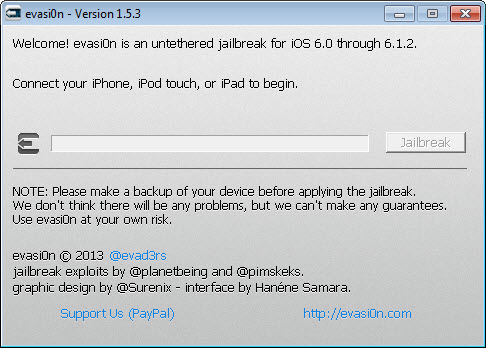
evasi0n7 jailbreaks an iPhone, iPad or iPod touch running iOS 7 and installs Cydia on it. Plug the device into a computer and run the program. It works through a chain of exploits to open the locked system, then puts Cydia on the home screen so unofficial tweaks and apps can be installed.
The whole run is a few minutes and a couple of restarts, with one manual tap partway through. When it finishes, the device is jailbroken untethered, staying jailbroken through every reboot with no computer needed again.
Before anything else, the frame. evasi0n7 is a historical tool for a historical system. It jailbreaks the iOS 7.0 line, from 7.0 through 7.0.6, and nothing newer. Apple closed the holes it used in iOS 7.1, so a device on 7.1 or later needs a different tool, and no modern iPhone runs anything this can touch. It still works on a device left on iOS 7.0, which is the narrow case it serves today.
The sections below cover the run, the devices, the Cydia question and what a jailbreak on a system this old is honestly good for.
Running the jailbreak
The evasi0n7 process is mostly automatic. Connect the device, make a backup first because a jailbreak can go wrong, and start the program. It detects the device, pushes its payload and restarts it once or twice on its own. Partway through, it asks you to tap a new icon once, which triggers the next stage, and then Cydia appears.
Keep the device still and do not touch the screen except for the one tap it asks for. A jailbreak interrupted midway can leave the device needing a restore, which is why the backup comes first. Once Cydia is on the screen, the jailbreak is done and the computer is no longer needed.
Which devices and versions
evasi0n7 covers every device that could run iOS 7, with one exception. Every iPhone, iPad, iPad mini and iPod touch of the era is supported, from the iPhone 4 up to the iPhone 5s, and the Apple TV is the only family left out. What matters more is the version, which must be iOS 7.0 up to 7.0.6, since iOS 7.1 patched the exploits.
A device on 7.1 or later is out of reach here, and a later tool handled those. Check the version first, since a model that qualifies on hardware still fails if its software moved past 7.0.6. For browsing the files on the device from the computer afterwards, a device file browser reaches its filesystem over the cable.
The Cydia question, and a buried surprise
Cydia is the point of evasi0n7, the unofficial installer that opens the device to themes, tweaks and apps Apple never allowed. The tool installs it, and the version it installs was updated across the tool’s own releases to fix refresh and repository problems, which is why the last version is the one to use.
It is a tool with a short history and a known quirk in its first release, since corrected, which is why the final version is the one to use. Any current copy installs Cydia as it should.
What a jailbreak on iOS 7 is good for now
Be realistic about the device. An iPhone on iOS 7 is many generations old, the current apps will not install on it, and Apple abandoned it long ago. A jailbreak changes none of that. It gives the old tweak repositories that still carry packages for this generation, enough to customise the interface or run a few old utilities. Many tweaks never worked well on iOS 7, so expectations should be modest.
The security picture is one plain sentence. A phone on an operating system that stopped getting fixes a decade ago should hold nothing that matters and stay off any network it does not have to touch. Use such a device as a toy. For rooting an old Android phone in the same spirit, KingRoot PC does the equivalent, with the same warnings.
Conclusion
evasi0n7 suits the owner of an old iPhone, iPad or iPod touch still on iOS 7 who wants Cydia on it, out of curiosity or to turn an old device into a single-purpose gadget. For that one system it does the job cleanly, untethered, on every model of the era.
It reaches nothing past iOS 7.0.6, the device it unlocks is too old to trust with anything real, and its first release had a flaw since fixed. Use the final version, back up first, keep the phone off the accounts that matter, and treat the whole thing as a hobby.
Pros & Cons
- Untethered jailbreak of iOS 7.0 to 7.0.6 that survives every reboot
- Installs Cydia, opening the device to unofficial tweaks and apps
- Supports every iOS 7 device except the Apple TV
- Mostly automatic, with a single manual tap during the run
- Only jailbreaks the iOS 7.0 line, not 7.1 or anything newer
- The device it unlocks is obsolete and unsafe for anything that matters
- The first release had a quirk, since fixed, in what it installed
- Many tweaks never worked well on iOS 7
Frequently asked questions
iOS 7.0 through 7.0.6, on every device that runs iOS 7 except the Apple TV. iOS 7.1 and later closed the exploits and need a different tool.
Yes. Once done, the device stays jailbroken through every reboot with no computer needed again.
Yes. It puts Cydia on the home screen. Use the final release, since the bundled Cydia was updated across versions and the first release had a quirk since corrected.
No. It is for an old device left on iOS 7, which should be treated as a toy and kept off important accounts and untrusted networks.


