

Effectrix
About Effectrix
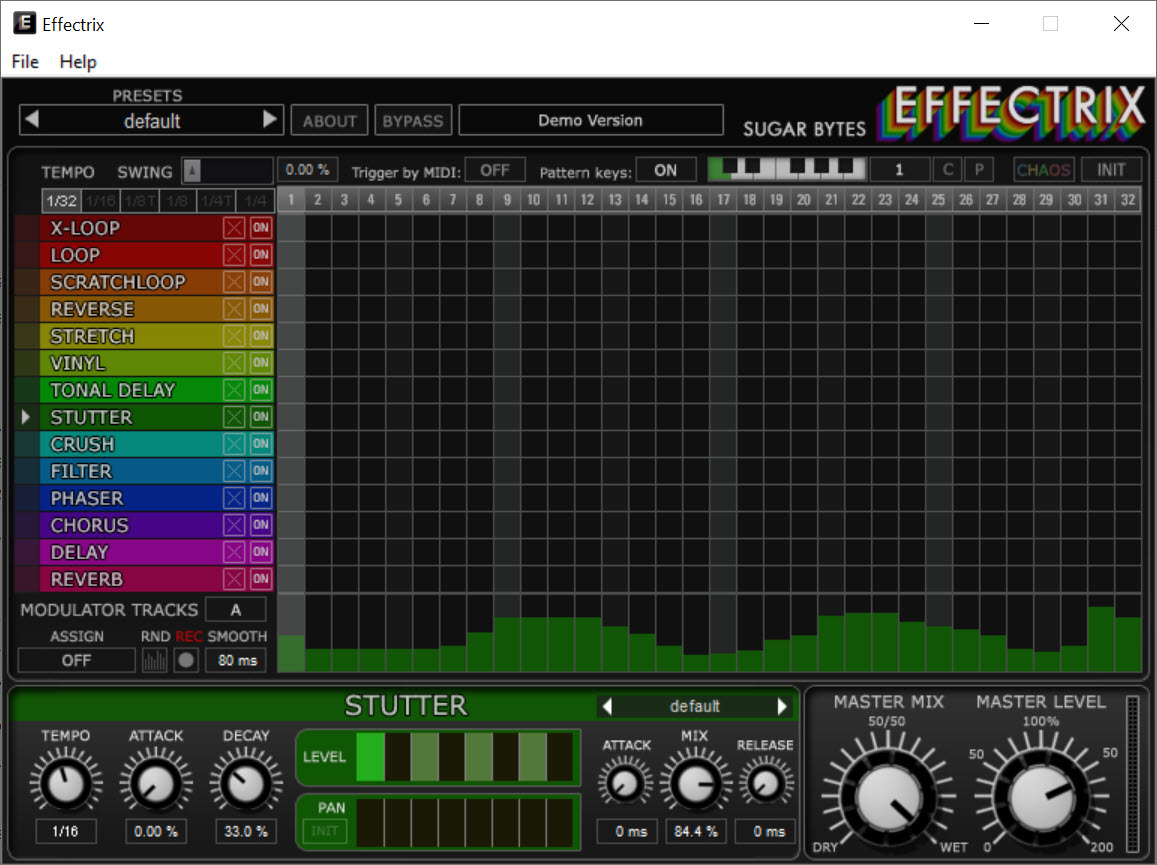
Automating an effect in a host means drawing envelopes, one parameter at a time, for every change you want. Effectrix throws that out. Fourteen effects sit stacked down the left side, a thirty-two step grid runs across from each one, and you turn effects on and off by painting cells into the lanes. Draw a single cell and you get a hit. Draw eight in a row and the effect holds for half a bar.
That is the whole interaction, and it changes what you end up making. Freezing a snare, rolling a hi-hat into a stutter, tape-stopping the last beat before a drop, turning a plain four-bar loop into something that lurches, all of it happens by drawing rather than by opening an automation lane.
Sequence length runs from a single bar upward, there is a swing control for the grid itself, and everything follows the host tempo.
What is actually in the fourteen lanes
The loopers are the reason most people install Effectrix. They capture what is passing through and repeat it with control over loop size, playback speed and pitch, and one of them plays back and forth like a hand on a record. A granular engine sits alongside them, running from mild texture to complete disintegration of whatever went in.
Then come the character effects. A vinyl module handles scratches and tape start and stop, a ring modulator does metallic and vaguely science-fiction tones, and a tonalizer adds pitched harmonic content that lands somewhere near a vocoder. Stretch, reverse, stutter plus a bit crusher round out the disruptive half.
The other half is ordinary, and it should be said plainly. The delay, reverb, filter, phaser plus chorus are perfectly decent, and none would win a comparison against a dedicated equivalent.
You are not buying this for its reverb. If a rack of high-quality conventional processors is what you actually want, Guitar Rig is a better use of the money and the screen space.
Two modulation tracks per effect
Painting cells gets you rhythm. It does not get you movement, and a pattern that repeats identically every bar starts sounding mechanical after about eight of them. Each effect gets two modulation tracks for this, letting two of its parameters follow their own pattern-based automation instead of sitting still.
Those tracks can be driven by an LFO, by an envelope follower reading the incoming signal, or by external MIDI, and any knob can be assigned to a MIDI controller. An envelope follower on a filter cutoff inside a stutter lane is the sort of thing that makes a pattern breathe rather than tick.
Two per effect is the limit though, and on the loopers in particular you will want more. Beyond that you are back in the host, automating Effectrix parameters from the outside, which is exactly the workflow the plugin was built to avoid.
Playing it rather than programming it
A preset in Effectrix holds up to twelve separate patterns, and you switch between them from the interface or by sending MIDI notes. That second option is what turns this from an insert effect into something you perform. Assign patterns across a keyboard, hold one through a chorus, hit another for the fill, and the arrangement gets played in rather than drawn.
Live use makes latency matter in a way it does not when you are drawing patterns offline. If the round trip through your interface feels sluggish, ASIO4ALL is the usual first fix on hardware without a decent driver of its own.
The randomiser, and the fixed chain
There is a randomiser, and expectations should be set low. It fills the grid with cells, and most of what comes out is noise rather than music. That is a long-standing complaint. Treat it as a way to break out of your own habits, keep the one bar in ten that works, and edit from there.
The bigger structural limit is that the lane order is fixed. Signal runs down through the effects in the order they are printed, and nothing lets you reorder them, so you cannot put the crusher before the looper if the layout says otherwise.
For a plugin whose appeal is flexibility that is a real constraint, and you notice it once you know the grid well enough to want something specific.
Fitting it into a session
Processing load climbs with overlap. A few lanes running at once is unremarkable, a grid where eight effects fire simultaneously across a busy passage is not, and on a large project you feel it. Freezing or bouncing the track once you are happy is the sensible move, and it has a second benefit, because the results are not always identical between runs.
That unpredictability is worth planning around rather than fighting. Record a long pass, let it wander, then cut the two bars better than anything you would have drawn deliberately. If you need the audio committed to a file for that kind of editing, an editor for chopping the bounce apart afterwards is the other half of the workflow.
One practical note for anyone without a project already open. This is a plugin rather than a standalone program, so it needs a host, and DarkWave Studio will run it without much ceremony.
Conclusion
Effectrix suits anyone whose music benefits from things breaking on purpose. Producers working in glitch-adjacent electronic styles, remixers who need a fill that does not sound like the last one, and anyone tired of drawing automation curves for a two-bar stutter will get more out of an afternoon with the grid than out of a folder full of individual effects.
The reservations are equally clear. Half the fourteen effects are unremarkable, the fixed chain order will eventually block something you want to do, and the randomiser is closer to a novelty than a tool. Buy it for the loopers, the granular engine and the vinyl lane, treat the conventional processors as filler that happens to be included, and Effectrix stays useful long after the novelty of painting on a grid wears off.
Pros & Cons
- Painting cells into a grid replaces per-parameter automation entirely
- Loopers offer control over loop size, playback speed and pitch, with one that plays back and forth
- Granular engine scales from light texture to total breakdown of the source
- Vinyl lane covers scratching plus tape start and stop convincingly
- Two modulation tracks per effect keep repeated patterns from sounding mechanical
- Twelve patterns per preset, switchable from MIDI notes, make it performable
- Swing on the grid itself stops everything landing rigidly on the beat
- Conventional processors like the delay and reverb are unremarkable next to dedicated equivalents
- Effect order is fixed and cannot be rearranged
- Only two parameters per effect get modulation tracks
- The randomiser produces far more unusable patterns than usable ones
- Processing load rises sharply when many lanes overlap
- Results are not perfectly repeatable between passes, so committing early matters
Frequently asked questions
It sequences when each effect is active rather than leaving them all on. Fourteen lanes on a thirty-two step grid let you specify that the stutter fires on step nine and the reverse holds from thirteen to sixteen, which would otherwise mean drawing automation for every one of them.
Yes. A preset stores up to twelve patterns and MIDI notes can select between them, so patterns can be triggered from a keyboard during a take instead of being programmed in advance.
Two parameters per effect, each with its own modulation track driven by an LFO, an envelope follower or incoming MIDI. Anything beyond that has to be automated from the host.
No. The chain runs top to bottom in the fixed order shown on screen, and there is no routing panel to rearrange it. Working around it means placing a second instance later in the chain.
As a prompt rather than a producer. Most randomised grids are unusable, but running it a dozen times and keeping the fragments that surprise you is a reasonable way to escape a pattern you keep drawing.


