

Easy Gamer Utility
About Easy Gamer Utility
Software promising higher frame rates is a crowded and largely dishonest category, so it is worth saying early that Easy Gamer Utility does several useful things and that raising your frame rate is not among them.
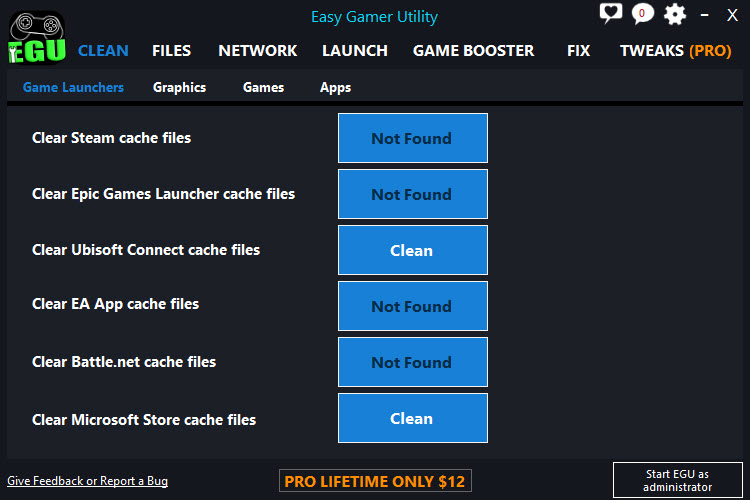
Easy Gamer Utility does housekeeping. Cache files left by game launchers, cache files left by graphics drivers, folders abandoned by driver updates, and the perpetual difficulty of finding where a particular game keeps its saved data.
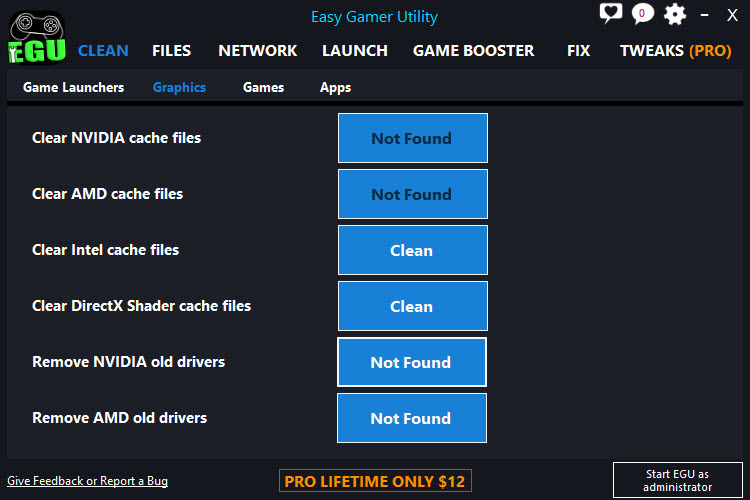
Launcher coverage spans the major storefronts, and graphics coverage handles the shader caches from all three manufacturers along with the system’s own shader store. For temporary files across the whole machine rather than gaming specifically, a general cleaner with an open definition set covers that broader ground.
Clearing a shader cache does not raise frame rate
This is the most important Easy Gamer Utility fact, and the maker’s own documentation supports it rather than contradicting it.
A shader is a small program the graphics card runs to draw something. Compiling one takes time, so games compile them once and store the results, which is what a shader cache is. Deleting that cache does not remove clutter. It removes work already done.
The consequence is the opposite of the marketing. After clearing, the game recompiles those shaders as it encounters them, which produces stuttering during the first session afterwards until the cache rebuilds. The maker’s own guidance says as much, warning that regular removal causes games to repeatedly rebuild their graphics data.
So the operation has a real use and it is troubleshooting rather than optimisation. A cache that has become corrupt produces visual artefacts, crashes on particular scenes, or a game refusing to start, and clearing it resolves exactly that. Doing it routinely in pursuit of performance achieves the reverse.
Settling the question for yourself takes one afternoon, and MSI Afterburner reports frame rate during play, so a before and after comparison turns the claim into a number.
Diagnosing before cleaning
An analysis step runs before removal on the options that support it, reporting what was found and how much space it occupies rather than simply acting.
That matters because the sensible approach is selective. You do not need to clean every option offered, and the right choice is the cache matching your own graphics hardware plus whatever is actually causing a problem.
Everything has to be closed first, since a file in use cannot be removed. Games, launchers and anything else touching the graphics card need shutting down, which is the usual reason a cleaning operation reports that some files could not be cleared.
Finding where games keep things
Here is the part that saves real time and that nobody markets, because it is unglamorous.
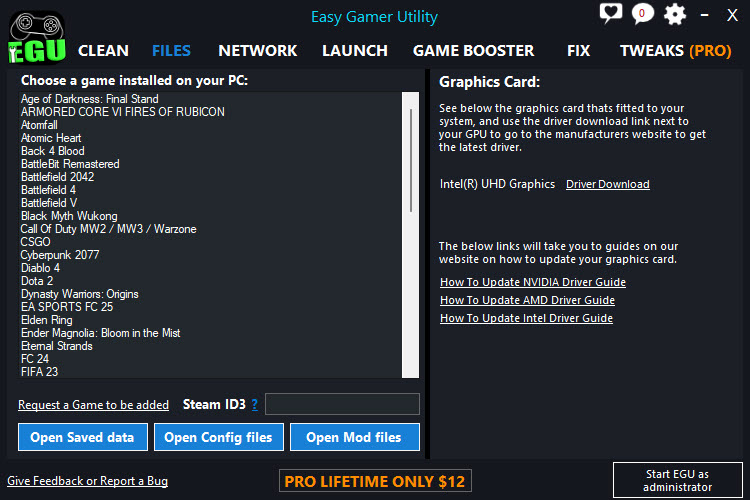
Games scatter their files. Saved progress in one place, configuration in another, mod folders somewhere else entirely, and none of it where the game is installed. Finding any of them means knowing the convention that particular title follows.
Easy Gamer Utility holds a list of games and opens the correct folder directly. Wanting to back up a save before a risky decision, edit a configuration value the options screen does not expose, or install a mod by hand all become a click rather than a search.
Some of it needs your account identifier from the storefront, since save folders are named after it, which is a small setup step worth doing once.
Leftover driver folders and large game folders
Easy Gamer Utility also handles what graphics driver updates leave behind, and those folders accumulate quietly at a size that surprises people when they finally look.
Removing them is safe once the new driver is working, and having a button for it beats navigating to a directory most people have never visited.
The library scan is the other disk space feature, listing installed games by size so the decision about what to remove is informed rather than sentimental. For the same question across the entire drive rather than the game library, WizTree reads the file table directly and maps everything in seconds.
Process priority, and what it actually changes
The Easy Gamer Utility launch tab sets the priority a game runs at, with the option to make that permanent belonging to the paid tier.
Be realistic about the effect. Raising priority tells the system to favour that program when processes compete for the processor, and on a modern machine running a game with little else active, there is usually nothing to compete with. The gain ranges from marginal to unmeasurable.
It can also cause problems. A game holding high priority can starve background processes the system needs, which produces stutter rather than removing it, and that outcome is more common than the improvement people are hoping for.
Razer Cortex occupies the same territory with the same honest ceiling, closing background programs before a match, which helps on a constrained machine and does nothing on a comfortable one.
Conclusion
Easy Gamer Utility is a decent housekeeping tool wearing the clothes of a performance booster. Opening the right save folder without a search, clearing out driver folders nobody remembers exist, and listing game folders by size are all real conveniences, and none of them will change a frame rate.
Use the shader cache cleaning as the troubleshooting tool it is, when a game has developed visual problems or refuses to start, rather than as routine maintenance that costs you a session of stuttering each time. Approach it as tidying rather than tuning and it earns its place. Approach it expecting more frames and you will measure nothing.
Pros & Cons
- Cleans launcher and graphics caches across the major storefronts and all three graphics makers
- Opens save, configuration and mod folders directly for a list of known games
- Removes leftover driver folders that accumulate after every graphics update
- Scans the game library and lists installed titles by size
- Small and portable, with nothing installed permanently
- Clearing a corrupt shader cache resolves artefacts and crashes properly
- Clearing shader caches reduces performance until they rebuild, despite the marketing
- Priority adjustment produces marginal gains and occasionally causes stuttering
- Persistent priority setting belongs to the paid tier
- The known-games list covers popular titles rather than everything
- Framed as a performance tool when its real value is housekeeping and troubleshooting
Frequently asked questions
No, and the maker's own guidance says so. Shaders are compiled once and stored, so deleting the store forces recompilation, which causes stuttering during the next session until it rebuilds.
When it has gone wrong. Visual artefacts, crashes at a particular point, or a game refusing to start are the symptoms a corrupt cache produces, and clearing it resolves those specifically.
No. Save data is stored separately from launcher cache files, and the cleaning tools target the caches. The program also includes separate tools for locating and backing up saves, and backing up before any major cleaning remains sensible.
Tells the system to favour the game when programs compete for the processor. On a machine with little else running there is nothing to compete with, so the gain is usually negligible and can occasionally make things worse.
Launcher caches, graphics caches and leftover driver folders, which together can amount to a considerable quantity on a machine that has been gaming for a while and updating drivers regularly.


