

Desktop Restore
About Desktop Restore
Desktop Restore is a free utility designed to help PC users save and restore the arrangement of their desktop icons. This tool is particularly useful for those who frequently change screen resolutions or connect to external displays, as such actions can disrupt icon positions.
By preserving your preferred desktop layout, Desktop Restore ensures a consistent and organized workspace.
Seamless Integration and User-Friendly Operation
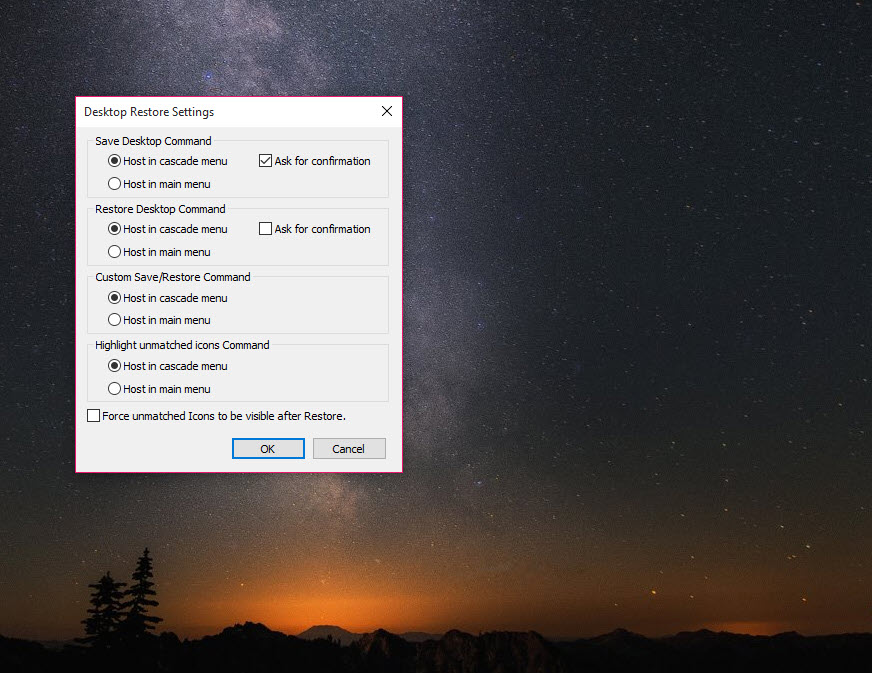
Once installed, Desktop Restore integrates directly into the Windows context menu. Users can right-click on the desktop to access options for saving or restoring icon layouts, making the process straightforward and efficient.
This seamless integration eliminates the need for separate applications or complex configurations, allowing for quick adjustments as needed.
Versatility Across Multiple Resolutions
Desktop Restore is particularly beneficial for users who switch between different screen resolutions or use multiple monitors. Such changes can often lead to disorganized icon placements.
With this tool, you can save distinct layouts for each resolution, ensuring that your icons remain in their designated positions regardless of display changes.
Backup and Portability of Layouts
The application allows users to save multiple desktop layouts and export them to local directories. This feature is advantageous for creating backups or transferring layouts between different systems, ensuring that your desktop organization can be maintained across various environments.
Conclusion
Desktop Restore offers a practical solution for maintaining your desktop icon arrangement, especially for users who frequently alter display settings.
Its integration into the desktop context menu and ability to handle multiple layouts make it a convenient tool for preserving desktop organization.
While it focuses solely on icon layout management, its efficiency and ease of use make it a valuable addition for users seeking to maintain a tidy desktop environment.
Pros & Cons
- Easy integration into the desktop context menu for quick access.
- Ability to save multiple layouts for different resolutions.
- Export and import functionality for layout backups.
- Lightweight and does not consume significant system resources.
- Limited to managing desktop icon layouts; does not offer additional desktop customization features.
- May not function correctly on systems with custom desktop management software.
Frequently asked questions
Right-click on your desktop, select 'Desktop Restore,' and choose 'Save Desktop.' This action records the current arrangement of your icons.
Yes, after adjusting your screen resolution, right-click on the desktop, select 'Desktop Restore,' and choose 'Restore Desktop' to revert to your saved layout.
Yes, you can save multiple layouts and restore them as needed, accommodating different resolutions or user preferences.


