

Crypt It
About Crypt It
Crypt It locks a file so that nobody without the password can read it. Drag a file onto the window, or several files at once, type a password, press encrypt, and each file turns into a scrambled version that opens again only when the same password is typed back.
The content is unreadable until then, whether a stranger finds it on a lost stick or opens it on a shared computer. It can also encrypt text you type straight into the program, so a short message is scrambled without saving it as a document first. It installs nothing and runs from a single file.
The program chooses the encryption for you. It uses AES, the standard that banks and governments rely on, and it does not offer a menu of algorithms or modes, which is the point. Crypt It is for someone who wants to protect a file in three steps, not someone who wants to tune a cipher.
That simplicity is its appeal and also its ceiling, and the sections below say which side of the line a given need falls on.
Encrypting files in a batch
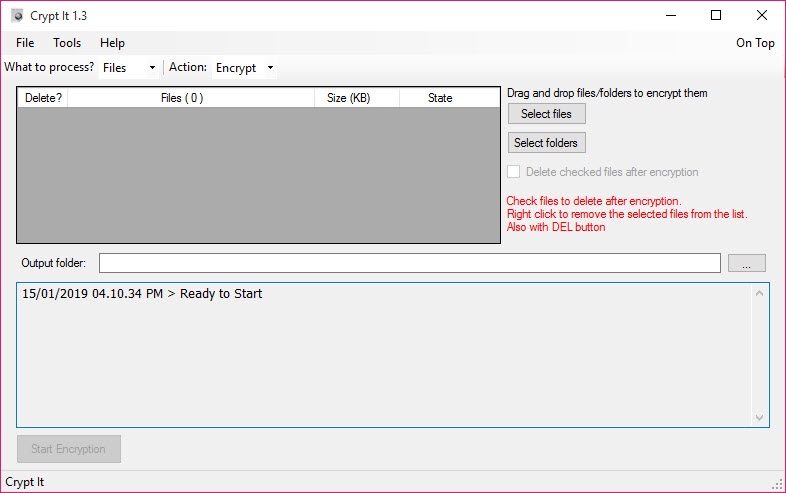
The main window takes files by drag and drop or by browsing to them, and it takes more than one. Select a folder’s worth of documents, give them a single password, and the program encrypts them in one pass, each into its own locked file beside the original.
Decryption is the same motion in reverse, feeding the locked files back with the password to restore them.
When to reach for it
That Crypt It batch handling is the everyday use. A set of documents going onto a USB stick, a folder of records kept on a shared machine, a handful of files emailed to someone who has the password, all are locked in one step. For locking files inside a compressed archive with a password instead, 7-Zip does the same AES protection as a side effect of zipping.
The window can be resized and the file list arranged, which helps when the batch is large. The password is the only key, so losing it loses the files, which the program cannot undo.
Encrypting text, not just files
A second Crypt It mode encrypts text rather than files. Type or paste a message, set a password, and the program returns a scrambled block that only the password unscrambles. That suits a note that should not sit on the disk as a readable document, or a message pasted into an email where only the recipient has the password.
It is a small feature with a clear use, and it works the same way as the file side. For a password manager that keeps logins in an encrypted vault rather than scrambling loose notes, a password manager with an encrypted vault is the tool built for that job.
Where a stronger tool fits
The simplicity has edges. There is no encrypted container that mounts as a drive, so protecting a working set of files that change all day means encrypting and decrypting them each time rather than opening a vault. There is no hiding that a file is encrypted, since a locked file is plainly a locked file. The program has not been updated in a long time, and while AES does not age, the surrounding program is from an earlier generation. The password is the whole of the security, so a weak one undoes the strong cipher behind it.
None of that stops it doing its narrow job well. For a mounted encrypted volume that holds a working set behind one password, VeraCrypt is the heavier tool. For hiding that a secret exists at all rather than only locking it, a steganography tool is the different approach. This one is for the quick lock of a file or a folder before it travels.
Conclusion
Crypt It suits anyone who wants to lock a file or a folder with a password in a few seconds, before it goes onto a stick, into an email or onto a shared computer. The drag-and-drop batch encryption and the text mode cover that need with nothing to configure.
It is not a vault, it does not hide anything, and its whole strength is the password you choose. Pick a strong one, keep it safe, and the file is unreadable to anyone else until you unlock it.
Pros & Cons
- Encrypts files with AES by drag and drop, several at once
- Decrypts the same way with the password
- Encrypts typed or pasted text as well as files
- Portable, installing nothing and leaving no trace
- No algorithm to choose, so there is nothing to get wrong
- No encrypted container that mounts as a drive
- A locked file is visibly a locked file
- Not updated in a long time
- Security rests entirely on the password
Frequently asked questions
Yes. Drag a batch of files onto the window, set one password, and it encrypts them all in a single pass, each into its own locked file.
AES, the widely trusted standard. There is no choice of algorithm, which keeps the program simple.
Yes. A text mode scrambles text you type or paste, returning a block that only the password unscrambles.
The files cannot be recovered. The password is the only key, and there is no reset.


