

Clicador
About Clicador
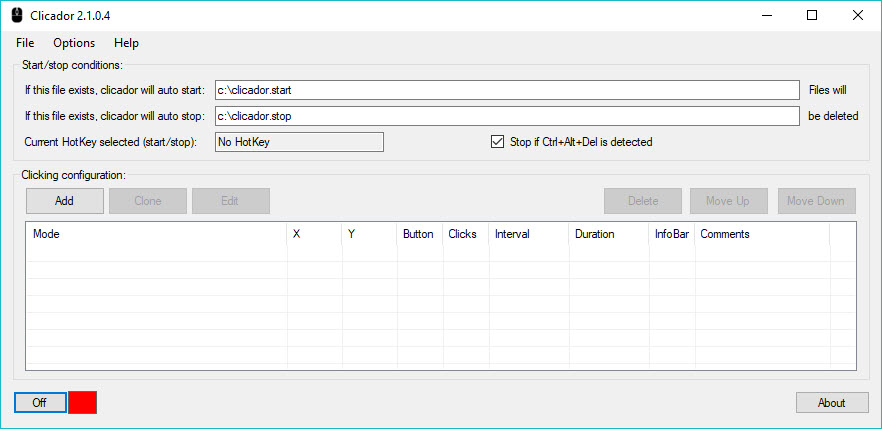
Clicador takes over your mouse button so you do not have to keep pressing it. You tell it where to click, how often, and how many times, then start it and walk away. It fires off mouse clicks at intervals you set, repeating the same action for as long as you want, which makes short work of anything that involves hammering the same spot over and over.
The use cases are everywhere once you start noticing them. A browser game that wants you to tap a button every few seconds to collect resources. A form that needs the same confirmation clicked across dozens of records.
A piece of software with no batch option, where the only way through a long list is one manual click per item. Clicador sits on top of all of it and does the clicking for you, on a schedule, without complaint.
Setting the interval and click type
The core of the tool is the interval. You decide how much time passes between each click, from a fast burst several times a second to a slow tick once a minute or longer. That range matters because the right pace depends entirely on the job. A game might punish you for clicking too fast and flag it. A data-entry task might need a half-second gap so the application can keep up with each action. You set the number, and Clicador holds that rhythm exactly.
You also choose what kind of click it sends. Left button for the usual selections and confirmations, right button for context menus, and a double-click option for anything that opens or activates on two taps.
Pairing the click type with the interval covers most of what repetitive mouse work throws at you. If you only need the basics, an even simpler tool like Autoclicker fires on a single hotkey, while this one gives you the scheduled, interval-based control as its main draw.
Clicking a fixed spot or following the cursor
Where the click lands is the other half of the puzzle. You can lock the action to a fixed screen position, so the tool clicks the exact same coordinate every time no matter where your pointer drifts. That is the mode you want for a button that never moves, like a collect button in a game or a submit control on a form. Set it once and Clicador keeps hitting that pixel.
The alternative is letting the clicks follow your cursor, firing wherever you happen to move the mouse. This is handy when the target shifts around or when you want to keep manual control of position while the tool handles the actual pressing.
Switching between the two takes a moment, and knowing which one fits the task is most of the skill in using it well.
Hotkeys and knowing when to stop
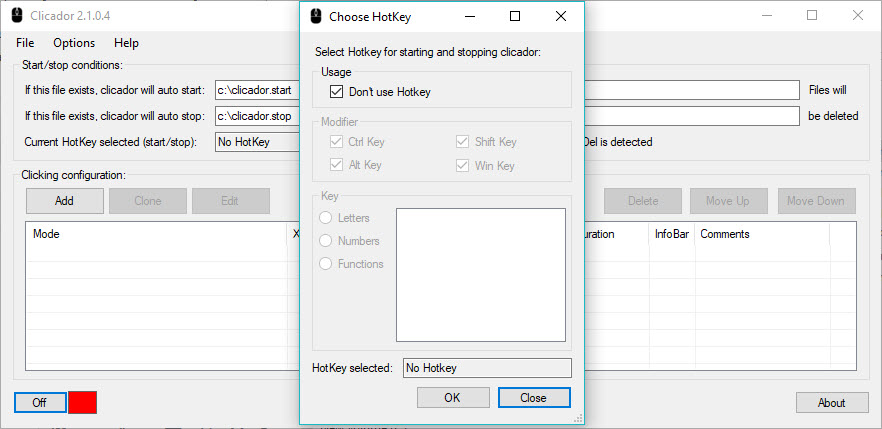
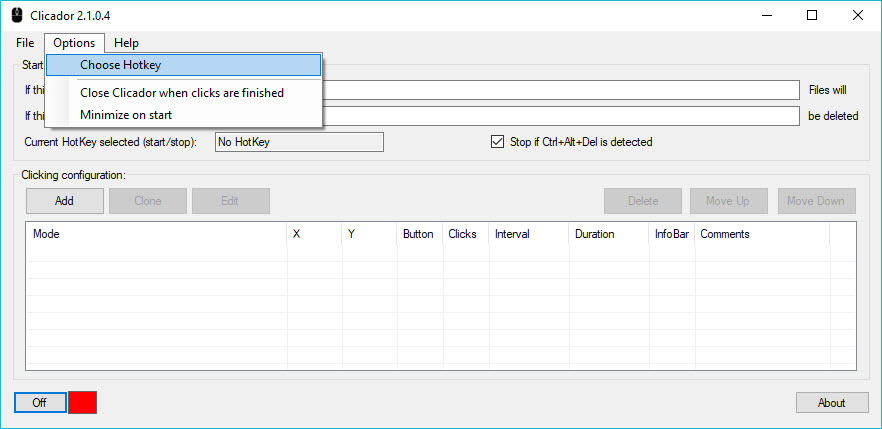
A clicker you cannot stop quickly is a menace, so Clicador binds start and stop to a hotkey. One keypress launches the sequence, another halts it, and you never have to fumble back to the program window mid-run to regain control. This sounds minor until you have a tool clicking away several times a second and you need it to quit right now.
You can also cap the run by a set number of clicks, so the tool stops on its own once it has done the work. Tell Clicador to click two hundred times and it counts them off and finishes, rather than running until you intervene.
Combine the click cap with the interval and you can define a job precisely. Click this spot, every two seconds, exactly fifty times, then stop. The application does it and gets out of your way.
Where a simple clicker ends and a macro begins
It helps to be honest about the line this tool draws. It repeats one click action at a steady interval. It does not record a sequence of different moves, type text, or branch based on what is on screen. For straight repetition that is a feature, not a shortcoming, because there is nothing to set up beyond the interval and the target.
When a task needs more, that is where you graduate to a recorder. Something like Mini Mouse Macro captures a whole string of clicks and movements to replay, and a scripting tool such as AutoHotkey opens up logic and conditions for anything genuinely complex.
If you also need keystrokes automated rather than clicks, Auto Key Presser does for the keyboard what this tool does for the mouse. But for the plain, common need, clicking one place on a timer, the focused approach here is faster to set up and easier to trust.
Conclusion
Clicador does one job and stays out of the way while doing it. If your day includes any task that boils down to clicking the same spot again and again, whether that is a game timer, a stubborn form, or software with no bulk option, this tool hands that chore to the computer and gives you a hotkey to call it off. The interval control, fixed-position targeting, and click cap are exactly the knobs that small job needs.
It will not record complex sequences or automate the keyboard, and a moving window can throw off a fixed click. Those are fair limits for something this focused. But as a set-it-and-forget-it answer to repetitive clicking, it is quick to configure and easy to rely on, which is the whole point of reaching for a clicker in the first place.
Pros & Cons
- Clicks at custom intervals, from several times a second to once every few minutes
- Supports left, right, and double-click actions for different tasks
- Locks to a fixed screen coordinate or follows your cursor as you move it
- Hotkey start and stop gives you instant control during a run
- Click-count limit lets a job finish on its own without supervision
- It repeats one click action, so it cannot record a sequence of different moves
- No text typing or keyboard automation, since it focuses on the mouse
- Fixed-coordinate clicking breaks if the target window moves or resizes
- Misuse in online games may run afoul of their rules, so the responsibility is yours
Frequently asked questions
It automates mouse clicks at a set interval. You pick the click type, the timing, and the target position, then it repeats that click for a set count or until you stop it with a hotkey.
The interval is yours to set, from rapid clicks several times per second down to a single click every few minutes or longer, so you can match the pace to whatever the task needs.
Yes. You can lock the click to a fixed screen coordinate, and the application keeps hitting that exact position regardless of where your pointer moves. You can also let clicks follow the cursor instead.
You assign a hotkey to start and stop the sequence, so one keypress halts it instantly. You can also set a maximum number of clicks so it stops on its own after finishing.
No. It repeats a single click action on a timer rather than recording a chain of moves or sending keystrokes. For those jobs you would step up to a macro recorder or a scripting tool.


