

CamStudio
About CamStudio
Screen recorders have grown into streaming suites with scenes, sources and encoders. CamStudio predates all of that, recording a region of the screen to a video file with almost nothing in the way and almost nothing asked of the machine.
CamStudio offers cursor highlighting, captions typed onto the recording, plus audio from the microphone or the system, and that is the extent of it. There is no compositing, no streaming and no editing timeline.
That narrowness is the appeal for a specific set of people, and there is a piece of history to settle before anything else.
The installer history, stated plainly
Being direct, because this comes up in every discussion of CamStudio and readers will encounter it.
For a period of several years the installer carried a third-party wrapper offering other software during installation. That arrangement funded development, and the result was the program being classified as unwanted software by protection products, with users reporting extras installed despite appearing to decline them.
The current maintainer addresses this directly rather than denying it, saying the bundling should never have happened, that the reputational damage was substantial, and that it will not be repeated. That is an unusually candid statement and it is worth weighing against the older discussions, which are numerous and hostile.
The practical position for anybody reading this is simpler than the history. What matters is which build you obtain, not what a wrapper did during a period that has ended.
Watching installation screens carefully remains sound practice for anything, and Unchecky unticks offers automatically as a general habit.
What it is actually good at
The case for CamStudio now is narrow and real.
The program is tiny and demands very little while recording, which matters on an old or weak machine where the modern alternatives consume more resources than the thing being recorded.
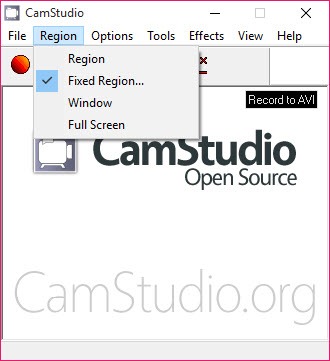
Region selection lets you capture a fixed area rather than a whole screen, which suits recording one window or one part of an interface without editing afterwards.
Cursor highlighting draws attention to the pointer, and typed captions can be added during or after the recording, which covers the instructional case that most people are recording for.
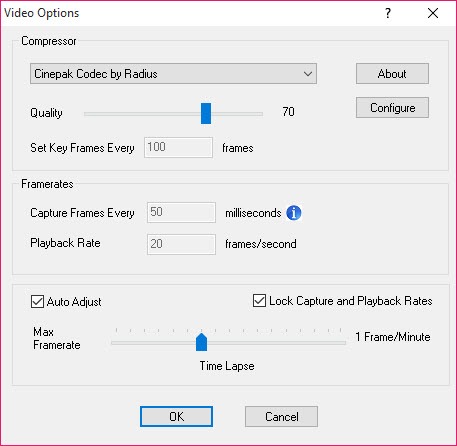
A lossless codec is included, which produces large files and preserves text sharply, and that combination suits screen material where compression artefacts around lettering are the usual complaint.
Where it falls short now
Being equally clear about the CamStudio limitations, since the alternatives have moved a long way.
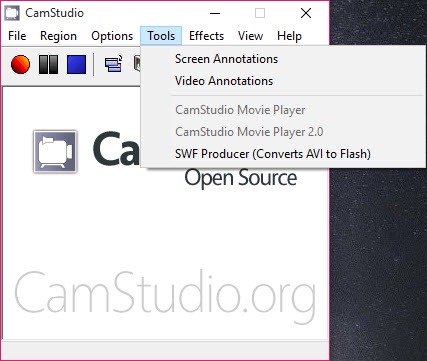
Output is basic and the second format it supports has effectively disappeared from the web, so one of its two options is now of no use to anybody.
Editing is absent beyond trimming, so anything requiring cuts, titles or arranged sections has to go into something else afterwards, and a recorder that edits in the same program removes that second step entirely.
Reports of instability recur, including crashes during long recordings and settings that need reconfiguring, which loses a whole session rather than one file.
Region controls are described as awkward, with users reporting difficulty setting an arbitrary capture area rather than choosing from preset shapes.
What replaced it
The competition to CamStudio is free and considerably more capable, which has to be said. ShareX records the screen alongside capturing images, uploads the result if you want, and is maintained with a large user base behind it.
Neither is heavier in any way that matters on a current machine, and both are where somebody starting now should start.
The audio side, which trips people up
One CamStudio detail causes more confusion than anything else, and it is worth settling before a recording rather than after.
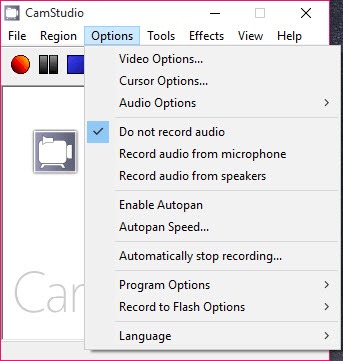
Audio comes either from the microphone or from what the machine is playing, and the choice is made before recording rather than mixed afterwards.
Somebody narrating a demonstration wants the microphone. Somebody recording a video with sound wants the machine’s output. Somebody wanting both, which is the commonest case in a tutorial, has to arrange that outside the program, since it captures one source at a time.
The interleaving setting matters too, controlling how audio and video are woven together in the file. Wrong values produce a recording where the sound drifts out of step with the picture as it plays, which is the fault people notice only on playback when the session is over.
Where it still wins
Being fair, since CamStudio has a real case rather than nostalgia behind it. A machine too weak to run the modern recorders is the obvious one. A recorder consuming a quarter of the processor makes the recording itself stutter, which defeats the purpose, and a small one does not.
A locked-down machine where nothing substantial can be installed is the other, since this is small and asks for little.
And somebody who wants a file rather than a workflow gets exactly that. Press record, press stop, there is a file, with no project to save and no scenes to configure.
For recordings that need nothing at all beyond capturing what happened, Rylstim Screen Recorder is even simpler and does one thing.
Conclusion
CamStudio still does the thing it was built for, which is turning a region of a screen into a video file without ceremony, and it does it on hardware the modern recorders would struggle on. The lossless option and the captioning cover instructional recording properly.
Weigh it against what else is free. The maintained alternatives record better, edit in the same program and carry none of the history, so the case for this one rests on a weak machine, a locked-down machine, or wanting a file rather than a workflow. Where one of those describes you, it remains a reasonable choice.
Pros & Cons
- Very small and undemanding, so it records well on weak machines
- Region capture of a fixed area rather than the whole screen
- Cursor highlighting and typed captions for instructional recordings
- Lossless codec included, which keeps text sharp
- No project, no scenes, no configuration, just a file at the end
- Free and open, with the source available
- The installer carried bundled offers for several years, which shaped its reputation
- One of its two output formats is obsolete
- No editing beyond trimming, so anything more needs another program
- Reports of crashes during long recordings recur
- Region selection is described as awkward compared with the alternatives
- Free alternatives are maintained and considerably more capable
Frequently asked questions
Yes, and the maintainer addresses it directly rather than denying it, describing the bundling as a funding decision that should never have happened and will not be repeated. The older hostile discussions refer to that period.
Recording on machines too weak for the modern alternatives, capturing a fixed region without editing afterwards, and producing a file with no project or configuration around it.
Not beyond trimming. Anything requiring cuts, titles or arranged sections needs a separate program, or a recorder that edits in the same place.
Because it predates the web abandoning that format. One of its two outputs is effectively useless now, which leaves the ordinary video file as the only sensible choice.


