

Adobe Flash Player Uninstaller
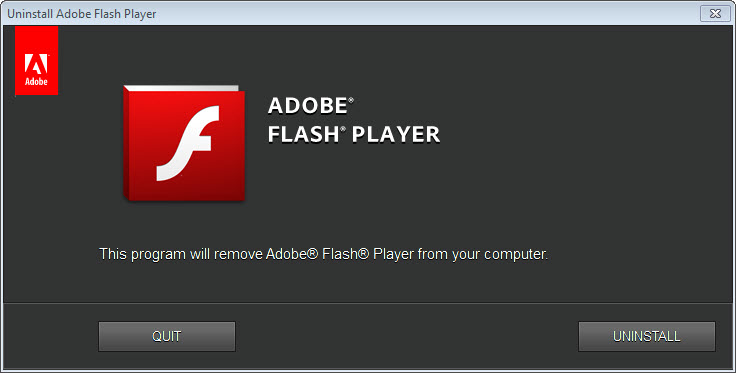
About Adobe Flash Player Uninstaller
Flash Player was never a single program, which is why removing it through the usual list of installed software so often left something behind. Adobe Flash Player Uninstaller exists for that reason. It is one small executable whose entire job is to find every piece of the runtime scattered across the machine and take all of it out in one pass.
The pieces in question were three separate builds. An ActiveX control for the older bundled browser, an NPAPI plugin for the plugin-based browsers, and a PPAPI build for the Chromium-based ones. Each installed its own files, its own registry keys and its own helper binaries, and a machine that had been through several browsers could easily be carrying all three.
Since the runtime no longer receives security fixes and no longer plays content anyway, what remains on a drive is dead weight with known holes in it. That makes this a housekeeping job rather than a decision.
What it actually takes out
The sweep covers the registry uninstall entries for each variant, checking both the native and the 32-bit registry views so a build registered in one but not the other does not survive. On disk it clears the Macromed\Flash directories out of the system folders, including the SysWOW64 copy that a manual cleanup usually misses, along with the FlashUtil helper executables and the background update service that kept nagging about new releases.
Everything here can be done by hand with a registry editor and enough patience, and doing it by hand is how people delete one key too many.
Close everything first, or it stops halfway
Any browser holding a Flash component in memory blocks Adobe Flash Player Uninstaller, and the failure message is not always clear about which application is at fault. Browsers are the obvious culprits. Less obvious are chat clients, mail readers and anything with an embedded web view.
Run it with administrator rights, close everything that could conceivably touch the runtime, then restart afterwards so the remaining file locks clear. Skipping the restart is the usual reason someone finds Flash apparently still installed on the next boot.
The leftovers it does not touch
Two folders survive Adobe Flash Player Uninstaller by design, sitting in the roaming profile under Adobe\Flash Player and Macromedia\Flash Player. They hold saved settings and local shared objects, the storage that Flash content used in place of cookies, and neither gets cleared. If you care about the leftover data rather than just the plugin, Revo Uninstaller actually bundles this tool, runs it, then scans for the orphaned files and keys afterwards.
There is also one side effect that catches administrators out. Uninstalling resets the AutoUpdateDisable and SilentAutoUpdateEnable values in mms.cfg back to defaults, so any managed rollout that relied on custom settings loses them. A cleaner that also clears stored site data handles the user-level remnants if you would rather not delete folders manually.
What it cannot reach
Browsers that shipped their own copy of the runtime managed it internally, so nothing on the system side removes those. They went away with the browser’s own updates instead.
Many machines have also had core components pulled by a system update already, which leaves an odd situation where the runtime is already gone but the folders, registry fragments and update service remain. Running the tool on a machine like that is still useful, it just has less to do than the progress bar suggests.
Conclusion
Adobe Flash Player Uninstaller is a single-purpose utility for anyone tidying up older machines, and it is aimed squarely at technicians and administrators rather than casual users who will only ever run it once. Its value is knowing where all three builds hid, which is knowledge nobody should have to acquire manually.
Just do not mistake it for a complete cleanup. It handles the system-level pieces properly and stops there, so the roaming profile folders and any stored site data need a second pass with something else. Pair it with a leftover scanner and the job is finished in two steps rather than one.
Pros & Cons
- Removes the ActiveX, NPAPI and PPAPI builds in one pass instead of three separate uninstalls
- Checks both the native and 32-bit registry views, so a partially registered build cannot survive
- Clears the Macromed\Flash directories from both system folders, including the one manual cleanups miss
- Takes out the background update service along with the plugin files
- Command-line switches allow silent, unattended removal across multiple machines
- Leaves the per-user settings and local shared object folders in the roaming profile untouched
- Fails without a clear explanation when any application is holding a component open
- Resets custom auto-update values in mms.cfg, which managed deployments have to reapply
- Cannot remove builds that a browser installed and managed itself
- No log or summary of what was actually removed
Frequently asked questions
Something is holding a Flash component open. Close every browser plus any chat client, mail reader or application with an embedded web view, then run it again with administrator rights and restart when it finishes.
No. The per-user folders under Adobe\Flash Player and Macromedia\Flash Player in the roaming profile stay where they are, along with the local shared objects inside them, and you clear those yourself.
Yes. It accepts an uninstall switch for unattended runs and a force switch for components that resist, which is how it gets deployed across a fleet rather than clicked through one machine at a time.
Often yes, because those updates pull the core components while leaving folders, registry fragments and the update service behind. There is less for the tool to do, but the cleanup is still worth completing.


